

New twenty fifteen theme header entry title font size varies, even with CSS.
-
The is the title for my blog post [articles] are is a different fort size. Using Inspect Element, I see some as h1, some as h2, and some other. I’ve changed with CSS, only to have the title revert to some other size. Is this a “bug”? I want my title for post & pages to all have the same size.
Thanks!
Jim Artis
The blog I need help with is: (visible only to logged in users)
-
Hi Jim,
The theme is responsive so that it is readable at all device sizes which is why you may be seeing different font sizes. The theme adapts to the screen size and so the theme changes the font size by the display size so that it fits accordingly to the device you are using to view your site. Normally I would recommend against changing this, but if you want, let me know what font size you want across all devices and I’ll see what I can do.
Cheers!
-
Hello Grace,
Thank you for your reply.
I understand the font size variability across platforms. That is not the problem I am presenting. I see multiple sizes on the same platform–whether the platform is my PC or smartphone.
Please look at say 10 of my articles. You should see that some of the articles have larger forts that others. Each was created on my Windows 8.l desktop using the WordPress editor. Again, CSS has not made a difference.
I am asking if there should be a consistent font size on the SAME platform?
I’ve tried to be clear.
Thanks again.
Jim
-
Added: I have tested the occurrence this problem on Google Chrome, Microsoft IE 11, iPhone 6 Plus, and Microsoft Lumia 1520. On my smartphones, I am using my WP App on each.
I am also a computer technician. I’ve done my best to ensure I am not giving you a none-problem.
jaa
-
Can you explain exactly which font sizes you are talking about?
The theme has a bigger font size just for the first post which is used to emphasize the first one. But every other post title is smaller. Here are some screenshots on my display:
https://cloudup.com/cm2M-uoBdji
https://cloudup.com/cCPMfA2zOf3I looked on your Cycling page and found that the page title’s font size is the same as the first post’s title on your posts page as seen here:
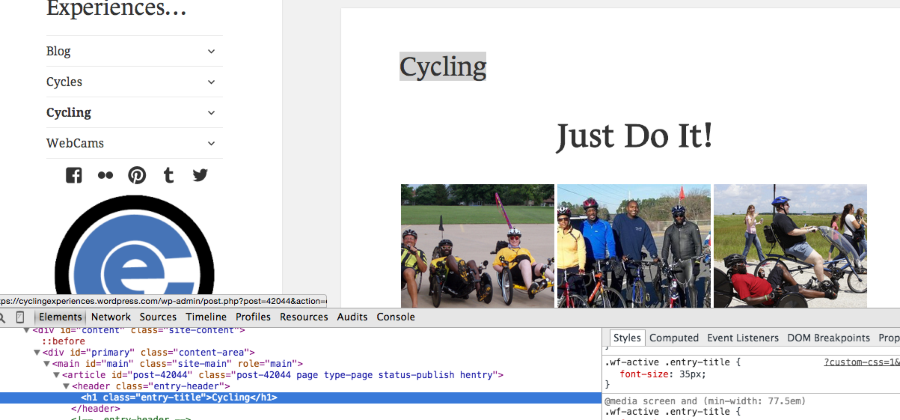
The “Just Do It!” was added within the page by you, so if you want that to be the same size as the page title’s, it would be best to set it at 35px by going in and editing the text.
I checked another page and found that the font size of the page title was the same as the other page and the 1st post title as well:
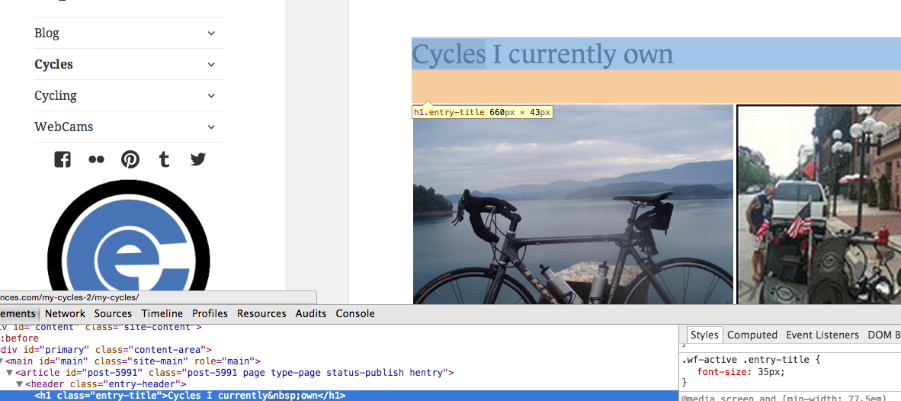
If this is not what you mean please provide me a couple screenshots and add them to your Media > Library. I’d be happy to take a further look.
Thank you!
-
My question is just on post, not pages. I have not seen in any documentation that the first post has a larger font-size. The first post, being at the top of the front page should be obvious.
Please look at my lat 5 post. The 1st is large as is the 5th http://bit.ly/1zcoYwY
As I have scrolled on through my post, I find others that have larger font-size as the 5th. Looking at post 2-4 with inspect element shows different characteristics. That is different than any theme I have used here!
If you do not see what I am talking about, can we elevate?
Thanks!
Jim
-
Ah, thanks for the clarification. So, I made a mistake about the posts page. The font size isn’t dependent on the order of the theme as I had initially thought. It looks like the font changes by the Post Format. You’ll notice that the font size of the image formatted posts like:
Happy Birthday to Reverend Bernard Hayes, 12/10/2014
Place ~ A Nice Place to Shop–Walter Guy Jewelers, Fayetteville, North Carolina, 12/09
Place ~ The Market House, Fayetteville, North Carolina, 12/08aren’t as big as the Standard Formatted posts like:
Publication ~ Blog Theme Twenty Fifteen Arrived Yesterday, 12/10 [I Like!!!]
History ~ December 7, 1941 [Pearl Harbor Day], 2014
Cross Creek ~ Linear Park Waterfall, 12/03If you would like the post titles to be all one size, go to Posts > All Posts in your Dashboard and select all your posts. Then, in the Bulk Actions menu click on Edit and hit Apply. Then where it says, Format, set that to Standard and click Update.
Cheers!
-
I will look at that.
Finally, I thought I had been clear.
Most of my posts are galleries. Too bad the relationship between format type and post title is not explained. That was, in part, my reason for asking you to look at 10 of my posts.
Does your solution mean subsequent post will be one size? Yes, I want one size for ALL post and ALL pages. I want to know how the title will spread across the blog posting area.
I give feedback as soon as I have completed your instructions…
Thanks!
Jim
-
Okay, I see what we are doing. I thought there is a reason for using different format types. Why are they there. Certainly, using different format types worked with the Twenty Fourteen Theme. I have not executed yet because that will reset the formats. Seems that would be a way to achieve the same using CSS.
Thanks!
jaa
-
I thought there is a reason for using different format types. Why are they there.
It will depend on the theme. Some posts will be formatted differently based on the post formats. One of the differences in Twenty Fifteen is that it was designed so that the post title font sizes differ by post format. Take a look at the demo here:
http://twentyfifteendemo.wordpress.com/
Seems that would be a way to achieve the same using CSS.
If you want to all post title’s to be 35px like the first post, you can add this to your CSS:
.entry-title {
	font-size: 35px !important;
}
That will make all entry titles 35px, no matter the post format.
Cheers!
-
PROGRESS!!!
That works for me!
I had this in my CSS
.wf-active .entry-title {
/* trying to control post font size [to no avail–waiting for support] */
font-size: 35px;
}I guess my error is not using !important.
I prefer this solution so that I retain the flexibility for subsequent themes [years from now].
I am relieved my problem is understood and that you have given me a solution where I can adjust the size of the title with a simple CSS edit and not loose previous format types.
Good Job!
Jim
-
-


- The topic ‘New twenty fifteen theme header entry title font size varies, even with CSS.’ is closed to new replies.
 WordPress.com Forums