Nishita theme
-
Hello,
I used to work with Nishita theme long time ago, but I can’t find now how we can add video on your schedule?
Any help?
Regards,
Jean-Edouard Guillemin
-
See here https://wordpress.com/themes/nishita
Then note what’s in the sidebar:
Download Nishita for your self-hosted WordPress site. -
but I can’t find now how we can add video
The site linked to your username is an empty wordpress.com hosted site wearing the Ryu theme. My suspicion is your are referring to another site and it is a wordpress.ORG software install that we do not provide support for here. I cannot confirm that because you did not provide a URL.
We provide support only for sites hosted by wordpress.COM and that site is not one of them. We do not provide support for it here at WordPress.COM. You are posting to the wrong support forum for help with that site.
WordPress.COM and WordPress.ORG are completely separate and have different username accounts, logins, features, run different versions of some themes with the same names, and have separate support documentation and separate support forums. Read the differences here http://en.support.wordpress.com/com-vs-org/
If you don’t have a username account at WordPress.ORG account, then click http://wordpress.org/support/ and register one on the top right hand corner of the page that opens, https://wordpress.org/support/register.php so you can post to the support forums there.
Resetting your WordPress.ORG password http://codex.wordpress.org/Resetting_Your_Password
WordPress.org support docs are at https://codex.wordpress.org/Main_PageSee also https://apps.wordpress.org/support/
-
Me again,
I presume that first .com has to be provide in order that the web site is underconstruction. And also the “nishita thème” will work. Unless i have to buy the package premium at 99 euros.
Is that possible to use the url website to another one. Transfer web directory.I’ m completely lost
Jean-Edouard Guillemin
-
I see the following site linked to your username with a domain mapping upgrade: http://restaurationtraditionnelle.com . Is that the site you are talking about, or are you talking about a different one?
If your site is hosted elsewhere, as @timethief says, you can download Nishita for free from our Nishita Theme Showcase page and install it on your self-hosted site.
-
Hi,
the right address of the site is : http//restaurationtraditionnelle.com, like you discover. I apply for Nishita theme.However I can’t download any videos on Nishita them, do you have an idea.
Regards,
Jean-Edouard Guillemin
-
Hi there, you can find out more about using VideoPress for your videos in our VideoPress support page. It included the procedure and also some information on video settings and such. Have a look through that and let me know if you have any questions.
-
Thank you, I found how I can add a video according to text. However i don’t have an add Media button in my editor, only for picture. Is it possible de add a video without a text, seems to me impossible. I missed a chapter….Thank u for helping me
-
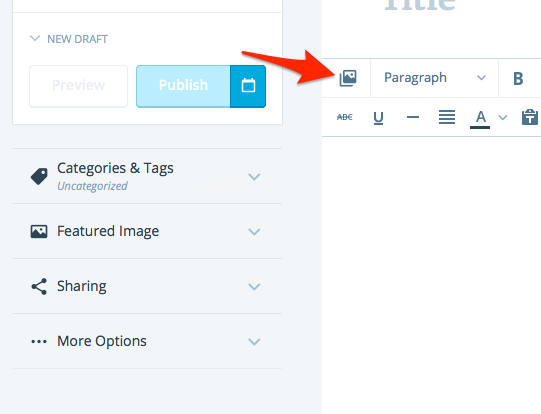
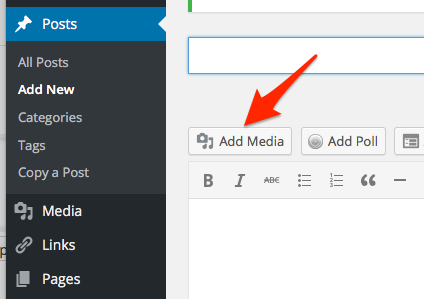
Hi there, here are a couple screenshots showing where the add media button is in the post and page editor.
Calypso (new) editor: https://cldup.com/uGNGQzTKpo.png
Dashboard editor: https://cldup.com/9bfUh4dvNZ.png
-
Hi, it seems that the icon on the scedule to write an article does not work within a link from another website. The only way to add a video is to start an article using the link on the toolbar to add”adress web” (adress link to web site) then “Cible du client” customer target to insist you need to click here to get the video. I paste the url adress on you tube at the “adress web” and write for the customer: click to see the video.
How can I paste a video on its on without the schedule page of the youtube video?
I do not have a buttom “add media”
It seemed it is not the same version in all the link to understand how can i paste properly. See the example by Linda but I have no clue to find out how does it work.Thank you to take care of me
Jean-Edouard
-
Hi Jean-Edouard, can you take a screenshot of your editor screen so that I can see it? When I go into your dashboard, I see the Add Media button above the editor toolbar.
On Youtube videos, if you paste in the URL, WordPress should create the shortcode for you when you save/publish a post/page and then display the video. Can you point me to a page or post on your site and let me know what video related stuff you do not want to show?
In this support document it lists the videos that we support here at WordPress.com. If the video is from a source that is not listed, it cannot be inserted into a page or post.
-
Hi
Sorry for the delay, but I can’t send you some screen shot on this message, have you got any e-mail in order to send you the screen shots. In the meantime, when you see “click at the end of the title article it means that there is a video hidden behind the letter.
Thank you
-
Hi, you can upload the screenshot to your media library on your site and I can look at it there.
-
Hi, I send 2 screen shot in the display media buttom on the dashboard. Let me know if you understand. I discover for the media buttom, it says you can not use at this stage because I don’t have the premium subscription. “Did you know that you can upload videos and embed them directly on your blog with videoPress included in our premium plan?”Is these facilities I think I can’t deal with it, i need to a pay a premium subscription?
-
I discover for the media buttom, it says you can not use at this stage because I don’t have the premium subscription. “Did you know that you can upload videos and embed them directly on your blog with videoPress included in our premium plan?”Is these facilities I think I can’t deal with it, i need to a pay a premium subscription?
I can’t find now how we can add video on your schedule?
The WordPress.com Premium or Business plan is needed in order to upload your own video or audio files to a site. For example, if you have a QuickTime (.mov) or MP4 file that you’d like to upload and host on your own WordPress.com site.
No plan is needed to upload images or to embed video that’s already been uploaded to another site, like YouTube or Vimeo.
This is the same no matter what theme you have.
Can you clarify if you’re looking to host your own video, or have you already uploaded to a video service like YouTube?
How can I paste a video on its on without the schedule page of the youtube video?
Follow this guide:
https://en.support.wordpress.com/videos/youtube/


- The topic ‘Nishita theme’ is closed to new replies.
 WordPress.com Forums