

No ability to add New User – Function Missing in WordPress.com
-
There is no ability to add a User. I, and my tech, have both explored extensively the ability to add a User. We have read the support instructions, but the functionality is missing. The “invite new” exist. But absolutely not “add” function. We have invited someone to “contribute” to this blog. This person received the invite and accepted. We are attempting to have him listed as a “User”, but are unable to add him to the list of “Users”. When we click to look at the list of past invitations, this person is listed as having accepted the invite and it shows his role as “contributor”. But we need him listed as a “User”. Again, the “Add” function is missing. Thank you for your help.
The blog I need help with is: (visible only to logged in users)
-
Are you the blog owner? Each blog has a sole owner and it is the person with the username account who registered the blog and who is the original Admin of the blog.
You must be logged in as Admin http://en.support.wordpress.com/user-roles/#administrator under the exact same username account that registered the blog to access the blog’s dashboard.
-
What is the username of this person you refer to please?
I’ll tag this thread for Staff assistance. Please subscribe to the thread so you are notified when they respond and please be patient while waiting. -
I logged with my credentials in order to be notified of any responses. Otherwise, I login with the credentials of the blog owner (my husband). He leaves the administration of the blog up to me and and one other person in our office. The user name of the person we are attempting to add as a user is: ae21tx
I access the dashboard to post to the blog (for the site owner) and manage it. I pretty much always login using the site owner’s credentials. Especially since I post in the blog as him.
-
-
-
Hi again,
Staff work through all forum threads tagged for their attention and through all email support tickets in order of datestamps and timestamps – first posted first served, as would be expected.Please subscribe to the thread so you are notified when they respond and please be patient while waiting.
-
Hi there!
Thanks all :)
I have added the user: ae21tx as a Contributor of the blog: claimsmastersblog.wordpress.com as requested!
Please let me know if you have any questions!
-
Thank you! To add a User in the future, do I post to this support forum to do that? Or will that function become available for me to do myself?
-
Hi Toni,
You should be able to do it by the invite. I looked into the invitation and on our end it looks like the invitation was sent out, but not accepted. However, this could be a mistake. Next time, let me know if you run into this issue again. I’d be happy to look further into it.
Cheers!
-
The invite was accepted by ae21tx. He even sent me a screen shot of the confirmation. And as described above, he was listed in the list of sent invitations as having accepted, and it showed his role as contributor. The function to Add User is, for whatever reason, missing. I even tried using a different browser in the event it was a browser issue. But it didn’t matter. Perhaps next time I need to add a User, the function will have returned. If not, I will ask for the new User to be added.
Thank you.
-
Hi Toni,
The function to Add User is not available? If you go to Users > Invite new in your Dashboard you can send invitations to be a user of the blog. I was able to view it in your Dashboard, and I see that all the invitations were sent out by the other administrator of the blog (claimmasters) not your account.
You can view the screenshot below to see where to go to invite a new user:
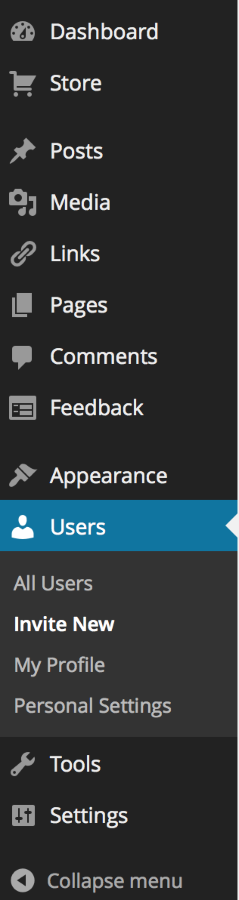
Next time a new user accepts the invitation, but is not added to the blog, please let me know!
-
Please see my original post. The function to invite is there. That has been used successfully. And when the invitee accepts the invitation, they show up as having accepted the invitation when I look at the invitations that were sent. No problem. The problem is that I am unable to Add them to the User list because there is no Add function. This Add function is described in Help and support. But it is not available.
-
Also, as in my earliest post above, I am the one managing this blog. I am logged in as myself only for getting support so that the messages are between you and me. Otherwise I am logged in as ClaimMasters, the owner of the blog, who is my husband.
-
-
Hi Toni,
Currently, we do not have an add function as once a user is invited and accepted, they should automatically show up as a user of the blog. I have tested this out on my test blogs and found that when an invite is create for a person to be a user of the blog and it is accepted, that person’s username is automatically added a user of the blog. Can you please show me the support guide that you are referring to?
Currently, there is no function to just add a username to a blog directly from your account without the invite/acceptance process. The only possibility is to invite a user and have them accept. So, if there’s a situation in which a user has accepted and that user is not automatically showing up as a user of the blog, please let me know. That would be a mistake.
-
Had ae21tx showed up in the user list once he had accepted the invite, I would not have had to figure out how to get him there. I am currently away from the office. Is there a way I can send screenshots? When I return to my office, I can attempt to show you.
Thank you.
-
I understand that there might have been an error when adding the user ae21tx since I added him for you after the situation was made known to me. However, I was unable to reproduce this situation with my test blogs.
So, if this were to happen again, screenshots will definitely help. I see that you sent out a new request. You will receive an email once that user accepts. Please send me screenshots of that and your user list if this new user is not showing up. You can upload that to your Media > Library and I will take a look.
Thank you and sorry for the inconvenience.
-
I have added a screen shot to the Media Library. When the Help on the right side of the screen is clicked, it drops down with a message about “Add New”.
Update: I sent an invitation to my graphic designer and she accepted the invitation. She automaticly showed up in the list of Users. That is what I needed to happen to ae21tx after he accepted the invitation. But instead, the only place he showed up with in the list of sent invitations, which showed him as having accepted the invite. However he would not show up in the list of Users until you added him on Saturday.
Perhaps it was just a glitch in the system that once he accepted the invite, he did not show up in the list of Users. Yet it is still misleading when the Help has information about adding a New User. See the image in the image library I uploaded. I wonder if this function is only on WordPress.org and should not be in this dashboard.
Thank you for your help.
Toni Greer -
Hi Toni,
Yes the documentation needs to be updated to Invite New instead of Add New. Thanks for bringing that to our attention – we are currently looking into getting it fixed! Sorry about the confusion.
Yes, it was probably just a glitch as it is currently working now. If this happens again, let me know and we’ll see what’s going on.
Thanks again.


- The topic ‘No ability to add New User – Function Missing in WordPress.com’ is closed to new replies.


 WordPress.com Forums