

No Longer Accepting XLSM Files
-
I used to be able to upload macro-enabled Excel files, but now it seems that the XLSM file format is not allowed. My blog is about writing Excel macros, and some of the macros are thousands of lines long. Do I need to upgrade, or is there way I can enable the files again? Everything was fine until that restriction was put in place.
The blog I need help with is: (visible only to logged in users)
-
Hi there,
I believe your issue may be connected to the recent changes. See here https://en.forums.wordpress.com/topic/the-paste-as-word-button-has-been-removed-from-the-visual-editor?replies=7I’ll tag this thread for Staff help. Please subscribe to it so you are notified when they respond.
-
Thanks. That post doesn’t address it explicitly, but it is very possible that it has something to do with that series of changes. If it was done for a reason, it isn’t mentioned anywhere that I can find. Perhaps one of the staff can shed some light on the issue. I appreciate you checking on it, timethief.
-
-
Hi there!
Currently we are looking into the issue, but we do have a temporary workaround. Please use the browser uploader to upload the file as seen here:
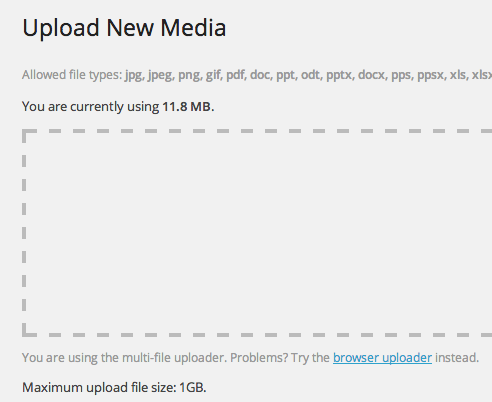
This should open up to this:
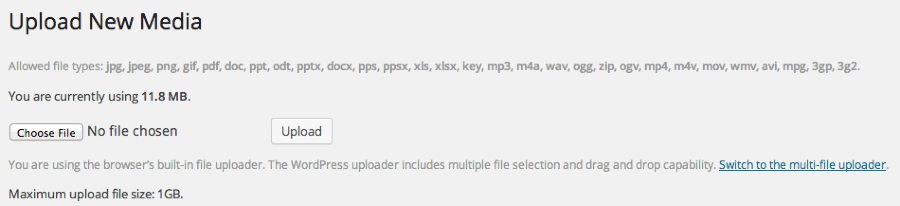
If you use that it should upload.
Thank you for your patience!
-
Hi, Grace. It doesn’t look like the browser uploader is available anymore. The screenshots you sent appear to be from the old version of WordPress before they removed the ability to upload xlsm files. Is there another way to get to the browser uploader?
-
Is the link to the browser uploader no longer there?
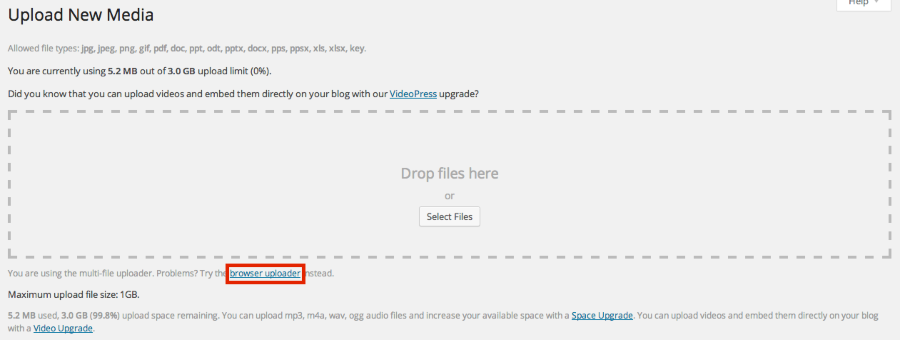
I am still seeing it in my Dashboard. Let me know if that link is no longer there.
-
Ah I see that you are trying to directly insert into the post. Can you try uploading it to your Media > Library page and then attach it to the post?
-
Thanks, Grace. Your advice worked. If I upload the file to my media library, it goes in without causing the error. The problem seems to be limited to uploading the file to a specific blog post. It’s strange that WordPress is inconsistent like this. Now that the file is in my media library, is there any way to associate it with the blog post? It’s not absolutely necessary, but it would be nice to keep things organized by post.
-
Hi there!
I see that you uploaded the most recent XLSM file to the post: Cubic and Bicubic Interpolation Excel Functions. After you upload the file to your Media Library you can just attach the file to any post as you have done.
As for the inconsistency, we are aware of this bug, and I have reported it back to our team. They will look at it and report back as soon as possible.
Thank you so much for your patience. Please use the workaround until we are able to sort this out. Again, I apologize for the confusion and inconsistency.


- The topic ‘No Longer Accepting XLSM Files’ is closed to new replies.
 WordPress.com Forums
