

No Publish Button
-
I’m a new user to WordPress. When I go to write a post, I don’t see a “publish” button. My only options are “save and continue editing” and “save.” How do I actually publish my post?
(My browser is Firefox 1.5.0.9)
-
It sounds to me more like you’re editing a pre-existing post, which, if it’s your first post, you could well be doing. All WordPress blogs start out with some boilerplate standard text on their first post, so you would naturally click the Edit button to change that.
If you want to write an entirely new post, go to your Dashboard and click Write, which is up in the top, towards the left-hand side. Then you should get a box with all three options.
-
Thank you for the suggestion, raincoaster. Unfortunately, following your instructions I still am not receiving the publish option :(
-
Can you give us the URL of your blog at WordPress to take a look?
Also, I have noticed that sometimes the Publish button is in a row BELOW the Save and continue Editing and the Save button. Scroll down and make sure it’s not there, just in case.
If nothing else works, I’d suggest you send a Feedback to the staff from your Dashboard. Feedback it in the top right-hand corner.
-
Sorry, the blog I’m trying to post to is here :
http://knuts4knitsheepshawlkal.wordpress.com/I created a word press account specifically so I could join the knit along blog.
I’ve scrolled completely down the page and still cannot find the publish button.
I finally gave in and was able to save it as ‘private’ (clicked private in the status widget, then clicked save) hoping that the blog owner would be able to do something but I haven’t heard back from her yet.
And I’ve already sent a feedback. Thank you for your help :)
-
I thought I would add a screencap of what I see when I go to my dashboard and then click ‘write’
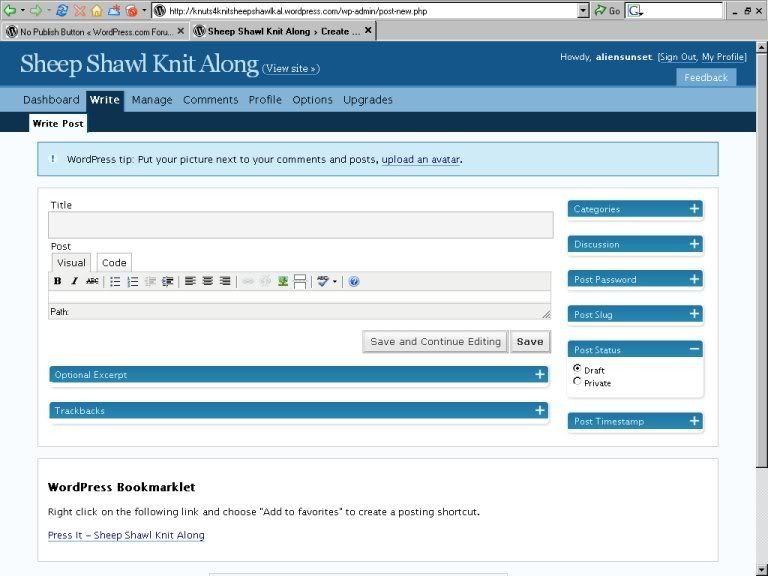
Scrolling down any further only gives me the ‘thank you for using word press’ box at the bottom of all pages.
-
I wonder if the blog admin has it set up so that posts are saved until she approves them and THEN and only then they are posted? One way or another you’ll know soon; either staff will get back to you or she will. Good luck!
-
(My browser is Firefox 1.5.0.9)
Have you considered upgrading to Firefox 2? I ask because this solved another blogger’s problem that sounds the same as yours.
Also it may be helpful if you check below and determine what role you have been given on this multiple authors blog as each role has specific things they can and can not do. http://faq.wordpress.com/2006/05/12/what-are-the-different-roles/
-
timethief –
Thanks :DI just got an e-mail from the blog administrator and that looks like what the problem might have been.
She’s new to wordpress and blogging in general. And neither of us had much luck navigating the FAQ’s
(This is my one big complain so far. The FAQ’s are hell to navigate, the search function seems practically useless and tags are a crap shoot.)
-
The FAQ’s are hell to navigate, the search function seems practically useless and tags are a crap shoot.
Now come-on, that’s so harsh. WordPress is only 1 1/2 years old and has a staff of only 12. The FAQs are always in a state of flux as new features are being added weekly.
And if the FAQs were perfect then bloggers like myself, who volunteer to answer forum questions, wouldn’t experience that rush that comes with being able to help another blogger. :P
-
Ok, I admit I was a bit harsh.
I was frustrated, and I didn’t know wordpess was still that young!
I’m so used to blogging over at Live journal, I guess I’m spoiled.
Thanks again for your help.
-


- The topic ‘No Publish Button’ is closed to new replies.
 WordPress.com Forums