

No puedo instalar el front page de Sela
-
Use estas instrucciones
When you first activate Sela, your homepage will display posts in a traditional blog format. If you’d like to use the Front Page Template instead, follow these steps:Create or edit a page, and assign it the Front Page Template from the Page Attributes box.
Go to Settings → Reading and set “Front page displays” to “A static page.”
Select the page created in Step One as “Front page,” and choose another page as “Posts page” to display your blog posts.Y no logro hacer que se vea la pagina como la del tema.
The blog I need help with is: (visible only to logged in users)
-
Hi there, it looks like you’ve managed to set your front page to a static page, but that page is still running the “Default Template.” You’ll need to select “Front Page” template for that page. Here’s what it looks like in both editors:
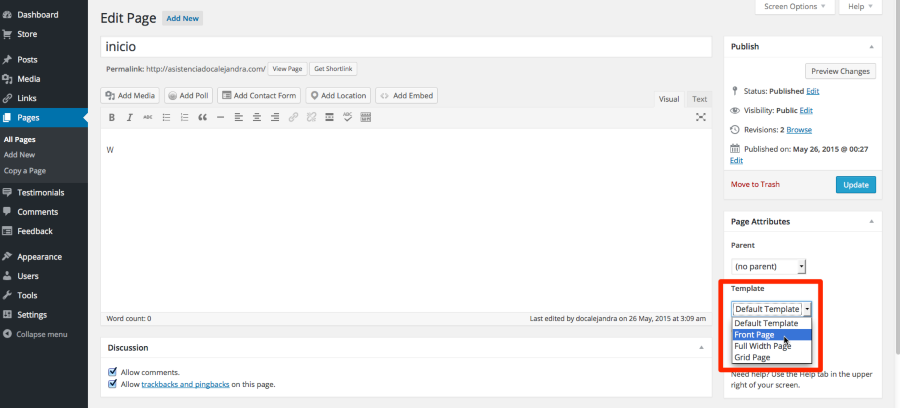
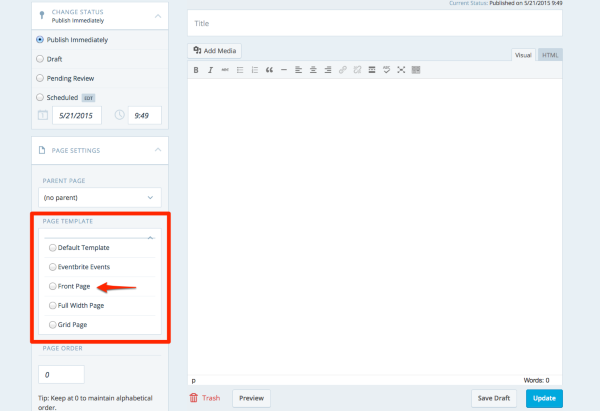
Let me know if this helps!
-
Hi! thank you , I already follow the instructions but I still cannot see the front page as in the example. :(
-
-


- The topic ‘No puedo instalar el front page de Sela’ is closed to new replies.
 WordPress.com Forums