

no XML sitemap
-
Hi, I’ve read the following on the wordpress support page on sitemaps: “Your blog is enabled with just about everything you need to be super-searchable. This includes an XML sitemap, which you can access at yourblogname.wordpress.com/sitemap.xml.”
When I try visiting eraantiquesandbooks.wordpress.com/sitemap.xml. I get a message saying “Oops, that page can’t be found”.
Google Webmaster Tools is also saying I don’t have a sitemap. Do I need to get a plugin for an XML sitemap or is one supposed to be automatically generated by WordPress (as it says on the support page) and if so where is it?The blog I need help with is: (visible only to logged in users)
-
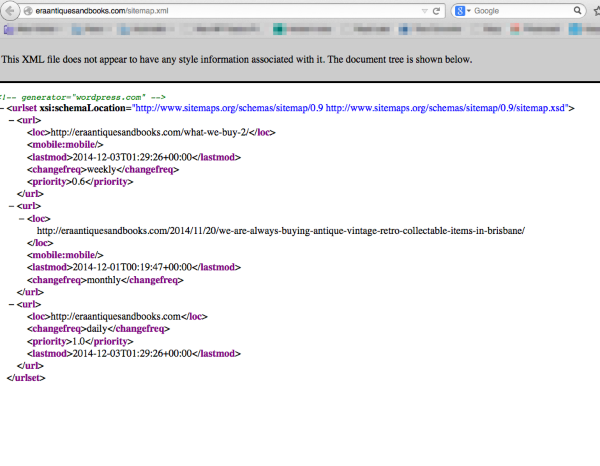
This XML file does not appear to have any style information associated with it. The document tree is shown below.
Yes there is an issue. I tagged this thread for Staff assistance. Please subscribe to it so you are notified when they respond. To subscribe:
1. Look in the sidebar of this thread and find the subscribe to topics link.
2. Or look below the comment box for this: _ Notify me of followup posts via e-mail -
-
-
Hi there,
I just took a look, and it does appear that your sitemap is present:
http://eraantiquesandbooks.com/sitemap.xml
Keep in mind that by default Chrome does not have any plugins or extensions installed which will allow you to view XML files, so you might need to view this in another browser. Let me know if you have problems seeing it!
-
amightywp
I am using Firefox 34 and at http://eraantiquesandbooks.com/sitemap.xml I see:This XML file does not appear to have any style information associated with it. The document tree is shown below here.
-
-
Yes I see that now.
<!– generator=”wordpress.com” –><urlset xsi:schemaLocation=”http://www.sitemaps.org/schemas/sitemap/0.9 http://www.sitemaps.org/schemas/sitemap/0.9/sitemap.xsd”><url><loc>http://eraantiquesandbooks.com/what-we-buy-2/</loc><mobile:mobile/><lastmod>2014-12-03T01:29:26+00:00</lastmod><changefreq>weekly</changefreq><priority>0.6</priority></url><url><loc>http://eraantiquesandbooks.com/2014/11/20/we-are-always-buying-antique-vintage-retro-collectable-items-in-brisbane/</loc><mobile:mobile/><lastmod>2014-12-01T00:19:47+00:00</lastmod><changefreq>monthly</changefreq></url><url><loc>http://eraantiquesandbooks.com</loc><changefreq>daily</changefreq><priority>1.0</priority><lastmod>2014-12-03T01:29:26+00:00</lastmod></url></urlset>
-
Thankyou for your help.
Yes, I am using google chrome. Can you tell me why the sitemap is not visible to google webmaster tools, all the other information is there, key words etc, but it says “no site map”?
Also, and forgive me if this is a stupid question (I’m new at this!), is that the sitemap for everything on the website: 1 post and 1 large page of info? -
Looking at google webmaster all the keywords are from the post, I don’t think it sees the page at all.
-
-
I noticed that you have enabled it and disabled it a few times in the last few hours. It could be that webmaster tools somehow hasn’t caught up. Also, make sure that you have set your site in webmaster tools to your domain name and not to eraantiquesandbooks.wordpress.com. The one should forward on to the other, but let’s make sure it’s easy for it.
Beyond that, I’m not sure what else I can tell you. Webmaster tools is another system and it is definitely available so if it is going to pick it up it should.
-
-
Ah, I just saw your last message, you must’ve sent it right as I sent mine. Sorry about that.
No problem, happy to help!
-
Hi there, I use to have the same problem with no sitemap present for my blog:
When I try visiting sonovivoevegeto.worpress.com/sitemap.xml. I get a message saying “Oops, that page can’t be found”.
I’m using Safari 8.0…Any tip?
-
@ellocotarot – I just visited this link and I’m seeing content:
-




- The topic ‘no XML sitemap’ is closed to new replies.
 WordPress.com Forums