

Not getting email as my own Follower or via Sharing?
-
Hi Gary,
We’ve added debug info to show us when your subscriptions are updated, so we’ll take a look into that and see what’s going on.
Thanks!
-
OK. I’ll turn on the subscriptions I want and we’ll see what happens from there. Thanks!
-
And it’s happened again. I published a post this morning. Before I published, i checked my Reader and all my Follows were set as I had set them on Feb. 4th. Just now, i went in because I wanted to change some of my Follows and I found that all of them have been reset to “You get no post and no comment emails for this blog”. I’m going to go through and edit the ones I do want to follow but I hope you’ll keep working on this until you find a fix. Thanks.
-
Well, it’s continuing to happen. After my last reply on Feb. 7th, I went through and edited my subscriptions for the blogs I wanted to get updates on, including my own. Just now, prior to publishing my latest post, I checked my Reader and once again all my Follows have been reset to “You get no post and no comment emails for this blog”. I’m editing the subscription for my own blog so I get my own update today. PLEASE do all you can to fix this problem. Thanks.
-
If you think this has been weird up to now, listen to this. Due to a problem I was having using my email on aol.com, I had to reset my IE settings. In the process, I think IE got upgraded to the latest version. Afterwards, I happened to go to my Reader and I found all my subscriptions had been restored to the way I had set them on Feb. 7th. I don’t know if this is actually a fix to the problem I’ve been having but I wanted you to know what happened. Weird!
-
Hi Gary,
My team looked into it and I’m not sure if that’s what caused it. They say that it could be possible that we’re caching certain things in the browser’s localStorage that IE is causing problems with. If this happens again, can you please try clearing out your cache and cookies using the guide below and see if that fixes it?
Please note that we highly recommend using Mozilla Firefox or Google Chrome instead of Internet Explorer. Try to use those browsers as I see less issues when our users use them.
Cheers!
-
OK, the good news is that my subscription settings have been sticking. The bad news is that I’m not actually receiving any email notifications. That includes not getting notification of my last two posts on my own blog.
-
HI Gary,
I have followed your blog again. I’ll let you know if I receive email notifications on your next few posts.
-
BTW, my wife is a follower of my blog & she didn’t get notification of my last post. Here email is (email visible only to moderators and staff).
-
-
I just published another post and though my subscriptions are set for me to Instantly get email notifications, I did not receive one.
-
Hi Gary,
I was able to receive it as seen in the screenshot below:
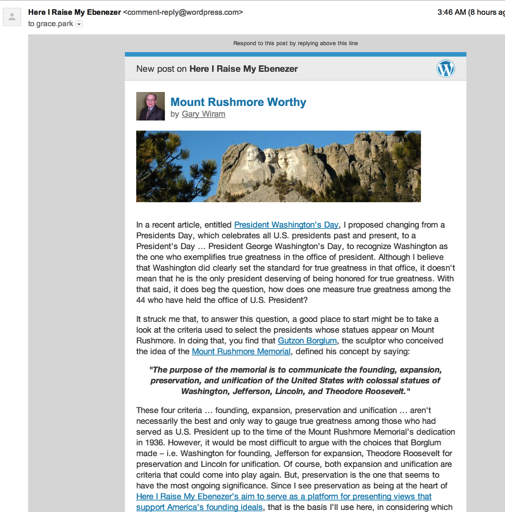
After looking into your account, I found that you blocked all email updates from blogs you’re following on WordPress.com on your Subscriptions Delivery page as seen here:

I have unblocked it and saved your changes. You should be receiving them from this point forward.
Please have your wife check this page as well here:
https://wordpress.com/settings/notifications/
Cheers!
-
My wife received hers. The blocking setting you changed was not set by me. Please have your team look into how my settings get changed without me making those changes.
-
-


- The topic ‘Not getting email as my own Follower or via Sharing?’ is closed to new replies.


 WordPress.com Forums