

Notifications won't stop
-
I’ve double and triple checked. I have notifications via email OFF. The box for getting email notifications when someone “likes” my post is UNCHECKED. So why am I still getting all email notifications? It’s too much and I can’t have it crowding my inbox. My app already notifies me, and that’s all I want.
The blog I need help with is: (visible only to logged in users)
-
Oh my! That sounds so annoying. I’ll tag this thread for a Staff follow-up. Please subscribe to the thread so you are notified when they respond and please be patient while waiting.
-
-
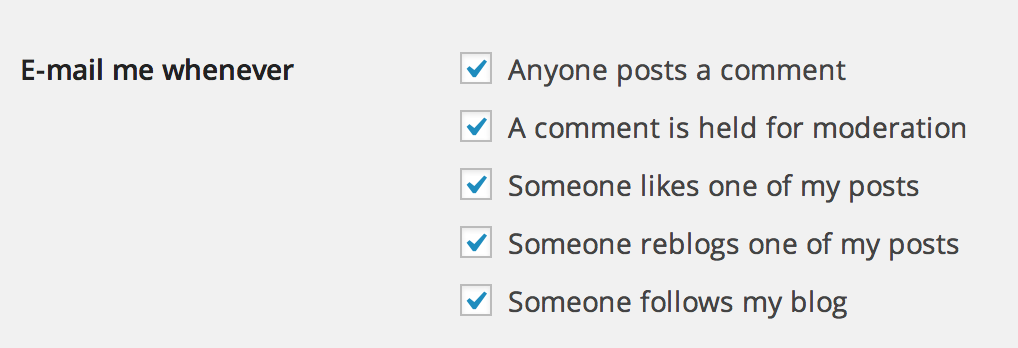
On the page at https://mypersonalmultiverse.wordpress.com/wp-admin/options-discussion.php you will need to uncheck some (all?) of the “Email me whenever” boxes, and then scroll down to the very bottom and save changes.
These are the boxes in question:
-
-
It worked, thanks for the help. It’s a little strange that there are two entirely different email settings pages. One for my blog and one for my account. Those need to be merged!
-
I’m glad it worked!
As for the different settings, it’s possible that someone will want to receive notifications from WordPress.com as a whole but not from certain blogs, so we allow various settings across the platform. I apologize for any confusion you ran into but I’m glad I was able to help you sort it out.
-
Ooh ok. Sorry, new to this site so I didn’t realize one was for blogs and one was specifically from wordpress itself. Maybe I’ll go turn those ones ban on!


- The topic ‘Notifications won't stop’ is closed to new replies.
 WordPress.com Forums