Odd tiny photo issue
-
All of a sudden the newly added photo on my blog is tiny, I have used the same template for over 180 posts now something is wonky, the photo is the same size as I always load………………
The blog I need help with is: (visible only to logged in users)
-
Any help out there……… I have now trashed and redone the post and used another post in its place……… one that has no problems, I downloaded Chrome to see if its Safari……… I still have the problem????
-
Please post a link to the post or page this image is displaying in and I’ll tag this thread for a Staff follow-up. Please subscribe to the thread so you are notified when they respond and please be patient while waiting.
-
Do you mean ALL the posts are displaying this tiny image? If you mean it only happens in certain posts, give us a direct link to one of those posts.
-
-
The images in your two most recent posts are the same size. They are the same size on the main page and on the blog pages. Do you see a difference?
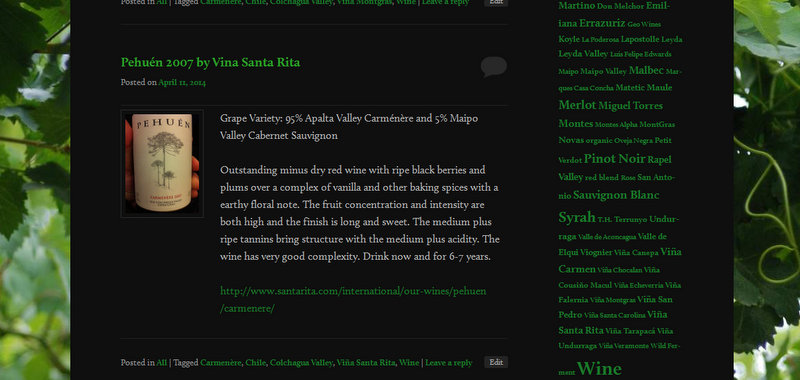
http://chilecopadevino.com/2014/04/11/pehuen-2007-by-vina-santa-rita/
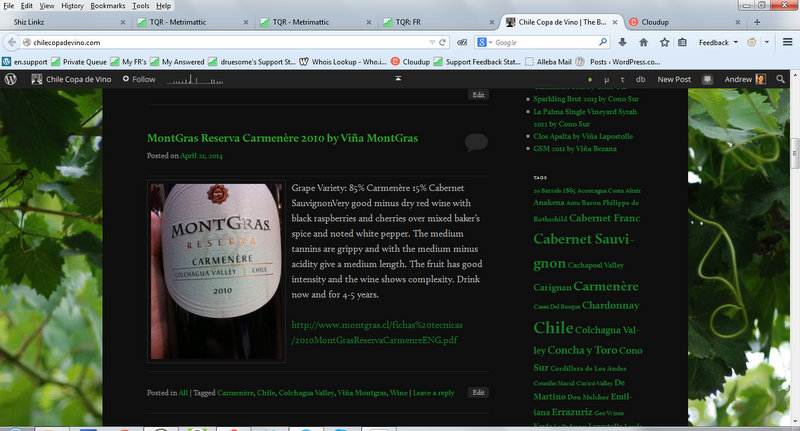
http://chilecopadevino.com/2014/04/21/montgras-reserva-carmenere-2010-by-vina-montgras-2/PS I prefer the Santa Rita.
-
Yes the MontGras is tiny on my computer, my iPad in both Crome and Safari, what browser are you using, yes it like the Santa Rita best of those two
-
I am using Firefox. Since I can’t duplicate this issue, I’m afraid you’ll have to wait to see if someone else can help you with it. But make sure in the Edit Post page, that you inserted the images full size on the actual post instead of thumbnails.
-
I used thumbnail on the previous 100 posts with a piece of code that a helper gave me last year, the code is cut and pasted from a document I have and then the picture is added from my media files which are iPhone pictures all the same size………
-
Hello there,
When an image is uploaded, different sizes of it ranging from Thumbnail to Full Size may be inserted into your blog post. I can see that in the sample posts you provided, you inserted the smallest size possible — Thumbnail. You may change this by editing the image within the blog post, and choosing a larger image size. I went ahead and edited the image in the “Montgras” blog post for you:
http://chilecopadevino.com/2014/04/21/montgras-reserva-carmenere-2010-by-vina-montgras-2/
I did this by clicking on the image and selecting the configure tool.
http://en.support.wordpress.com/images/image-settings/#within-posts
Then, from the panel on the left, I chose the “Medium” size setting under Display Settings.
For more about inserting images, click here:
Feel free to edit your other blog posts and check if you see any improvements. Thank you!
Andrew D.
-
Thankyou but it still is tiny when viewed by my computer Safari (yes I refreshed the loading) and if viewed by a friend on safari the photo is the right size but the writing overlaps the photo, this week’s post is fine……….. as I pointed out I have done nothing different for 100+ posts and this one was trashed and reposted 2X now …… maybe I’ll try that again
-
Hi again!
Can you kindly provide some screenshots to help us understand how tiny the pictures appear from your end? Here are some instructions:
Please include the links in your next message.
Here are screenshots of what I’m seeing on my computer:
https://i.cloudup.com/7wibaD9jce.jpg
https://i.cloudup.com/bw1GOJVRHX.jpgDo the pictures appear normally in my screenshots?
Looking forward to your reply! Thank you for your patience.
Andrew D.
-
Your screenshots look normal on my computer….
Thanks here is a screen shot, can’t figure out how to link to it, but the top shot in my media library, named:
screen-shot-2014-04-26-at-8-42-26-pm.png
-
Hi!
Thanks for the screenshot. I took at look at it, and I noticed that the size of the image in “Pehuén 2007 by Vina Santa Rita” is about the same as what I’m seeing on my own browser. Have you tried increasing the image size by following the instructions I provided?
Thank you!
Andrew D.
-
Its the MontGras wine above the Pehuen, notice the tiny picture, and yes I tried to resize it didn’t help…………. this wouldn’t be an issue but my next post is my 200th and I have a very special wine for the post, the last post is fine but its the MontGras post that still has issues
-
Hello there,
Sorry for missing that! I did not realize it was that small!
Ok, here what I’ll have you do. Right-click on the tiny image, then choose “Inspect Element” from the menu. Expand the inspector window such that it takes up about 3/4 of the browser window with the image still visible. To enable the web inspector in Safari, click on Edit > Preferences > Advanced and check the “Show Develop menu in menu bar” option.
Then, take another screenshot and upload it to your media library. This will help me investigate the issue some more.
Thanks!
Andrew D.
-
thank you for your help.
I fixed it by trashing the post (which I have done before) and changing the order of the posts it is now my newest post, there must have been a code issue with the theme the day I posted it first time and tried to fix it by trashing it and starting over (that day) because last week’s post was fine and reposting now is fine………
-
-
It’s back!!!!!!!
I had 3 posts without problems now the tiny picture in Safari and Chrome problem is back……………….


- The topic ‘Odd tiny photo issue’ is closed to new replies.
 WordPress.com Forums