

Official invoice documents for purchases (Receipts #11922240, #11922139)
-
Hi there,
our accountants department is desperately asking for official invoice documents for our last two purchases (Receipt #11922240 and #11922139). Can you please send the desired documents as pdf to my email. That would be great. Thanks in advance.
Guido
The blog I need help with is: (visible only to logged in users)
-
Hi Guido,
You can find receipts for all your transactions in your billing history:
https://globalwellbeinglab.wordpress.com/wp-admin/paid-upgrades.php?page=billing-history
From there you can choose to View/Print the receipts or have them Emailed to you.
-Alex G.
-
Hi Alex,
thanks for coming back to me so quickly. I already have downloaded the receipts your are refering to. But our (very German) office asks for a formal billing document with our company address on it.
(DIE PR-BERATER GmbH, Worringer Str. 22, 50668 Köln)
It would be great if you can provide such a document.Thanks again,
Guido -
Hi Guido:
You can adjust the information under “Bill to” as needed by choosing the View/Print option.
Double-click on the information currently under Bill to and you type in / paste your company address.
-Alex G.
-
Hi Alex,
its me again. Same topic. Sorry. I couldn’t find the “bill to” option as you described in your last reply. I can view and print the receipts, but there is no option to double-click…? Any ideas?
Thanks again,
Guido -
Hi Guido,
Were you viewing the receipt at https://wordpress.com/me/billing ?
This feature is not yet available in the new dashboard, please visit the receipt in your site’s /wp-admin/ billing history here:
https://globalwellbeinglab.wordpress.com/wp-admin/paid-upgrades.php?page=billing-history
Click “View/Print” for the receipt. There will be sub-heading for “Billed to”, with some information already populated. Here’s an example:
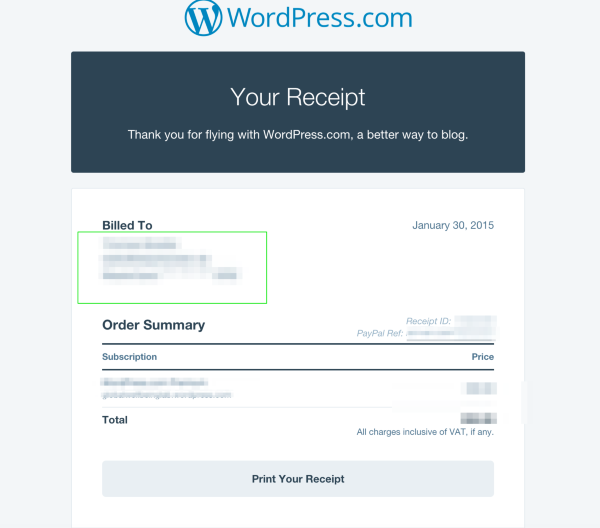
If you double-click the provided information (in the green box of that example), it will allow you to edit the text before printing or saving, intended for instances like these.
-Alex G.
-
Hi Alex,
thanks for coming back to me so quickly. I guess, we don’t have the same interface view. **Here is what happens when I’m following your guidelines:
(please visit the receipt in your site’s /wp-admin/ billing history here:
https://globalwellbeinglab.wordpress.com/wp-admin/paid-upgrades.php?page=billing-history
**DoneClick “View/Print” for the receipt. There will be sub-heading for “Billed to”, with some information already populated.
**I can click view/print, but in the window poped up shows no sub-heading “billed to”Here’s an example:
https://cloudup.com/cHVMLKSjMbt
**mine looks different and has no interactive field at allIf you double-click the provided information (in the green box of that example), it will allow you to edit the text before printing or saving, intended for instances like these.
**not possible in my world:(Anyway, I give up. I’ll try to get trouhg my financial department without the “billed to” information. Thanks again for your help.
Best,
Guido


- The topic ‘Official invoice documents for purchases (Receipts #11922240, #11922139)’ is closed to new replies.


 WordPress.com Forums