

opening links on front page of organization theme
-
HI there. I am using organization theme and have set up my three boxes as per the demo but only one will open and not the first two. Can you let me know what I have done wrong in the settings thank you!www.halfmoonyoga.co.nz
The blog I need help with is: (visible only to logged in users)
-
Hi there!
It looks like you got this working as well?
Let me know if I can help further!
-
Hi yes it looks ok but the first two yoga music and yoga classes dont open only the third one yoga music goes to a page. They used to open so I must have changed a setting. Also can you point me to the forum that shows how to set up front page so recent blogs and content in tabbed section on left are different as opposed to having the same material in both. Thanks again
-
Is this the link you’re talking about?
http://theme.wordpress.com/themes/organization/support/
It looks like you set Yoga Music as your Page with the Home Template set as your Front Page. This mean that this page will never show the content from the content area. Here are some steps to correct this:
- Rename Yoga Music to “Home” or something similar.
- Create a new page titled Yoga Music.
- Copy the content from your page “Home” to your new page “Yoga Music” and publish the page.
- Fix the links to Yoga Music on your Home Page.
Let me know if you have any trouble with that!
It looks like your page Teaching Schedule has the Home Page Template applied to it, which is why it looks the same as your home page. Just go to the page editor and change the template to Default or Full Width and this link should start working.
Let me know if I can help with anything else!
-
Hello I got the teaching page working thank you setting it with no parent and default on page attributes. The Yoga music one has me fooled still. I did up to instruction 3 and now the content title is home which is not what I wanted ( I wanted Yoga music) and it doesn’t click through to the yoga music content. Why is it different from the other two content boxes in the way it is set up, maybe I don’t understand what it mean to fix the links to yoga music on your home page
thank you! -
You’ll need to update which page is linked from that first slot on your home page. You can do this by going to your Customizer and selecting Theme.
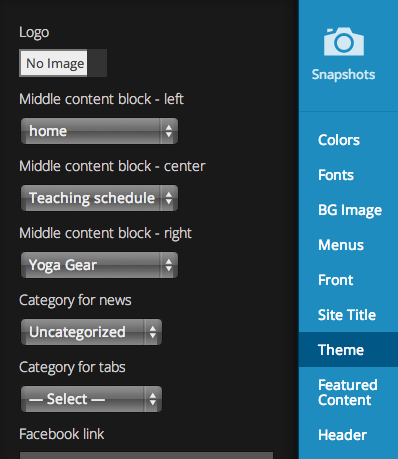
The second setting is for the content block on the left. You just need to update it to point to Yoga Music instead of home.
Let me know if I can clarify anything there!


- The topic ‘opening links on front page of organization theme’ is closed to new replies.
 WordPress.com Forums