

Orvis Theme, how do I edit this page?
-
Here is the link to the page on my site that I am trying to edit.
https://justinmartinhandmade.wordpress.com/project-type/leatherwork/
How do I get rid of the big featured image of the hatchet sheath on this page?
Thanks!
Justin
The blog I need help with is: (visible only to logged in users)
-
Hi Justin, we’re not sure how that image got stuck there, but we removed and then re-added the image you’d set in the Customizer’s Theme Options > Portfolio panel (your logo) and it’s now appearing on your portfolio archive pages. You can swap it out for something else if you prefer.
Just let us know if you experience any unexpected behaviour with that image again. Thanks!
-
Hi! Thanks for replying. Can you tell me how I get to that option in the customizer? I would like to remove the really large image entirely as now I have two logos on the same page. It would be best if I just got rid of the very large pic entirely.
Thanks you!
-
Sure! If you go into your Customizer, head to the Portfolio panel. (Sorry, the path I gave you earlier wasn’t quite right!)
From there you can remove the image. Here’s a screenshot:
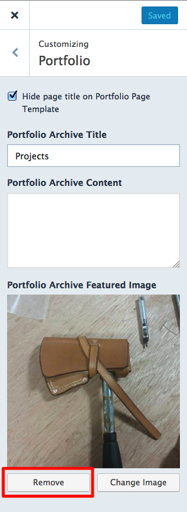
Let me know how it goes.
-
-


- The topic ‘Orvis Theme, how do I edit this page?’ is closed to new replies.
 WordPress.com Forums