

OUTSPOKEN THEME INSTALL AND HOMEPAGE QUESTIONS.
-
I purchased a $68 premium theme – Outspoken. BUT I DID NOT GET A RECEIPT EMAIL.
When I activated the theme (I did not have the theme zip file as in demo video), the appearance does not look like the demo. Also, nothing like I saw in the tutorial.
I REALLY LIKE THE OUTSPOKEN THEME and I paid the premium price, PLEASE HELP ME TO GET INTO SOMETHING LOOKS LIKE I SAW IN THE DEMO ASAP!
http://www.chuntedesign.wordpress.com
PLEASE LET ME KNOW WHAT AM I MISSING. THANK YOU!The blog I need help with is: (visible only to logged in users)
-
Hi there!
First, all receipts for your purchases at WordPress.com can be found here:
https://chuntedesign.wordpress.com/wp-admin/paid-upgrades.php?page=billing-history
Regarding the zip file, themes purchased at WordPress.com can only be used at WordPress.com (not on self-hosted sites). As a result, we do not provide the zip file for themes purchased at WordPress.com. If you are interested in buying Outspoken for a self-hosted (non-WordPress.com site), you can do so here from the original theme creators:
http://wpshower.com/themes/outspoken/
Regarding the setup, I’m happy to help you out with that. First, have you checked out the support docs here for the theme?
http://theme.wordpress.com/themes/outspoken/support/
The setup instructions there should get you most of the way to looking like the demo site. Can you let me know if you’re getting stuck on a particular element of the layout?
-
Thank you for getting back to me.
I think I got the Honepage figure out, ( I need to position each widgets, not just dragging into the “area”.)Main questions I have right now are:
1. How do I create the categories at the red band area at the top and the area below web page title- architecture, Graphic Design…etc.?2. Where do you define how many categories for Homepage Categories?
3. What’s the difference between create new page and new post?
also I created a page and posted it on the homepage big slider, but the images are not showing. Could you let me know I might be doing something wrong?Thank you for your help!
Chunte -
hello, How do I create top menu? I have tried many times just not working as you think it should be.
Thanks. I also would like to know if there is phone number I can call to ask questions but not try and error to get to somewhere.
Thanks, -
Please see my answers below!
1. How do I create the categories at the red band area at the top and the area below web page title- architecture, Graphic Design…etc.?
Those are custom menus. You can create one as explained here:
The theme has two menu locations (Top Menu and Main Menu). The Main Menu location is displayed in white. The Top Menu is displayed in the orangish color on the demo. If you create a custom menu and assign it to the appropriate area, it should display correctly.
2. Where do you define how many categories for Homepage Categories?
It doesn’t appear as though you can customize the amount of posts that appear in the Homepage Category widget. The theme displays a default layout that features six posts in this format:
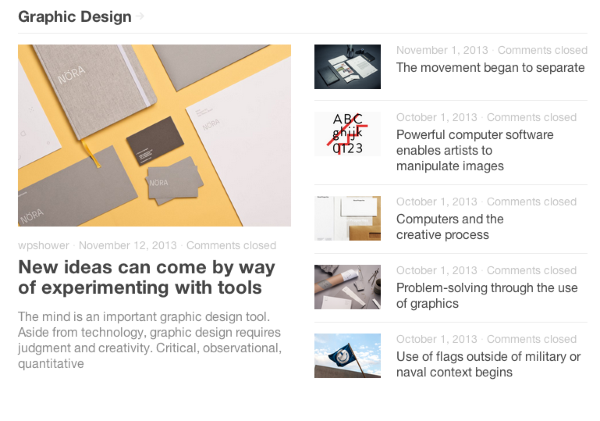
3. What’s the difference between create new page and new post?
also I created a page and posted it on the homepage big slider, but the images are not showing. Could you let me know I might be doing something wrong?One main difference is that posts are traditionally displayed in reverse chronological order with the latest post being at the top of the blog. Pages, however, are not displayed in order relative to time. They’re “static”. You can read more about the difference here:
It looks like you added the post “GUESS BY MARCIANO” to your slider. However, you did not set a featured image. If you set a featured image for the post, the image should display in the slider:
Thanks. I also would like to know if there is phone number I can call to ask questions but not try and error to get to somewhere.
Currently, we do not offer support over the phone (just through email, forums, and live chat for certain users). However, if you have additional questions, please drop them here! I’m happy to answer them.
-
ok, this is my first web experience. I will just send you questions hope you can help.
I want to add my portfolio/ work images to this web/blog. Can I create pages under a category say Retail Architecture? I will post new posts in the future under the same category, is that works?
Can I make the font sizes smaller and center ” chunte DESIGN with Gene ” at the area?
-
You can certainly add posts to a certain category and have that category displayed as a separate page to highlight work from your portfolio. The process to do that is described here:
http://en.support.wordpress.com/category-pages/
Is that what you’re looking for?
Regarding the font size and centering, that can definitely be accomplished. However, in order to do so, you’ll need to purchase the custom design upgrade shown here:
http://en.support.wordpress.com/custom-design/
This will allow you to change font sizes, change colors, and upload custom CSS. Once you purchase the upgrade, I’m happy to help you get setup!


- The topic ‘OUTSPOKEN THEME INSTALL AND HOMEPAGE QUESTIONS.’ is closed to new replies.


 WordPress.com Forums