

Oxygen Theme "Location" option missing
-
Hi:
I’m using the Oxygen theme. According to past support forum posts, I noticed there used to be a “Location” box on the “Posts” page under “Featured Image.” I do not have that “Location” box, even if I go to Screen Options and look at my options under the drop-down. I want to be able to assign Posts to “Featured,” “Primary” or “Secondary” areas. For instance, I want some Posts to be under the “Recent Articles” section and some under “More Articles.” I cannot do that.Finally, I want to be able to change the headers “Recent Articles” and “More Articles” to something else. I suck at CSS, so any help would be greatly appreciated.
THANKS in advance!
The blog I need help with is: (visible only to logged in users)
-
Hi!
The featured posts are assigned by making them sticky as explained here:
http://theme.wordpress.com/themes/oxygen/
I’m not quite sure what you’re referring to when you say “secondary” and “primary” areas. Are you potentially referring to the Widget sidebar? Could you point me to the forum post you’re referring to so I can investigate further?
Regarding the “Recent Articles’ headlines, those are actually part of the page template so they will not be directly adjustable through CSS. One workaround that you could potentially use would be the following:
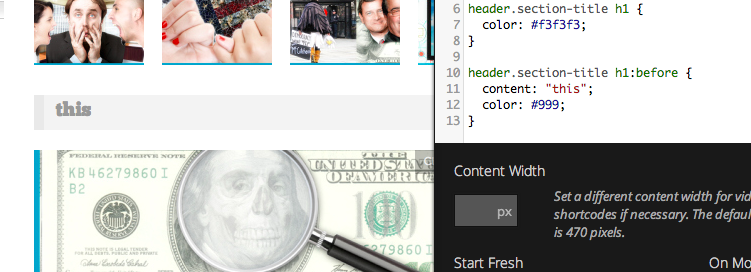
Basically, you could use the following CSS:
header.section-title h1 {
	color: #f3f3f3;
}

header.section-title h1:before {
	content: "this";
	color: #999;
}
That would cause the current title to blend into the background and would insert additional text with a different color. Would that work for what you’re looking for?


- The topic ‘Oxygen Theme "Location" option missing’ is closed to new replies.


 WordPress.com Forums