

Page Attribute Module is gone?
-
i posted this in the “theme” forum but perhaps this is a better spot to ask for help:
I want to remove the sidebar from a post on my Zoren themed blog. I am not new or stupid and know I need to access the Page Attribute Module to make it happen.
Where IS this setting? Is it gone or is it just hidden someplace?The blog I need help with is: (visible only to logged in users)
-
Provided you are referring to a page (not Post):
Full Width, No Sidebar Page Template
Zoren includes a full-width page template if you want to keep the sidebar on your blog but remove it on a page. You can use the Full Width, No Sidebar template, by selecting it under Page Attributes. http://theme.wordpress.com/themes/zoren/If you don’t see the Template module, please make sure you’ve selected the Module in your Screen Options.
http://en.support.wordpress.com/screen-options/
http://en.support.wordpress.com/pages/page-attributes/#template -
The Page Attribute module has disappeared on my Post edit pages. It was once there, but no longer. And it does not display as an option in Screen Options.
-
When i pull down Screen options there is NO template or anything remotely like Page Attributes.
I am telling you the full width page template doesn’t seem to exist anywhere I’ve looked, and I started combing through the dashboard looking for it yesterday.
Because I’ve had many bad experiences in these support forums, i ONLY pose questions here as a complete last resort. Perhaps a staff member can look at my blog and show me what I am missing and/or doing wrong.
http://www.smallhousebiggarden.wordpress.com -
@prcasting
http://www.paulrussell.net/ is NOT hosted by WordPress.COM and we can’t help with it. You need to post to the WordPress.ORG support forum for help with your site because it is not hosted by WordPress.COM.WordPress.com and WordPress.org are completely separate and different http://support.wordpress.com/com-vs-org/
If you don’t have a username account at WordPress.ORG click http://wordpress.org/support/ and register one on the top right hand corner of the page that opens, so you can post to the support forums there and receive advice from WordPress.ORG bloggers.
-
-
Okay I’m back and I see the Templates in the far right hand column on my test blog wearing Zoren.
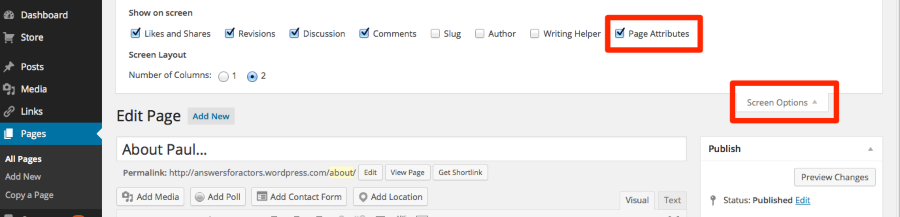
Go to your page and edit ti then go to the top right hand corner and click screen options to activate the same modules I have activated.
Show on screen
Likes and Shares Page Attributes Featured Image Discussion Comments Slug Author Writing Helper -
-
I have done that already. :) The good news is that if you do the same thing by editing the Page and then going to screen options to activate the module it will appear like it did for me. Then you can select the Full Width Page, No Sidebar Template like I just did.
-
thank you! I see it now, too. Evidently I was looking in the wrong place. I am most appreciative you took the time to look into it and direct me correctly.
Thanks again! -
Hooray! I’m so glad you worked through this successfully. My fingers have been crossed for you. Best wishes with your blog. :)
-
Timethief:
Thank for the all caps yell that my blog: http://answersforactors.wordpress.com/
is not WordPress.com (which is in my address) but .org.
Please explain how my WordPress.com address is a .org hosted address.
-
prcasting – could you give me an example of a page on which you’re not seeing the Page Attributes section?
One thing to keep in mind is that posts don’t have Page Attributes options – only pages do.
If you’re not seeing the Page Attributes options, it’s possible you accidentally hid them through the Screen Options panel at the top. Try opening it up when you’re on a page, and make sure the Page Attributes option is checked.


- The topic ‘Page Attribute Module is gone?’ is closed to new replies.
 WordPress.com Forums