Page Attributes doesnt work – How to link pages to main page?
-
So i have created a few pages, and have one main page. But when i link the other pages to the main page (to get a scroll down menu) it doesnt work. Non of the pages that been linked to the main page does not show up on the drop menu. What am i doing wrong here?
Screenshot of the menu: http://imgur.com/a/5uaqq
Screenshot of the page setting: http://imgur.com/a/46so7As you can see, the page “poolen” has been linked to “fastigheter”, but its still not visible as a drop down menu on the site.
The blog I need help with is: (visible only to logged in users)
-
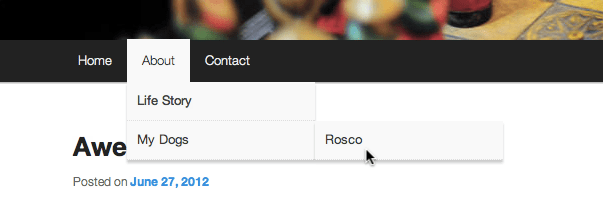
Heres an example of how i want it too look with the drop down menu: https://i2.wp.com/en.support.files.wordpress.com/2008/12/page_order.png
-
I’m having the same issue. I just changed from edin to dyad 2 because, amongst other reasons, the dropdown menus would make things much neater. But they don’t seem to work.
I’d love some help please!
-
Themes –> customize –> menus –> primary –> Display location — > UNTICK the box.
Worked for me when i did that
-
-
-
-
hm, change back to previous settings, edit what you want, and then change back current setting :)
-
I’ve actually found that this problem has given me an opportunity. Limitations are great for creative thinking. If I re-jig a couple of the pages, the original menu is going to work better!
thanks for the help taimasphat


- The topic ‘Page Attributes doesnt work – How to link pages to main page?’ is closed to new replies.
 WordPress.com Forums