

Page Attributes Module
-
Good Evening,
I am trying to locate the Page Attributes module in order to access the additional page templates that come with the Edin and Goran Themes. I’ve visited your support section under Templates -https://en.support.wordpress.com/pages/page-attributes/#template – but I can not find a window that matches that image.
Thank you.
The blog I need help with is: (visible only to logged in users)
-
Hey there!
Thanks for your note :)
Open up a new page for your site by clicking here:
https://exploratorydesigndotcom.wordpress.com/wp-admin/post-new.php?post_type=page
In the right-hand menu, you should see this:
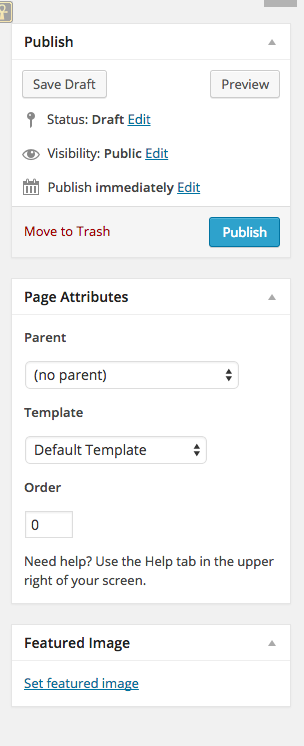
Could you please let me know if you see it now? If you don’t, you may see a Screen Options tab at the top of your page. You can click that, and then make sure that the Page Attributes box is checked.
I hope this helps! If you have any other concerns, drop me a note. Thanks much!
-
Thank you very much! Accessing my page through your link worked perfectly, I easily found the Templates drop-down list. I have a feeling this is a silly question but yesterday I was editing in a very different looking work space, where it had all the page feature option listed in a scroll bar on the right hand side – and Page Settings instead of Page Attributes. Would you please direct me to a resource the explains the difference between these two work spaces and how to navigate to the appropriate one? Thank you again!
-
Hey Chandler!
That isn’t a silly question at all.
We recently launched a new Dashboard that appears a bit more user-friendly, and is more streamlined to use. While our developers built it, they kept the most popular parts of the Classic Dashboard, and let the lesser-used areas go. Just to keep things simple and clean.
However, we’re keeping the Classic Dashboard because many of our long-time users are comfortable with it, and don’t want to change.
That’s why there are two “looks” to your Dashboards.
If you want to see the Classic version, you’ll do so here:
https://cloudup.com/clydJh0OwReWhen you’re logged into your account, and you’re looking at the version of the Dashboard you’ve been working with, you’ll click WP Admin. That takes you to the Classic Dashboard.
Right now, most of our support documents display the Classic Dashboard versions. We’re getting closer to creating new support docs, once the new dashboard is entirely launched.
I hope that clears up some of the confusion over the different views you’re seeing. Basically, you should be able to work in either one that you like better.
Please let us know if you have any other questions. Thanks much!


- The topic ‘Page Attributes Module’ is closed to new replies.


 WordPress.com Forums