

PAGE DISPLAY
-
I just switch themes, Penscratch to Motif. Love it, love both. But I have two questions.
One: I have never known how to have the new post on a page all by itself, a new post always displays on the same (Home) page as all other posts, and scrolls down to all other posts.
Two: As I scroll down, all those posts above display all the words and photos in the post (not comments). I want the separate posts to appear as a smaller “block” with one photo and first few words, or so…not all words and photos in the post.
Do I have to go back to each post and change something? Or can I push one magical button? Fingers crossed for one magical button.
HELP? Please.
BadfishThe blog I need help with is: (visible only to logged in users)
-
Hi,
Congratulations on your new theme! :)
To answer your first question, you can create a page and have new posts show up in there using our Display Post shortcode. You can customize which posts to show so that if you want to display posts from a specific category or tag, posts from specific category or tag will show up.
The shortcode requires some time to set up, but it’s really easy! You can find all the information you need to display posts on your page here: https://en.support.wordpress.com/display-posts-shortcode/
As for your second question, there isn’t any magical button to change that, unfortunately. You will have to edit your posts and add a more tag which will split your post and show only a part on the homepage. Here’s more about the tag: https://en.support.wordpress.com/splitting-content/more-tag/
If you have any more questions, feel free to let me know. :)
-
Aisajib
Thanks for that. However, when I go to Themes, and look at Motif, it has a page titled “blog” and the articles posted are all in a GRID format. That is what I want to do. I don’t want to have to create the look every post. Is this possible?
How do I get the grid look on my site?
When I open a new page, it looks like a post, not a page that holds posts. HELP!! -
Hi there,
It sounds like you’re describing the Grid Page here:
https://motifdemo.wordpress.com/page-templates/grid-page/
The way that grid page works is by using a Page Template. Here’s how you can set it up:
- Create a new page to hold the grid, and give it a title. You can add some text to it’s body too (it will appear above the grid). The demo titled this page “Grid Page”. But it sounds like you may want to call it “Blog”.
- Also set the ‘grid page’ template for this page. (Example)
- Publish your “Blog” page.
- Next, create several new pages (not posts) that will be in the grid. In each one of those pages, set the Parent to be “Blog” in their Page Attributes, but leave them as the default template. Publish each of these pages.
Now view your “Blog” page that is using the grid template. All its child pages that you just created will be displayed in the grid.
-Alex G.
-
-
Alex or ?
One other thing:
I have not tried the above yet (time issues & Writing 101). But before I do, I would like to know how to get the posts already posted in the “not-grid” format on the Home page to go into the Grid format…all on THAT Home Page that is already set up (but not as Grid format (as opposed to a new page). Or do I need to create a new Home page and transfer the existing posts to that page?Also, is the main page in the header (now titled Home or Blog) is that page called a “parent” page, and then the other pages on that page (hopefully soon in Grid format) are those pages called “child” pages? I’ve heard these terms, just don’t know about them, sorry.
-
If you already have all the content for your Grid Page stored as Posts, you’ll need to do some copy+paste to move them into Pages.
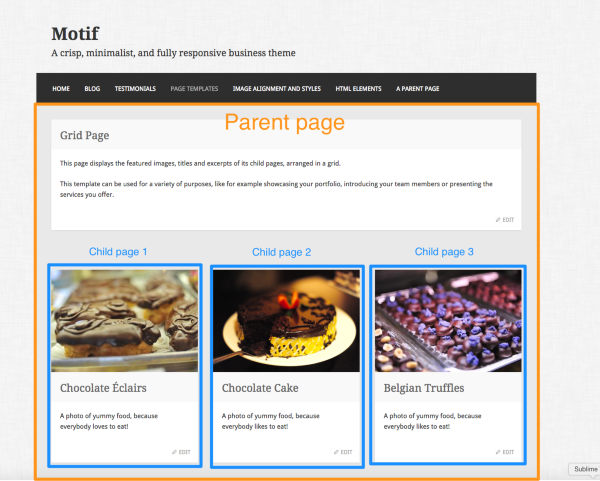
Also, is the main page in the header (now titled Home or Blog) is that page called a “parent” page, and then the other pages on that page (hopefully soon in Grid format) are those pages called “child” pages? I’ve heard these terms, just don’t know about them, sorry.
Correct. :)
The Grid Page template works because it will display all the child pages in the grid. Example:


- The topic ‘PAGE DISPLAY’ is closed to new replies.
 WordPress.com Forums