

page not displaying properly
-
When a page displays (specifically our recordings page), it is missing most of the content that is there when I am in edit mode. It just seemingly of its own accord decided to start doing this after years of displaying correctly. I hoped it would magically right itself, but it has not over the course of a month, and none of the users have been able to access the bulk of the recordings I have posted as a result of this. Any suggestions as to what might be the problem?
The blog I need help with is: (visible only to logged in users)
-
Hi there, So sorry to hear that you’re experiencing this. Could you please tell me which recordings are missing from your live site? Do you only experience these missing files when you’re in Firefox, or do you see the exact same thing if you’re in Chrome, Safari, or Internet Explorer? If you aren’t using the latest version of Flash Player, could you upgrade that now:
http://www.adobe.com/support/flashplayer/downloads.htmlIf your audio has been online for years, it’s possible that some ceased to work during one of our audio player upgrades in that time. Therefore, I want to make certain that your missing audio has been embedded in the following manner:
http://en.support.wordpress.com/audio/Finally, while you’re working with these audio issues, I thought I’d also send this along:
http://en.support.wordpress.com/audio/soundcloud-audio-player/
Some of our users with sites that focus on audio really enjoy the ability to use the SoundCloud player on their blogs. Thought I’d throw that out as an option for you as well.Please let me know how the browser testing and other troubleshooting suggestions work out for you. Thanks so much!
-
Thanks so much for your quick response.
The files that are missing are on the Recordings page. There are almost 350 music files (primarily in alphabetical order.) When the page is live, the list of recordings stops at “All I Have to do is Dream.SATB” and it picks up again at “Take Me Out to the Ballgame.00.SATB.TR. There are about 295 files (give or take a few) in between those two songs that do not show up.
I have checked it using my PC and my IPad. I have tried Firefox, Chrome, Safari, and Internet Explorer – they all have the same issue. I have asked other people to check with their computers and so far everyone I have asked has reported this as well.
As far as I know, this was not a problem until about two months ago (I am guess as to the time frame a bit). And there was nothing obvious that precipitated it. It just happened one day.
If there is anything else you can suggest, let me know.
Thanks,
Vickie -
Hiya Vickie,
Thank you for all these details. You led me right to the issue.Your previous manner of embedding sound files now needs a slight change to “close” the code.
So this audio shortcode:
[audio http://trilliumsingers.files.wordpress.com/2013/04/all-i-have-to-do-is-dream-00satb-tr.mp3 ]Should now look like this:
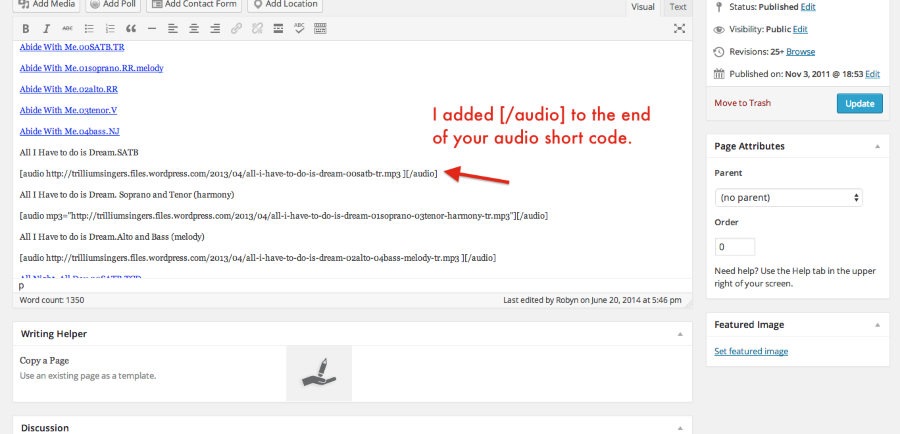
[audio http://trilliumsingers.files.wordpress.com/2013/04/all-i-have-to-do-is-dream-00satb-tr.mp3 ][/audio]I adjusted the first several codes in the window of your Recordings page so you could see how they need to be adjusted. You’ll notice on your actual website that these fixed codes now appear and can be played.
If you have any questions about the process, please let me know and I can help further. Thanks so much!
-
Thank you. I see that you changed several songs so that they can now be listened to, but I’d still don’t have a clue how to do it. I guess I need specific directions as to how you did it.
Thanks for your help,
Vickie -
Hi there! Do you see in my last note that I’ve added [/audio] directly after your shortcode? That is what you’ll want to do, too. You can copy and paste it right into your page as I have.
So this audio shortcode:
[ audio http://trilliumsingers.files.wordpress.com/2013/04/all-i-have-to-do-is-dream-00satb-tr.mp3 ]Should now look like this:
[ audio http://trilliumsingers.files.wordpress.com/2013/04/all-i-have-to-do-is-dream-00satb-tr.mp3 ][/audio]Then, after you make those additions, you’ll click Update to save the changes on your page.
Hope that’s clearer. Let me know if you have questions. Thanks!
-
-
Thanks again. I just got back to this. If you’ll look on the page, only some audio files were listed the way you showed, and the others were simply blue underlined titles. I didn’t know how to edit the blue underlined titles (as a great deal of those were not displaying either), so I just edited the ones that looked like the example you showed me, and oddly enough the blue ones just followed suit and began displaying properly. So now it is all working. I don’t understand how, but I am grateful it has resolved itself.
Thanks for your help. -
Fabulous! I am so happy to hear that the fix worked well and universally throughout your audio list. Glad you’re up and running again. Thanks for letting me know!


- The topic ‘page not displaying properly’ is closed to new replies.


 WordPress.com Forums