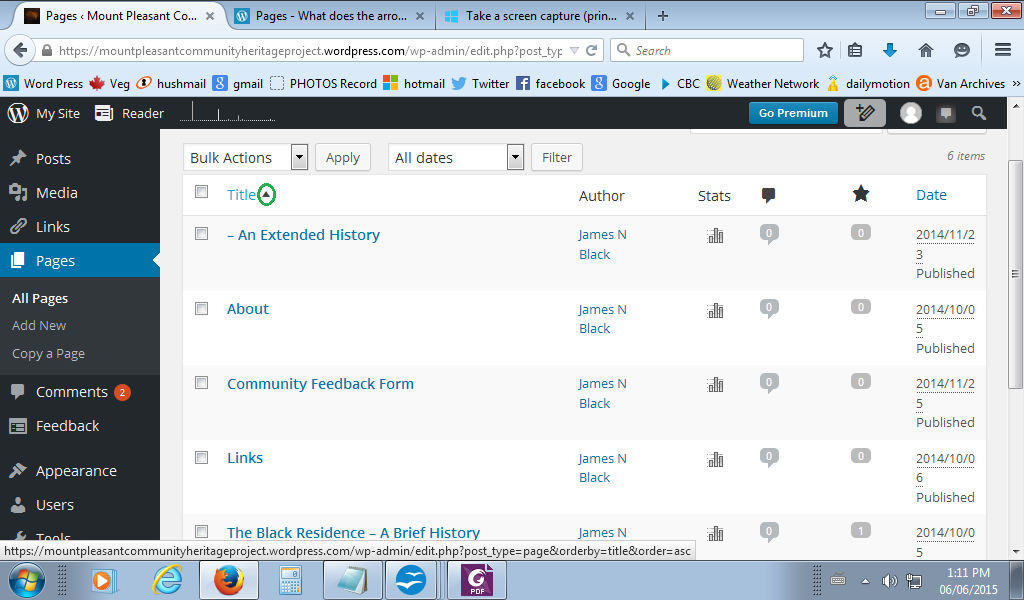
Pages – What does the arrow next to Title do? (as seen by admin in all pages)
-
Hi, I have been reviewing my blog to eliminate stupid statements as a news article is coming out next week that may lead people to the blog.
In the menu “all pages” (wp admin), I noticed an arrow next to title wich was the last page listed at the bottom. I usually make changes to the title page through general settings. I was curious. I hovered over the arrow, nothing popped up to explain it, a url appeared at the bottom of my browser. So I clicked the arrow, what could be the harm? The title item was duplicated at the top of the list. So now there is a title at the top of the page list and the bottom.
As far as I can tell this did nothing to the structure of blog or the title page.
Just in case though, could someone tell me what I have done, and how to remove this “extra” title in the page list?
The blog I need help with is: (visible only to logged in users)
-
Here is an image of the arrow I am talking about:
[URL=http://s1161.photobucket.com/user/Datasun/media/Title%20Arrow.png.html][IMG]http://i1161.photobucket.com/albums/q515/Datasun/Title%20Arrow.png[/IMG][/URL]
-
It’s a toggle switch. The arrow pointing up means the pages are displayed in chronological order, according to publish dates. The arrow pointing down indicates reverse chronological order.
-
-


- The topic ‘Pages – What does the arrow next to Title do? (as seen by admin in all pages)’ is closed to new replies.
 WordPress.com Forums