

Panels Theme not working correctly . PLEASE FIX THIS.
-
Our panels theme is not working, and has not worked since August of 2014. Since you closed the last request with out resolving it I’m opening up this one.
Here’s the original thread on our problem:
https://en.forums.wordpress.com/topic/content-suddenly-unavailable-for-our-online-comic?replies=5#post-2034532You should fix this. It’s troubling that it has remained unresolved this long.
The blog I need help with is: (visible only to logged in users)
-
Also, currently we are getting “oops content not found” error when we try to navigate from page to page.
-
-
It’s already been flagged as a bug and for staff attention. There’s nothing else you can do but wait.
-
Good to hear. Really has made blogging our comic difficult. Also mobile doesn’t seem to be functional too.
-
Hi helsigcomix,
I’m still reading up on the previous reports of your issue, so forgive me that I do not yet have more information. I’ll continue investigating this where it was previously left off and do what I can to get this resolved.
Regarding the new “oops content not found” error you mention, would that be the same notice in this screenshot?
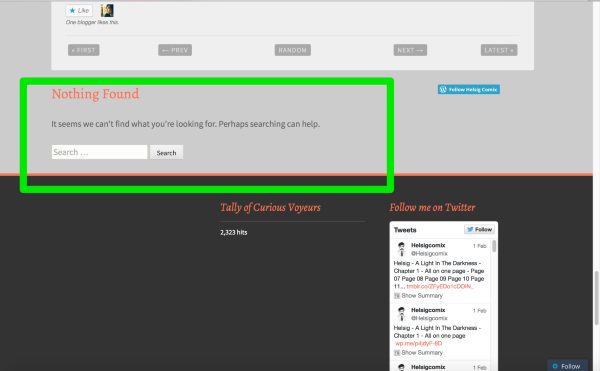
If it is another message, please upload a screenshot of the error you’re seeing to your media library so I can take a look. If that image is the notice you’re referring to, please let me know, I can help you get that removed.
-Alex G.
-
Hey Alex,
I have no screenshot. It is not the same error as the screen shot you linked above. What happens is the image that should be on that page does not appear, instead there is a error that says “Oops content not found” in the area that the image should be in. The image being the comic itself.
The second issue is a bit trickier. When we post consecutive pages, the “Next” button that should appear below the comic and navigate you on to the next page does appear for several hours, sometimes not at all. This has been as issue for awhile.
It used to be that we would post consecutive page and the “Next” button would appear immediately.
The last issue, is the mobile version of this page does not show up in the wordpress app for iPhone. Possibly all/some mobile browsers as well?
-
Alex,
Also, if you go to the original thread on this (see link above at top) go to my response dated: Sep 26, 2014, 10:07 AM it describes the “Next” button issue in detail. It appears the div for the “Next” button is not populating with what ever produces the “Next ” button or it’s functionality when more than one page is posted.Thanks for looking into this.
-
Thank you for your reply. I’ve been able to replicate the missing navigation error on a test site and have reported the error in a fresh ticket with our developers. I apologize the previous discussion on this error was left unresolved.
I have no screenshot. It is not the same error as the screen shot you linked above. What happens is the image that should be on that page does not appear, instead there is a error that says “Oops content not found” in the area that the image should be in. The image being the comic itself.
I’ve not been able to replicate this one, but it sounds like connection trouble to our media servers. While on a page where you see the error, could you please take a screenshot of your browser’s HTTP headers as described here:
The last issue, is the mobile version of this page does not show up in the wordpress app for iPhone. Possibly all/some mobile browsers as well?
Visited your site in my mobile browser and it looks like the WordPress.com mobile theme, not the mobile version of Panel, is loading:
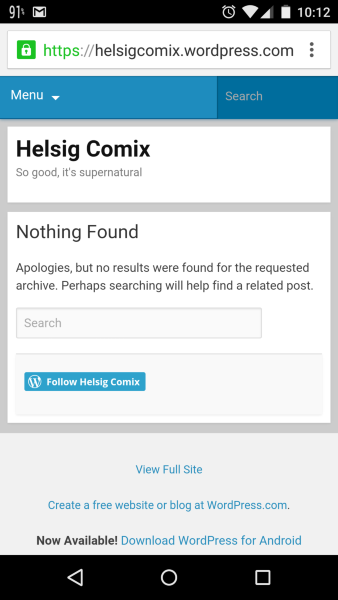
The Panel theme is meant to be mobile-ready, without the WordPress.com mobile theme in use. Since Panel includes the “Comic” custom post type, all that content will be missing in our mobile theme. So first step would be to visit your mobile options:
https://helsigcomix.wordpress.com/wp-admin/themes.php?page=mobile-options
Change the “Enable mobile theme” option to “No” and click Update. This will display your normal site instead of our mobile theme — your normal site is responsive to be ready for mobile browsers. (Here’s the demo site on mobile as an example.)
Once you’ve made that change, could you please take a screenshot of how your site appears both in the iOS Safari, and in the WordPress.com iOS app? I’d like to share those with our mobile team to make sure we’re accounting for the Comic custom post type — I’m not sure that we are.
-
Hey Alex,
Changing the mobile setting did the trick, appears as expected in the iOS app as well as iOS Safari. Thanks so much for all your efforts on our behalf. I have screens, but no way to upload them to this thread…
The navigation issue is the big one for us, so we really appreciate your getting this looked into and resolved.
-
-
For the screenshots, would you please upload them to your blog’s media library? No need to publish them in a post or anything, just upload into the library.
Let me know when you’ve done that and I’ll go take a look.
-
Hello, I am having the same issue with the next button not showing up. This is a very annoying issue where a comic is involved. Is there any way to resolve that so it shows up when I post a new page?
-
Hi ntroy5000,
Thanks for letting me know you also have the missing navigation issue. We’ve reported the ticket to our theme developers and it’s in their priority queue. I don’t know how quickly it will be resolved, but I’ll make sure to report any new information here when I have it.
You can receive notifications on this thread by clicking “Subscribe to Topic” in the right sidebar.
-
-
Hi Vince!
Thank you very much for the mobile screenshots. :)
Have you continued to see the “Oops content not found” error? If so I’d like to send that on to a developer, but would need the HTTP Header information I mentioned.
-
Haven’t seen that error since last weekend when we were posting new content to the site. I’m thinking that it may have been as you suggested, a server issue. It would occur when I would attempt to preview or view the older postings from with in the “All Comics” Admin page.
Will post if it happens again this weekend when we post new material.
-
Thanks for the update. :)
It would occur when I would attempt to preview or view the older postings from with in the “All Comics” Admin page.
I’ll try to keep testing that on my end as well!
-
it’s weird… I’m thinking it’s a url string issue? I could’ve sworn that the url string when previewed was different than the actual url string, I noticed it the first time through when it produced the error… then it stopped happening… and everything seemed normal.


- The topic ‘Panels Theme not working correctly . PLEASE FIX THIS.’ is closed to new replies.
 WordPress.com Forums