

Paragraph Indents
-
When I paste my word doc into the dashboard, my paragraph indents look fine. However, once I save the draft, I lose my parapgraph indents. Why is that and how to I fix it?
The blog I need help with is: (visible only to logged in users)
-
I still don’t get it. Before you removed the Word specific button from the dashboard toolbar, I had no problem with paragraph indents. I can’t insert a narrative text without paragraph indents. Code is not my strong point.
-
Hi there,
Please note that Microsoft Word is a fine word processor for producing documents to be shared or printed, with a wealth of print-based options for indexing, and producing table of contents. As a web publishing tool, however, it is a little less than ideal and produces very messy HTML.Therefore we strip out a lot of the formatting when you paste in content from these kinds of web publishers. Feel free to take a look at this guide more for info:
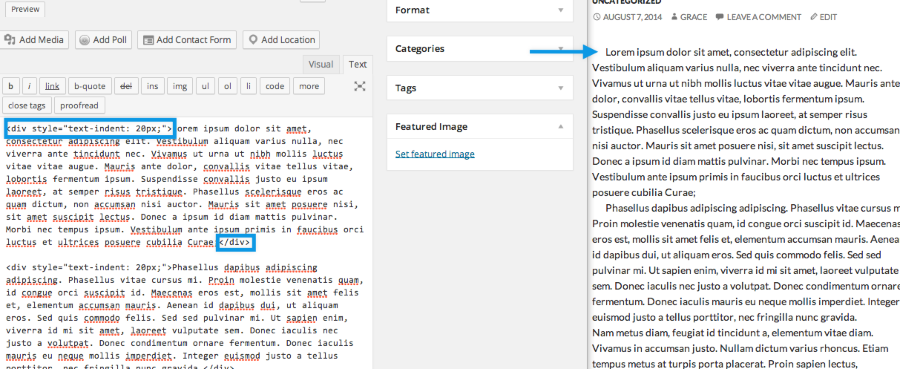
However, indenting the first line of the paragraph is not impossible! You can easily add a text indent with HTML. You don’t need any code knowledge to do this. :) Please switch to the Text Editor and then add this for the paragraphs you want to indent:
<div style=”text-indent: 20px;”>ADD PARAGRAPH HERE</div>
Here’s what it should look like in the text editor and the published version:
Cheers!
-
-


- The topic ‘Paragraph Indents’ is closed to new replies.
 WordPress.com Forums