

Paragraph spacing
-
We’ve just starting using this theme. We noticed that when we publish a post, there are no spacing between paragraphs despite what it looks like in the edit/ draft phase. We’ve even tried putting in lots of spacing! Doesn’t work.
Please help.Thanks
The blog I need help with is: (visible only to logged in users)
-
Hi there,
Did you by any chance copy in that content from somewhere else?
If I look at your most recent post in the HTML view of the editor, I see a bunch of empty
divHTML tags that are not coming from our end, and I see absolutely noptags, which are what denotes paragraphs in HTML. That’s why you don’t see spacing between the paragraphs – as far as your browser is concerned there aren’t any paragraphs, because they’re not indicated in the HTML.Highlight all the content of your post, and then click the Clear Formatting button in the editor toolbar:
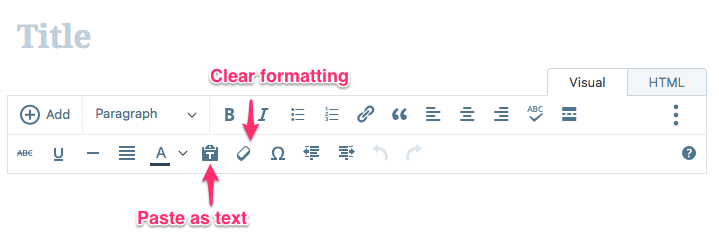
You might also need to manually delete all the empty
divtags that look like this:<div dir="auto"></div>Then add any formatting and paragraph breaks you want directly in the WordPress.com editor.
In future if you paste in content from another source, use the Paste as Text button indicated in the image above to strip out any formatting at the moment you paste, and then add your formatting in the editor directly to ensure the correct HTML code gets applied throughout.
-
Thank you! We’ll try your suggestions. We types it up on a notepad in our phone and transferred by copy and pasting. Makes sense now.
Thank you :)


- The topic ‘Paragraph spacing’ is closed to new replies.
 WordPress.com Forums