

Penscratch Theme – sticky posts
-
Hi there,
I’ve noticed that the Penscratch theme (https://wordpress.com/themes/penscratch/) doesn’t support thestickyCSS class, therefore, there’s no way to know when a post is sticky.
This way I’d like to suggest you to do it in order to avoid this type of confusion for the user: https://en.forums.wordpress.com/topic/penscratch-newest-story-on-top?replies=2Cheers
The blog I need help with is: (visible only to logged in users)
-
Hey there @catiakitahara,
I’m not sure what you mean by,
I’ve noticed that the Penscratch theme (https://wordpress.com/themes/penscratch/) doesn’t support the
sticky
CSS classbecause when using the Penscratch theme, I can choose for a post to be sticky.
-
If you have a WordPress.com Premium or Business plan that enables you to use Custom CSS, can you not use this CSS to style a post with the sticky class?
.sticky { property: value; } -
-
@Cátia Kitahara:
Jesse’s recommendation will work. If you check your HTML structure, you’ll see that there’s a class for ‘sticky’ posts:
<article id="post-44" class="post-44 post type-post status-publish format-standard sticky hentry category-sem-categoria"> [...] </article>Any special visual effects for sticky posts are dependent on the theme, but you can add your own styles.
-
Oh, yes I know that, @chrisrudzki!
I believe it’s a design choice, but I’d rather have this class styled by default. Also I thought it’s a best practice while developing WordPress themes that’s why I made this suggestion. I would have submitted a ticket had I known where! :)
-
Thanks for the suggestion, Catia, we appreciate it.
Since Penscratch has been out for a while we wouldn’t be able to make this sort of design change at this point, since it would affect all sites running Penscratch, changing the look of thousands of sites all of a sudden.
Not all theme designers choose to style the sticky post differently than other posts; it’s an aesthetic decision made by the theme’s developer, and can be overridden with custom CSS if you prefer to style it otherwise.
Thanks again for your suggestion. :)
-
Hi @Kathrynwp,
No worries. I totally understand the impact it could cause. And I see that it’s easier to create styles for it rather than override existing ones.
;) -
hi there,
I just posted on my blog. I use the penscratch theme. Since I last posted the editing format when posting seems to have changed and I can no longer find the ‘sticky’ function. As in sticking the post to the top of my home page.
Does anyone know where it is hiding? or has it been removed? and then what do I do?
Thanks a million!
-
On your “Edit Post” screen in your Admin area, under “Publish”, find the eye icon that says, “Visibility”. Click the edit button and then check the box that says, “Stick this post to the front page”.
Let me know if you have any other questions. Thanks!
P.S. – In the future, create your own thread. This helps support help you and keeps things organized a little better :)
-
Hi afterblixen – the sticky function in the new editor can be found by clicking the little down arrow to the left of the date (or the words “New Draft” for a new post):

Once you click it the panel will open up and you’ll see the sticky option:
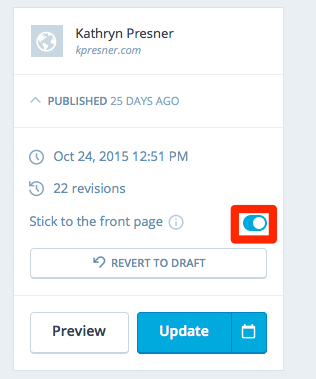
And yes, as Jesse mentioned, if you could please start a new thread next time that would be appreciated. This issue isn’t actually related to Penscratch but with the new editor. You can read more about the new editor here:
Thanks!
-


- The topic ‘Penscratch Theme – sticky posts’ is closed to new replies.
 WordPress.com Forums