

Photo Captions
-
I have gone to the media section on my dashboard and tried to add captions to all of my pictures but they are not showing up.
The blog I need help with is: (visible only to logged in users)
-
I have filled out the 3 fields : Captions, Alternate Text and Text. Is there something I’m missing? Thanks.
-
Hi there,
Those fields look to be appearing correctly on your image shown here:
http://samesamebutredder.com/?attachment_id=173
Both the caption and the alternative text are displayed. If you’re still having trouble, can you point me to a place on your site where the added information is not displaying?
-
Thanks for your quick response! I see the caption and alt caption on the link that you sent me, but when I view our blog I’d like to see the captions just under the pictures, while I’m reading the post. Do I need to embed a code or something to do that?
-
Ah! I understand. You shouldn’t need an embed code. You should just need to add the caption to the image within the post. You can do that by adjusting the image settings as explained here:
http://en.support.wordpress.com/images/image-settings/#within-posts
For example, when you highlight over the image in the post here, you should see the pencil icon. After clicking that, you will see a “Caption” field as shown here:
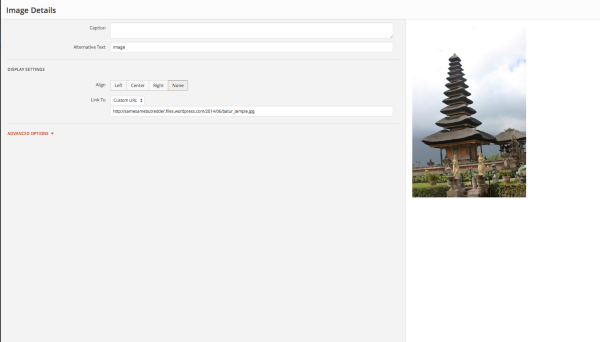
Entering the caption there should display it on your blog page. Can you give that a try?
-
-
Not a problem! I’m glad you were able to get this to work. Let me know if you need anything else.


- The topic ‘Photo Captions’ is closed to new replies.
 WordPress.com Forums