

Photo Gallery Changes?
-
I have a website that has displayed photo galleries beautifully in 3 rows of thumbnails for years. Just recently it has all changed and looks terrible! They now display erratic and ruin the whole look of my site. What can I do to now fix this?
The blog I need help with is: (visible only to logged in users)
-
HI there,
So I was previously talking with you in the Image Resize thread, but I’m glad I found you here.
I looked into your site, and found that the thumbnail grid was aligned, but your image sizes were all different as seen here:
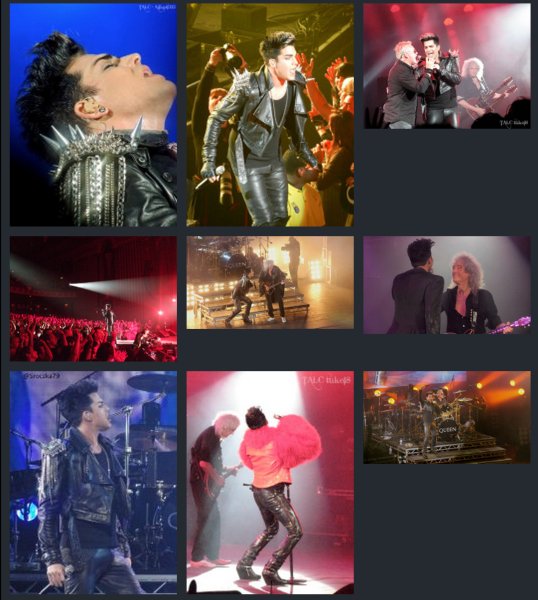
Please note that if you want the rows of the images to be the same height, the images must be the same size.
Therefore, instead of changing all the image sizes, I do recommend keeping the gallery style to square.
-
I’m pulling my hair out trying to figure out why the thumbnail photo gallery does not work anymore since WordPress changed from the galleries being in that blue box you had to open to edit, to this new way.
The thing is, my ‘thumbnail photo galleries’ for the last few years have always had up to 300 photos in them of sizes from 300pixels to 5000 pixels in the gallery and WordPress has always done a great job of putting them in the gallery 3 in a row and all the same size when displayed…..until now (with the change)I went back and forth between my main site (a photo site) and my other site I have not used yet that is a wordpress ‘free’ theme.
What I found tonight was even more confused the situation. I set both sites at thumbnail sizes of 225, which is what my main site is always at. I only displayed a ‘thumbnail photo gallery’ on each one. Nothing else in each post.
Here’s is the other sites info (and by the way this is what the photo gallery USED to look like on my rockimitatesart site before the change
The short code is:
[gallery ids="76,77,78,79,80,81,82,83,84,85,86,87,88,89,90,91,92,93,94,95,96,98"]and the site and post are here:
http://thepetposer.com/2014/04/11/this-is-only-a-test-for-wordpress-to-see-how-gallerys-display/
Now here is my rockimitatesart site’s short code for the same photos:
[gallery ids="33830,33831,33832,33833,33834,33835,33836,33837,33838,33839,33840,33841,33842,33843,33844,33845,33846,33847,33848,33849,33850,33851,33852"]
And the site and NEW test post is here:
As I said in the previous convo, ever since this change, all photos and videos as well are displaying bigger (and as you can see some here are actually now distorted) and no longer are able to align and looks really bad!
It’s kind of ruined the look of the whole site. Not sure what happened when wordpress changed everything, but I have changed nothing. I have no idea what to do. Is there something that I need to change in the coding of this site to work with what WordPress just changed?Because my site IS a photo gallery site this whole situation is not a good thing. I only put all the galleries into ‘squares’ temporarily while I figure out what just happened.
Thanks
-
Well, I contacted the @thelukemcdonald the guy who developed the theme and he ‘updated’ the theme and the galleries work now!!! YAY
So there may be at least one of the answers for you all with premium themes.
@thelukemcdonald -


- The topic ‘Photo Gallery Changes?’ is closed to new replies.
 WordPress.com Forums