Photo sizes within blog
-
When I insert photos into my blog, they appear in very small boxes within my post. I don’t seem to be able to resize these however I’ve just discovered a blog with the same theme and the photos are full size (they are the width of the text in the person’s blog). How do I resize the frame around the photo within a blog post?
The blog I need help with is: (visible only to logged in users)
-
First, can you make sure your image size settings are correct on the Settings > Media page in your blog dashboard?
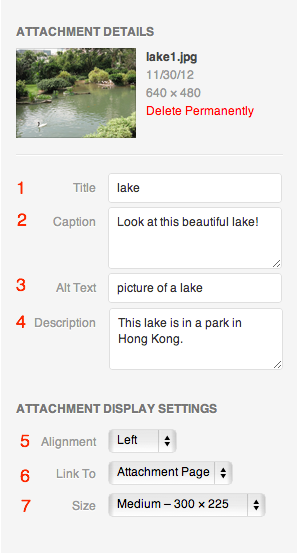
Next, make sure you are choosing the image size you want when you insert the image, see #7 in this screenshot: http://en.support.files.wordpress.com/2009/08/image-settings1.png?w=688
If you’re still having trouble, could you provide a little more detail such as whether you see the wrong sizes in the editor or the front end, if it’s happening on all posts or just one, and if you could provide a link to a post where I can see the problem happening?


- The topic ‘Photo sizes within blog’ is closed to new replies.
 WordPress.com Forums