

picture needs to appear on the left side and words to the right
-
My blog is suddenly appearing differently and I didn’t do anything. It should appear with the picture to the left and the content to the right. (as in the sample for the Bushwick theme) It is now appearing with the picture full width at the top. How do I change it back?
The blog I need help with is: (visible only to logged in users)
-
Hi there!
This is currently what I am seeing on your site:
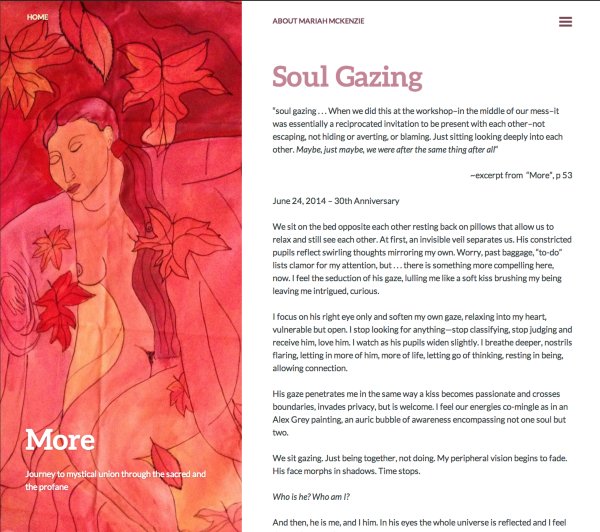
As seen the image is to the left with the text on the right. Is this what you are seeing? Let me know if you are talking about something else.
Cheers!
-
Thank you! That is exactly what I wanted. I checked for myself and that is how it appears to me now as well. Did you have to do something? Why did it appear with the picture on top yesterday?
Mariah
From: “WordPress.com Support Forums” Reply-To: Date: Tuesday, September 2, 2014 4:26 PMTo: “L. Marijke McCandless” Subject: [WordPress.com Forums] picture needs to appear on the left side and words to the right
a:hover { color: red; } a { text-decoration: none; color: #0088cc; } a.primaryactionlink:link, a.primaryactionlink:visited { background-color: #2585B2; color: #fff; } a.primaryactionlink:hover, a.primaryactionlink:active { background-color: #11729E !important; color: #fff !important; } /* @media only screen and (max-device-width: 480px) { .post { min-width: 700px !important; } } */ WordPress.com body { font-family: arial; font-size: 0.8em; } .post, .comment { background-color: white !important; line-height: 1.4em !important; }
-
Hi Mariah,
Honestly I have no clue. It may have been a browser issue of some sort. Let me know if it happens again. A screenshot would be extremely helpful in this matter. If you see it again, please take a screenshot and upload it to your Media > Library page.
Let me know if you have any questions with this!


- The topic ‘picture needs to appear on the left side and words to the right’ is closed to new replies.
 WordPress.com Forums