

picture size
-
Hi!
I have question about picture size: I would like to have bigger pictures in my blog posts, but I cant change the size. When making a blog post I choose Large picture size, but whenever I post its always in same width.
Can you please help me?
Kindly,
Ella ElersThe blog I need help with is: (visible only to logged in users)
-
Hi Ella,
Is the image itself how large you want it to be on your site? If it is, instead of large, insert it at full size as seen here:
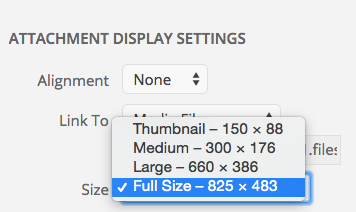
From there you can drag in the size in the text editor to your desire.
If the original size of the image is not large enough, please get a larger size of that image and upload that.
Let me know if you have any questions with this!
-
Hi,
thanks for your answer!
Yes pictures are as large as I want them to be in my computer, and I also chose full size from settings but it doesnt help. It stays in same size. I even tried to make it bigger from Image details -> Display settings -> width and height, but nope.
I also noticed that when I preview my blogpost and then I click some of my pictures, THEN new window appears and in that window picture is big enough, but not when I scroll through my blogposts. (does this make any sense? Sorry for my imperfect english)
And problem isn’t that my pictures would be too big, cause when I preview my post, there is like 12cm empty space on both sides of the picture. I would like there to be less empty space.
Or could it be that it is impossible in this “Tonal Theme” to get bigger pictures?
Would you like me to take a screenshot of my blog, or was this explanation clear enough?
Thank you so much for your help! I really love this theme, but if i cant make my pictures bigger then I need to find another platform for my blog.
Kindly,
Ella -
Edit: I would like to have all my pictures in same size than that article picture that shows before the actual blogpost, is that possible?
-
I see. So the main column width is 680 px. So obviously your images cannot go beyond that. Are you images bigger than that?
-
Yes, they are bigger than that. So is it possible to get bigger pictures than that in any way? If I upgrade my WordPress to premium or change theme, would that help?
-
You may be able to widen column if you edit CSS, but this can cause break mobile and tablet displays if you don’t add the correct media queries. So I would recommend posting this in the CSS Customization forum here:


- The topic ‘picture size’ is closed to new replies.
 WordPress.com Forums