

pictures from an extern url not showing in posts
-
pictures are not showing on my blog, specifically all pictures from http://images4-b.ravelrycache.com/uploads/snorrepot/
They’ve worked for years, until 4 hours ago.my blog is https://marvelknits.wordpress.com/
Pictures from Mediagallery that I uploaded in the wordpress editor and pictures from Flickr work fine. It’s just pictures from this source that suddenly don’t work.
the response is a
“400 Bad Request”
with the following body:
“Error 0002. The type of image you are trying to process is not allowed.”please share some thoughts how I can get these images to show again. There seems to be a rogue ampersand placed by wordpress, after the picture url. But that may be nothing. Switching it for a ? didn’t make them show.
Chrome, Firefox, add blocker, incognito modus do not make a difference. However, some of my readers do see pictures. Others do not. The ones that do are already logged in on the site that provides the pictures (ravelry.com). I’m logged in there too but here nothing shows.
apology: I tried to tag along on this forum with another member, nonmalueam, who also has pictures missing. But I realized I was distracting from his query so I opened one of my own.
The blog I need help with is: (visible only to logged in users)
-
it’s not ravelry-realtes, also pictures from sxc.hu do not show up. Anything where I add to the media gallery via url.
wordpress seems to add “srcset” to the code. I’ve never seen this. Is this the culprit?
-
-
It’s just pictures from this source that suddenly don’t work.
pictures are not showing on my blog, specifically all pictures from http://images4-b.ravelrycache.com/uploads/snorrepot/
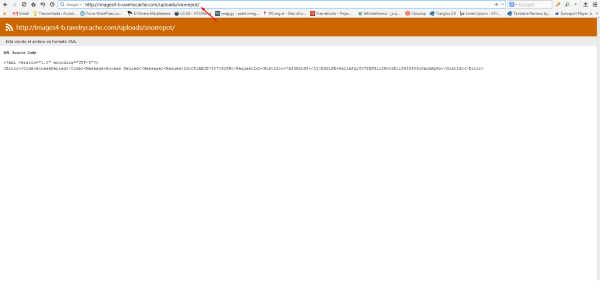
They’ve worked for years, until 4 hours ago.The probles is with that service: go to
http://images4-b.ravelrycache.com/uploads/snorrepot/
and see for yourself.Screenshot:
-
thank you but no. I omitted the rest of that url because it was for a particular picture and this concerns all pictures from that source.
the whole url is https://i1.wp.com/images4.ravelrycache.com/uploads/snorrepot/297333014/image_medium2.jpg
and shows no problem with that service. -
I omitted the rest of that url because it was for a particular picture and this concerns all pictures from that source.
Ok.
I tagged this thread (with the modlook tag) for Staff assistance. Be patient while waiting. -
thank you. One other tidbit:
we are using retina/hidpi screen. Friends who still see pictures probably not.
is related to srcset?
waiting patiently (and knitting)
-
Related thread in the support forum with more infos and video link:
https://en.forums.wordpress.com/topic/problem-with-photobucket-images
There are other WP.com blogs affected as well. In my blog there are more than 4,000 postings disturbed right now. Huge damage!
-
Hi there. In your own interest, not to publish messages until a staff member comes. They respond in order and each time you publish a post, the thread is moved up.
-
yes! I see pictures!
wordpress added a questionmark in the srcset code, it was missing before (it was an &)
THANK YOU :)
-
-
Apologies for the recent issues with images.
Some code changes were made on April 15th and 17th to help responsive images in mobile and high-resolution displays. Some unintended errors occurred, but the code was removed for further testing on April 17th.


- The topic ‘pictures from an extern url not showing in posts’ is closed to new replies.
 WordPress.com Forums
