

Pictures in post getting jumbled; Post page going from small to large (Scrolling
-
Firstly, I’m having trouble with aligning pictures in my post. I get them where I want, I preview the post, and when I return, they are all jumbled up and it is a paint to get them aligned right again (or I have to delete them and replace them in the draft.)
Secondly, as I work, the screen will go blank and I have to scroll all the way to the bottom of the page to get to my draft. It’s like I click on something, and than the page gets bigger all of a sudden for no reason. (From scrolling up and down with minimal space to scrolling down a LONG page).The blog I need help with is: (visible only to logged in users)
-
Hi there,
I’m sorry about that – that sounds really annoying. Sometimes the experience with working on WordPress.com can vary by browser. We highly recommend users use Firefox or Google Chrome over Internet Explorer. It’s more stable on those two browsers.
Also, can you try clearing out your cache and cookies using the guide below?
In addition, please make sure your browsers are updated to the latest version:
As for the images, I do see that your images looked pretty unaligned here:
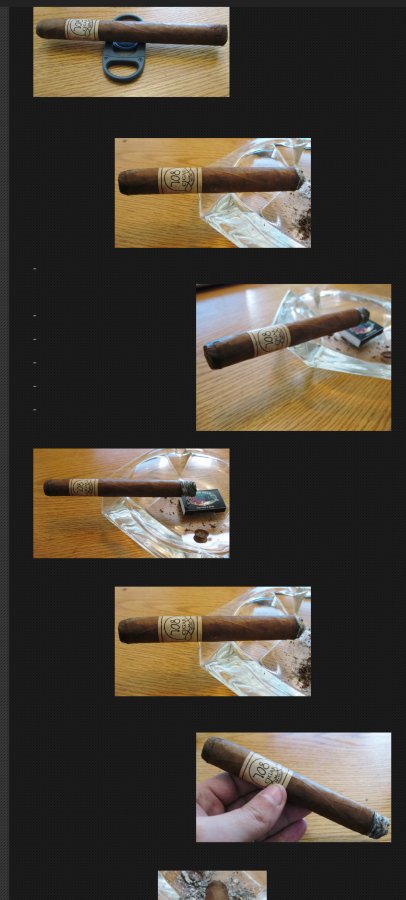
Can you give me an idea of what you are looking for? Do you want them all in a straight line down in the middle, left, right? If you can clarify what you are looking for, I can see what I can do. Please also take a look at this guide about aligning images:
Thanks!
-
I just want to be able to organize them the way I want without them resetting to a default jumble after I preview the post.
I try to keep one centered picture at the top and one left or centered picture at the bottom, and the remainder alternate. -
I’m a bit confused as to exactly what you want. With image alignment, it’s best to show me exactly what you want as it can get a bit complicated with the editor.
Can you provide me a screenshot of how you want it (I guess what it looks like before you preview it) and upload it to the Media > Library page?
Sorry for the inconvenience!
-
I’ll just align them one way down, since it’s so complicated. Starting to wonder if I should’ve stayed on Blogger. I came to WordPress to be able to use the PaidAds program and my new domain (not realizing I had to pay ANOTHER fee just to use it on WordPress) and I STILL haven’t gotten a response to that.
-
Please note that domain registration and hosting are separate. Since your domain is registered elsewhere, you can map it to our WordPress.com site for $13/year (hosting) – which you have done.
You can find more about the difference between domain registration and hosting here:
Feel free to reach out if you have any questions!


- The topic ‘Pictures in post getting jumbled; Post page going from small to large (Scrolling’ is closed to new replies.
 WordPress.com Forums