

Pinterest Widget
-
I want to create a page on my blog with a widget of a board from my pinterest profile. No matter what I do though, either my code appears on the page, or nothing does. I followed the instructions given, which is simply to add a link to the board to the page and then unlink it. I’ve even used the “build a board widget” tool available at pinterest, but to no avail. It’s supposed to display the 30 latest pins from that board. I must be missing something. The code it gives me to use is the following:
<!– Please call pinit.js only once per page –>
<script type=”text/javascript” async defer src=”//assets.pinterest.com/js/pinit.js”></script> -
The first half of the code isn’t appear in the op, but I DEFINITELY posted the full code there. Weird…
-
From the Code support page,
Users are not allowed to post JavaScript on WordPress.com blogs. JavaScript can be used for malicious purposes. As an example, JavaScript has taken sites such as MySpace.com and LiveJournal offline in the past. The security of all WordPress.com blogs is a top priority for us, and until we can guarantee scripting languages will not be harmful, they will not be permitted.
JavaScript from trusted partners, such as YouTube and Google Video, is converted into a WordPress shortcode when a post is saved.
-
Added information
The follow the Pinterest Site Verification instructions provided in the support docs which are all at http://support.wordpress.com
Go to http://en.support.wordpress.com/webmaster-tools/#pinterest-site-verificationGo to Dashboard > Sharing please and use this guide http://en.support.wordpress.com/sharing/#customize-your-services to enable a sharing icon so it will display under each post.
See also http://en.support.wordpress.com/embed-from-pinterest/
-
Your last link is the guide I was using to embed one of my boards into a new page on my blog. If it embeds the board into the page, why does nothing appear when I preview the page? I don’t understand. I would be beyond ecstatic if I could embed a board from my pinterest into a page on my blog.
I verified the site, which I didn’t understand how to do before. Thanks! But what does that do?
-
What is the website address of the blog? Is it a WordPress.com site?
-
As you should be able to see above, it is. Is that another distinction between .com and .org? So many technicalities…
-
Yes, it is actually. You might be surprised at the percentage of folks that come to the wrong forum. :)
-
If it embeds the board into the page, why does nothing appear when I preview the page?
Have you tried publishing the page before viewing? Just an idea.
-
The fact there is a .com and a .org is very confusing. When I try to log in, I don’t know which one to go to. I’ll try publishing it to see what happens, thanks!
-
-
This is the result. I did what it says to do and nothing appears.
Really?
Screenshot: https://cloudup.com/cbwyAkDYaES -
-
-
-
I tagged this thread for Staff assistance. Please subscribe to it so you are notified when they respond. To subscribe look in the sidebar of this thread, find the subscribe to topics link and click it.
-
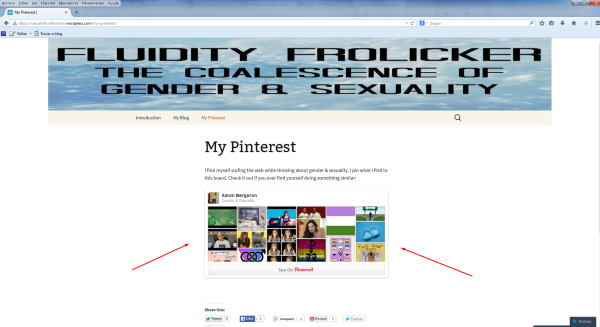
You are correct. It doesn’t appear in firefox, but it does in google chrome.
What version?
Screenshot with the lastest version of Mozilla Firefox (35.0):
-
It looks like the Pinterest widget is appearing on my side in Firefox 35.0 as well. Could you try resetting Firefox to see if that helps?
https://support.mozilla.org/en-US/kb/reset-firefox-easily-fix-most-problems
Please be aware this will reset the following items:
Extensions and themes, website permissions, modified preferences, added search engines, download history, DOM storage, security settings, download actions, plugin settings, toolbar customizations, user styles and social features will be removed.


- The topic ‘Pinterest Widget’ is closed to new replies.
 WordPress.com Forums