

Pique and the weird header / logo size issue
-
I’ve made a huge logo (3800 pixels across), and when I load it into Pique as my site logo, it’s tiny. Downright embarrassing.
On the static welcome page, on which I have four panels which scroll upward (that took hours to master) the site logo has no background header image- even when I had a background header image assigned.
Then when a visitor made it to a blog post, the background header image image was HUGE, and the logo was still small. So I deleted the header image which leaves _nothing_ behind my logo, which is also weird.
I see no way to make the logo bigger, which it so desperately needs to be.
I know the blog page (What’s New) has no images- the posts are dummy posts to get more info later.
The mobile version is a mess.
But I won’t get into that, I just want the logo bigger.The blog I need help with is: (visible only to logged in users)
-
I am not familar with the Pique service so I am not sure if its automatically happening but upon reviewing your source I see the issue:
<img src="https://friscostudios.files.wordpress.com/2016/11/friscostudiologoperspectiveclear.png?w=310" class="site-logo attachment-pique-logo" alt="Frisco Studios Logo" data-size="pique-logo" srcset="https://friscostudios.files.wordpress.com/2016/11/friscostudiologoperspectiveclear.png?w=310 310w, https://friscostudios.files.wordpress.com/2016/11/friscostudiologoperspectiveclear.png?w=620 620w, https://friscostudios.files.wordpress.com/2016/11/friscostudiologoperspectiveclear.png?w=150 150w, https://friscostudios.files.wordpress.com/2016/11/friscostudiologoperspectiveclear.png?w=300 300w" sizes="(max-width: 310px) 100vw, 310px" height="200" width="310">Your full image is being shrunk by two factors:
First the img tag is linking to:
https://friscostudios.files.wordpress.com/2016/11/friscostudiologoperspectiveclear.png?w=310
instead of …
https://friscostudios.files.wordpress.com/2016/11/friscostudiologoperspectiveclear.png
… which tells that server to only send a 310px wide version. The second issue is within the img tag itself having the max-width of 310px and width set as 310. This might be intentional by the service or theme and if so your best direction for correcting it will be a self-hosted version of WordPress where you have more control over the code.To add though 3806 wide images are usually overkill. I assume your intention is 4k resolution compatibility and if it comes down to using a self-hosted version of WordPress I would suggest using a plugin such as WP Smush to shrink the image to various sizes. From there you could use CSS Media Queries to deliver various sizes based on the users resolution and save quite a bit of bandwidth and page load speed.
-
Yea, I can make the images smaller, if it is indeed maintaining the original and then resizing it to just 300 pixels across for display.
I didn’t see any note in the theme that describes logo size guidelines.
-
To add, you will notice the code above links to a srcset with various URL’s for different sizes. I overlooked this atfirst For me atleast its defaulting to the 310px version. The src attribute would normally be ignored so now I wonder if the added html of width=”310″ is forcing it to always detect that specific resolution… If you have access to manually modify the code you might try removing both the width= and height= from the html markup. Read more about it here:
https://developer.mozilla.org/en-US/docs/Web/HTML/Element/img -
I played around with your code a bit. I found the best solution was just to use 100vw for all the sizes. If you have the ability to manually edit code you can try the code in this example:
-
Thanks I appreciate that.
Right now it’s the free version, but I can upgrade to get the ability to modify the code, right? -
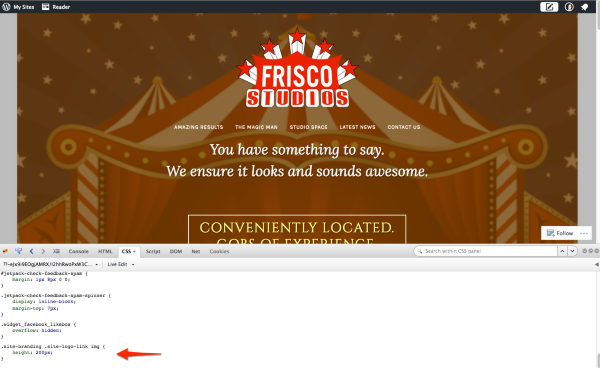
ieba – with Custom CSS — available with the Premium or Business plans — you would be able to add the following CSS to the Customizer’s CSS panel, to increase the logo size:
.site-branding .site-logo-link img {
    height: 200px;
}
I tested this in my browser inspector – here’s a preview of what it would look like:
strykerraven – WordPress.com users cannot edit their theme files directly, so it’s not possible to add this type of code, whether on a free or paid plan. You can learn here about the differences between WordPress.com and self-hosted (WordPress.org) sites:
-
That would certainly help. I did, finally, notice a tiny note at the bottom of the Pique theme “how to” page that says the logo image is limited to 100 px.
Damm that’s tiny. But now it explains what I’m seeing.
Your revision at just 200px does look remarkably better. :)
Thank you for helping me visualize that. -
-
Since I can’t jigger with the logo size I went the other route- and created a 200 Pix tall banner which works beautifully for both the header and footer everywhere EXCEPT the Home page with panels.
If I leave the logo in place, it appears on top the header image (which also has the logo) on every other page. Ugh. Not working.
If I take the logo away, there’s no header image on the static home page. So no logo at all. Ugh. Not working.
When I add the header image to the body of the Home Page (i.e. the top panel) the space between the menu and the first item more than doubles.
i.e. if it’s text, it’s half the distance to the menu bar on the page.
If it’s the header image dropped in as the first item on the page, that distance doubles, so there’s this huge gap. Ugh. Not working.I think the best solution would be to have the header image over top of the menu bar on every page, but I simply cannot figure out how to do that on the paneled home page.
Any ideas?
-
You’ll need custom CSS to do that type of positioning. If you decide to upgrade to a plan that includes custom CSS, feel free to post over in the CSS Customization forum.
-
Well, I actually don’t want positioning,
I’d just like the home page to work like the rest of the pages – with the header image over the menu. -
I understand, but that’s not how Pique is designed. You would need to add some CSS in order to move the header image.
-
I don’t want to move it. Right now it’s in the wrong place because it’s in the text body of the main page.
I actually want it to be the header, like on every other page. But for some reason the header image does not appear as the header image on the main page.
-
Right. Pique does not display the custom header at the top of the multi-panel front page, as you can see on the demo.
https://piquedemo.wordpress.com/
https://piquedemo.wordpress.com/a-parent-page/That isn’t something that can be changed.
-
Thanks. I appreciate your patience with me as I try and launch this new endeavour.
When it starts to make some money… website upgrades are in order. But I think I’ve tweaked it to be as workable as I can get it at this time.Main page, take the logo and make it a Featured Image so it’s the background. It’s finally bigger. ;;-)
Use the header with the logo on the other pages.
The contact page has a map as the Featured Image.
Studio Stats will substitute for a second panel page by utilizing a gallery of images on the page. Each image will have a caption describing the particular feature or statistics.
When we start to grow, upgrade to Premium and use CSS to give me a bigger logo so it’s consistent across all pages.
Only feature I don’t like is the almost invisible “(more…)” links on the What’s New (blog) page.
-
Glad you’ve gotten things to a workable state.
If you want to display the full post instead of excerpts on the blog page, you can select “Full Post” in the Customizer’s Content Options panel.
I’m going to close this thread and mark it as resolved since it’s already very long, but do feel free to start a new one if you need help with anything else.


- The topic ‘Pique and the weird header / logo size issue’ is closed to new replies.
 WordPress.com Forums