

Please help! Flickr photos appear as thumbnails in my WordPress blog
-
Hello! I have a problem, I have a wordpress-blog and a Flickr account with photos. When I try to add photos from Flickr url, the photos appear as THUMBNAILS in my wordpress blog! I need to have medium size photos there (640 pxls), how can I do that? Please help!!
The blog I need help with is: (visible only to logged in users)
-
Please give us a link to one post displaying this error and also give us the exact URL of the Flickr image you are using.
-
Hello, thank you so much for your quick reply! The first picture here displays the error: https://espanjaan.wordpress.com/ (Gambas al Ajillo photo). The photo can be found in Flickr: https://www.flickr.com/photos/129288027@N03/16473756645/
What I do is I add the photo from URL: http://screencast.com/t/f6caCVCR
I just don´t understand how to add them as medium size photos, not thumbnails. I have tried to look for an answer for hours… Getting desperate. -
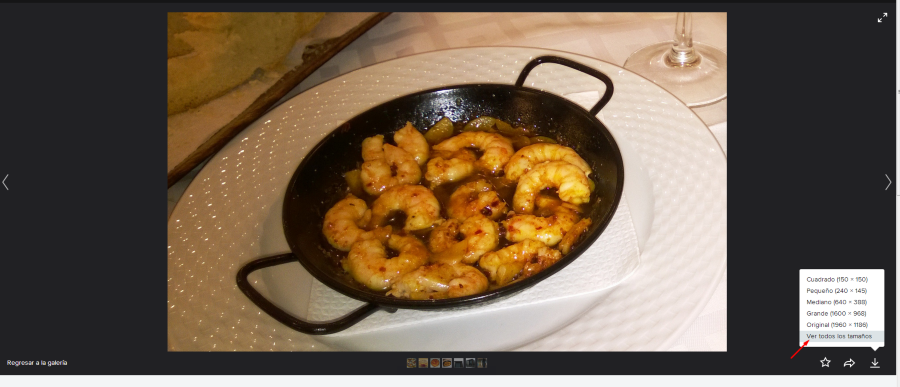
Don’t use that URL. Click to see ALL SIZES and then use the exact URL for whatever size you want, eg say you want the one 640px wide, you click to that page, get the exact image URL https://farm9.staticflickr.com/8591/16473756645_c5da0871bd_z.jpg and put taht in.
-
But how do I click to see ALL SIZES? All I see is this info: http://screencast.com/t/rY8SdJM0isEY
-
But how do I click to see ALL SIZES? All I see is this info: http://screencast.com/t/rY8SdJM0isEY
Clic on the arrow:
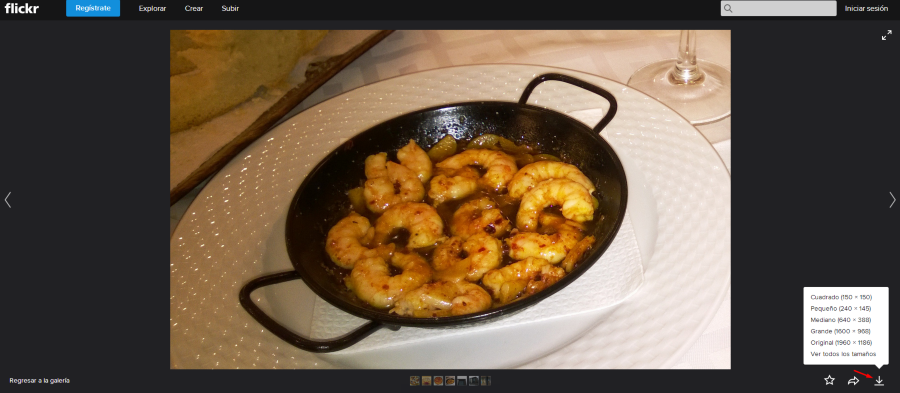
-
-
Ok, I got to this point: http://screencast.com/t/7BkPo5gmMfnR. Where can I find the url of the photo? Graciassss! ;)
-
-
-
Where can I find the url of the photo? Graciassss! ;)
Put your cursor right on the image and right click. Then Copy Image Link should do it.
As RC said, the URL is:
https://farm9.staticflickr.com/8591/16473756645_c5da0871bd_b.jpgYou’re welcome!/De nada! :)
-
You’re welcome! Flickr probably only gives you the URL for the thumbnail so they save on bandwidth. But this workaround works.
-


- The topic ‘Please help! Flickr photos appear as thumbnails in my WordPress blog’ is closed to new replies.


 WordPress.com Forums

