Point a WordPress.com Domain to GoDaddy
-
I see the instructions on the page: https://en.support.wordpress.com/change-name-servers/point-a-wordpress-com-domain-to-godaddy/
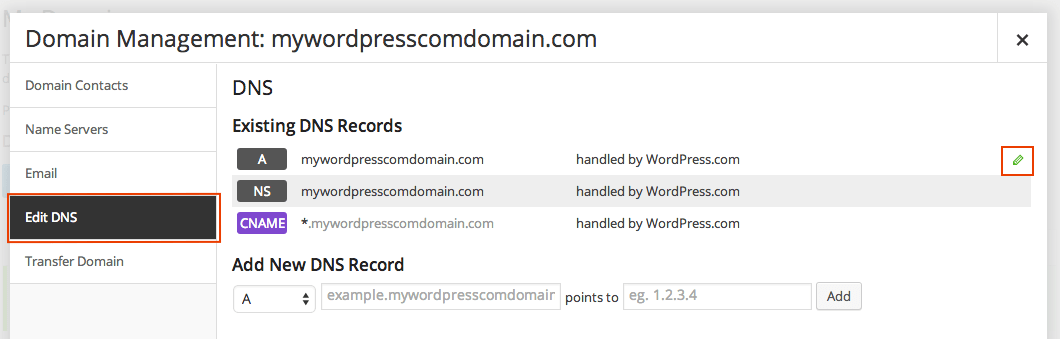
However, the screens in my client’s account do not give an option to edit the A record as shown in this step’s screenshot: https://i0.wp.com/en.support.files.wordpress.com/2014/05/godaddy-wpcom-edit-a-record.png
In fact, the WordPress.com screenshot looks nothing like what I see in his WordPress.com domain settings page. Is it possible that the platform changed after those instructions were written – I need an update to how to edit the A record. Or am I just adding new A and CNAME records for Godaddy?
-
Staff need to know:
What is the URL of the underlying wordpress.com site?
Which username account registered it and purchased the upgrade for it?
What is the domain URL?Post that information and then type modlook into the sidebar tags on this thread for Staff help. How do I get a Moderator/Staff reply for my question? https://en.support.wordpress.com/getting-help-in-the-forums/#how-do-i-get-a-moderatorstaff-reply-for-my-question Please subscribe to this thread so you are notified when they respond and be patient while waiting. To subscribe look in the sidebar of this thread, find the subscribe to topics link and click it.
-
I think this issue is simpler than my needing to reveal my client’s url. So I am going to attach some blurred out screenshots of how the WordPress.com support screenshot does not match the screen of the DNS area.
WP Support’s Domain management screenshot:
https://i0.wp.com/en.support.files.wordpress.com/2014/05/screen-shot-2015-01-31-at-9-41-42-a.pngvs.
My client’s Domain management screenshot: http://s241849985.onlinehome.us/screen1.jpg
They don’t match – although the instructions say “8) If it is set to use custom name servers, select “Use WordPress.com name servers” and save your changes.” – and clearly we have it toggled correctly to use the WordPress.com nameservers – so I assume this is the equivalent…
But when I get to step 9/10….
—————————————
Support DNS screenshot:
https://i0.wp.com/en.support.files.wordpress.com/2014/05/godaddy-wpcom-edit-a-record.pngvs.
My client’s setting screenshot:
http://s241849985.onlinehome.us/screen2.jpgThere is no “EDIT DNS” button as the WP step suggests, although I see an arrow to get to the settings. And there is no “edit icon” for the step “10) Click on the edit icon for the A record item.”
——————————–So back to my original question on a premium WP account where we want to keep the MX records with WordPress.com and Google App, but move the hosting(and create a WordPress site) over to Godaddy. I just want to know if someone can point me in the right direction as to the steps taken to match our blueish Domain management screens so we can just follow the instructions without any private support. We are not even ready with the Godaddy site yet, just gathering the how-to. Godaddy says we just need to change the A and cname record and I know what to change them to, but my question is about how to edit or is it just adding new A and cname records.
And by the way, if he keeps the domain and email with WordPress.com and Google App, while moving the hosting to Godaddy, what is that cost in general? This should be just a simple pricing answer that the public can know.
Thanks.
-
This is very difficult to sort out without being able to speak in specifics.
I have sent you an email to the address associated with your WordPress.com account. Please let me know if you do not receive it.


- The topic ‘Point a WordPress.com Domain to GoDaddy’ is closed to new replies.
 WordPress.com Forums