

Port Theme Help
-
I’m having trouble finding useful information on the forum and the set up page for Port theme isn’t answering all of my questions either. I have some very specific questions I would like some help with.
Thanks
AmyThe blog I need help with is: (visible only to logged in users)
-
Hi Amy!
Here to help. What questions do you have?
Port can be customized in a bunch of different ways, so if you know what you want the “end result” to be, I can help get you there. :)
-Alex G.
-
There are a lot of specifics I need help on. I don’t know if it would be best to ask on the forum. For example, my featured content page isn’t even showing up and I want that to be “our services.”
-
You can ask any questions you like here, or in the Port forum. :) In the Port forum other WordPress.com members may respond in addition to staff members, but usually the folks in theme-specific forums have gone through any struggles you’re going through too, so it can be helpful.
But I’ll do my best for any questions while you’re here!
So it sounds like you want an Our Services section like it appears on the demo. (Example)
- Add a new Page for each service here
- For each page, include a Title, Featured Image, and Excerpt (How Port uses these)
- In the theme demo, they would have three pages, one for Photography, one for Web Design, one for Motion, but you can use more or less.
- While making the pages, add the tag “featured” (without quotes) to each one
- After publishing all those pages, open your blog’s customizer
- Type in “featured” in the featured content options (example)
- Under the “Homepage” options, adjust Featured Content title, description, number of items, and background image (Example)
- Save your Customizer
-
I have 5 services I would like to showcase; however, it is only allowing me to display them in increments of 3. Is there a way you can go in and put the services in a row with 3 on top and 2 on bottom? Also, how do I add a little picture and description under each service like you described? There doesnt seem to be a correct place to set a ft. image, excerpt, title, etc.
Thanks!
-
In the Homepage settings of your Customizer, set the option to display 6 items, then create your five pages. By default it appears Port puts them 3 on top and 2 on bottom:
Quick Example I made on a test site
Let me know when you have that bit done, and I can give you some CSS to center up the bottom two services instead of left-aligning them if you prefer. :)
Also, how do I add a little picture and description under each service like you described? There doesnt seem to be a correct place to set a ft. image, excerpt, title, etc.
Maybe your editor does not have those modules activated. Click on the “Screen Options” tab in the top right, and then make sure “Featured Image” and “Excerpt” are checked:
Then the Excerpt and Featured Image will be available:
It’s also worth noting that usually Pages do not have excerpts or tags, only Posts have excerpts and tags as an option. But it’s a special thing for the Port theme.
-
Okay, can you help me now? I updated excerpts and pictures (although I need to adjust the sizes of the pictures so they are all the same…don’t know how to do that..) When I “view site” it also looks like the “Our Services” heading disappeared. I would still like that!! And I need the CSS for centering the boxes. Thanks so much for the help! Can you go in and see my site so you can understand what Im talking about ?
-
Not sure exactly what was happening with the “Our Services” heading. I saw that it was appearing in the Customizer but not on the live site. So I removed it (in the Customizer) and added it back, then published the Customizer again.
Seems to be up again now. :)
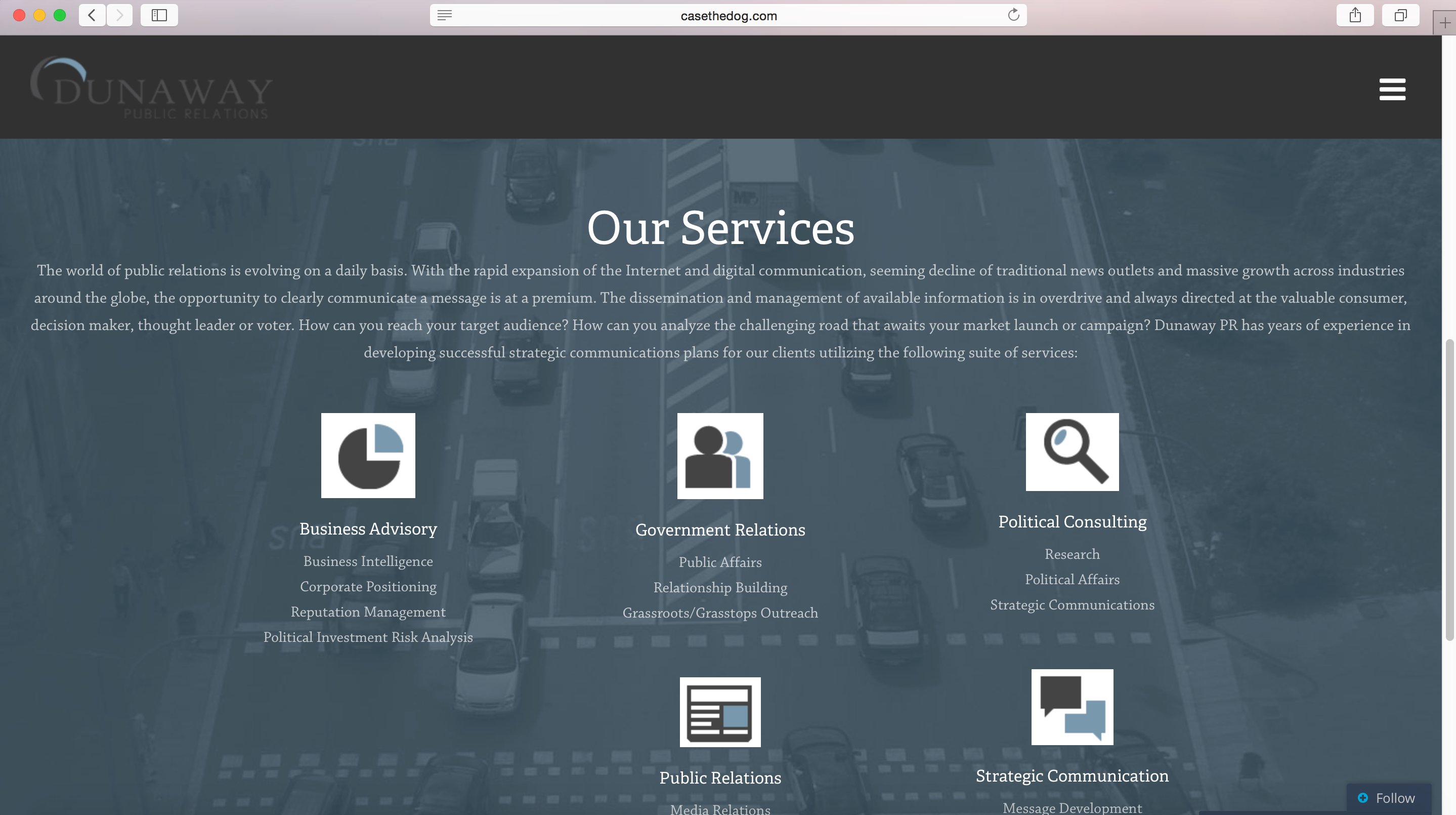
Try out this CSS to center up those two bottom items:
@media screen and (min-width:480px){
		     div.clearfix>div.post-327 , div.clearfix>div.post-329{
          		left: -15% !important;
	     }
}
You can play with that “-15%” number, move it up and down, if you’d like to make slight adjustments. Even use decimal points if you’d like.
This uses a @media query to only take effect on screens larger than 480pixels wide. Chose this because Port pushes everything into a single column on small screens for visibility. :)
-
-
Copy and pasting worked! How do I change font sizes so I can make some of the services bigger fonts and then the description below smaller font?
-
Sorry for the confusion! Yup, with any CSS code I give you, just copy+paste the whole thing into the text editor of the “CSS” tab in your customizer:
Font sizes are controlled in a couple of different ways. We can do the nitty-gritty specifics with CSS, but before we do that it’s good to make sure your Font setting in the customizer is as close to what you want as possible. So I can give you the CSS, but first open up your Customizer check out the Fonts tab:
(example)
Adjust those numbers next to “Headings” and “Body Text” until they’re as close to what you’d like as possible. They affect a bunch of different places. After those are set, we can use CSS to affect only specific places where adjustments are needed.
Let me know when you’re ready. :)


- The topic ‘Port Theme Help’ is closed to new replies.
 WordPress.com Forums