

Portfolio display option not enabled?
-
Espied theme is not displaying portfolio option properly. I can’t seem to be able to have the 12 projects show up in the main page. Instead, the page is only showing four per row and making a very short website. It’s very frustrating.
Their basic theme should allow me to see all the projects on the same page. Any ideas as how to fix it? or what you think I might be doing wrong?
The blog I need help with is: (visible only to logged in users)
-
The relevant theme description link is http://theme.wordpress.com/themes/espied/
The relevant support doc links are
http://en.support.wordpress.com/portfolios/
http://en.support.wordpress.com/portfolios/portfolio-shortcode/I’ll tag this thread for a Themes Staff response. Please subscribe to the thread so you are notified when they respond and please be patient while waiting.
-
@gatinela-
Hi there!
After looking into your account, I found that you set your portfolio to only show 4 projects as seen here:
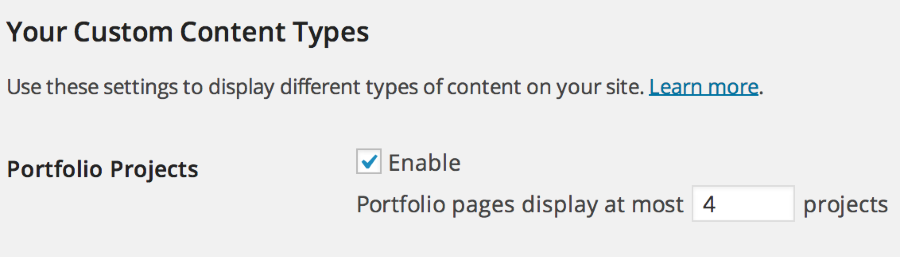
You can increase this number by going to Settings > Writing in your Dashboard. It will be at the bottom of the page.
Take a look at the link @timethief provided you above! All the information will be there as well.
Let me know if you have any questions with this!
-
Thanking so much for your help in such a timely manner! I had completely forgotten about that setting. :)
-


- The topic ‘Portfolio display option not enabled?’ is closed to new replies.
 WordPress.com Forums