

Portifolio (Dara theme)
-
Hello….
I am having issues with getting my projects (which I added under Portfolio/Add) to show under the Portfolio page I created.In the editor, they all show up when I click Portifolio….but they are not appearing anywhere on my website. I would like them to appear on my Portfolio page I created.
Any idea on how to do this?Gosh, it would be great if there was a manual for these sites! Maybe there is…????
The blog I need help with is: (visible only to logged in users)
-
Hi,
In the editor, they all show up when I click Portifolio….but they are not appearing anywhere on my website.
Here is your portfolio page: https://designstudio3ca.wordpress.com/portifolio/.
The Dara theme may not have portfolio projects enabled by default, or you may have disabled the feature at some point. The Portfolios support page says:
If your theme doesn’t have the Portfolio feature active by default, you can turn it on by going to the WP Admin dashboard at Settings → Writing → Custom Content Types and making sure the “Portfolio Projects” option is enabled. When you’re done, save your changes.
Portfolio projects can also be enabled, and the number of projects per page set, at the Calypso (My Sites) interface Writing Settings page. See also the Writing Settings support page.
On the other hand, you wouldn’t have been able to create portfolio projects on the site unless they had been enabled at either of the two locations mentioned above. How did you create the projects? Are they static pages? Can you provide the URL of one?
-
Here is your portfolio page: https://designstudio3ca.wordpress.com/portifolio/.
Correction:
Here is your portfolio page: https://designstudio3ca.wordpress.com/portfolio/.
The other page, “Portifolio,” is a static page with no content. The custom menu item “Portifolio” is linked to the empty static page, not the portfolio. -
The URL of the portfolio page, with the extension “portfolio” added to the website URL, is generated automatically and cannot be changed. It isn’t a static page and therefore has no page editor.
-
However, you may insert Portfolio Shortcode into a page, a post, a widget, etc., in order to display portfolio projects somewhere other than on the portfolio page.
-
There’s a misspelling in your Portfolio page, you have
https://designstudio3ca.wordpress.com/portifolio/…but there’s an extra “i” in the slug.
Your portfolio page is automatically generated, and is here:
https://designstudio3ca.wordpress.com/portfolio/
Alternatively, you could add the shortcode to your existing page, as musicdoc1 suggested above.
-
Thank you. I should have pointed out the extra “i.” After all that’s what I missed in my first post here. : )
-
Thanks all! Looks like the Portfolio is enabled feature. I added my projects in the WP Admin under “Portfolio – Add”.
Here is a link to one of the projects:
https://wordpress.com/edit/jetpackportfolio/designstudio3ca.wordpress.com/248
I can delete the static portfolio page. So then my question is – how do i get my Portfolio to show in the top menu (and when clicked – my projects come up)?
I have no idea what Shortcode is…..????
Thanks for all the messages!! I really appreciate it.
Roxanne
-
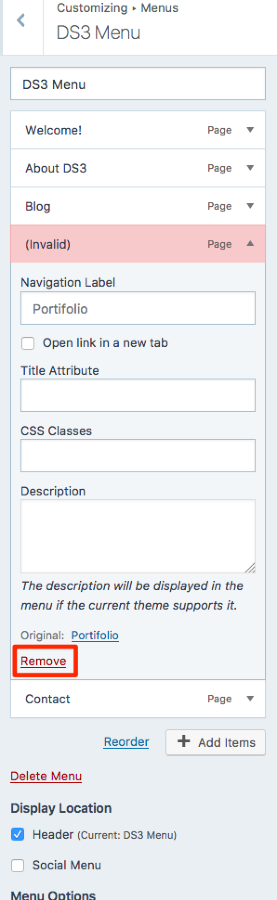
First, remove the current Portfolio page from your custom menu, as it’s showing as invalid:
Have look here to understand how to use the portfolio shortcode:
If you want to use the shortcode, you can:
- Create a new page
- Add the basic shortcode in the page editor
[portfolio] - Publish the page
- Add a link to the new page in your menu editor, if it does not automatically appear. Your custom menu is set to automatically add new page links, so you might be able to skip this step.
-
I can delete the static portfolio page. So then my question is – how do i get my Portfolio to show in the top menu (and when clicked – my projects come up)?
Portfolio shortcode is an option that gives you freedom as to where the portfolio appears, but it isn’t at all necessary to use portfolio shortcode in order to include a link the portfolio in your custom menu.
Here is your portfolio page: https://designstudio3ca.wordpress.com/portfolio/. You may add a link to it to the custom menu as described in the Add menu items section of the Custom Menus support page, choosing the Custom Link type.
-
-
-
-
-
It is certainly coming together.
Now. I want to feature my portfolio on my front page (next to About DS3). But the drop down menu (in theme options) does not include this portfolio page. How do i bring it into that menu?
-
I want to feature my portfolio on my front page (next to About DS3).
As you’ve noted, the pool of pages that may be drawn from and assigned to the front page featured pages that you refer doesn’t include the portfolio. It includes only static pages and the blog page.
How do i bring it into that menu?
One option would be to include portfolio shortcode in a static page. Then that page may be set as one of front page featured pages.
-
Alternatively, you might want to consider switching to one of the WordPress.com “Portfolio Themes.” These are themes that “have been designed specifically with the Portfolio content type in mind.” Most of them have an optional portfolio page template that may be assigned to a static front page.
-
One option would be to include portfolio shortcode in a static page. Then that page may be set as one of front page featured pages.
Correction:
Doing as I’ve described here would not result in the portfolio being displayed on the static front page. It would only display links (featured image and title), representing one of the three featured pages on the front page, to a static page that has the portfolio inserted into it. Also, wouldn’t “bring it into that menu” as you’ve said. I’m not sure what you mean by that. You could create another custom menu item linked to the static page that includes the portfolio, perhaps replacing the menu item presently linked directly to the portfolio.I want to feature my portfolio on my front page (next to About DS3).
A simpler option would be the following:
Insert portfolio shortcode into the static front page content. With the Dara theme applied, the content of the static front page will appear just below the featured image (or featured content slider), and just above the three front page featured pages.
-
One other quick question….how do i find out what the UrL of a page is.
I’m trying to create a custom link for my blogs on the “The Lake Effect” page (similar to what I did with the portfolio). I tried using the URL for the portfolio and substituting “posts”, but it did not work.
???
-
If you point at any item in your menu, or at a page or post title, the URL will appear at the bottom of the screen (bottom left on a desktop PC such as the one I’m presently using).
On a Firefox browser you may copy the URL of any such link by right clicking and choosing the “Copy Link Location” option from the menu that appears. On Google Chrome the corresponding option would be “Copy link address.” Other browsers presumably have a similar tool for copying a link. Copied links may be pasted wherever you want to paste them.
Post URLs may also be seen by pointing at the View icon under each post at My Site(s) > Blog Posts, and then copied and pasted as described above.
I’m trying to create a custom link for my blogs on the “The Lake Effect” page
On your blog page, “The Lake Effect,” point at a post title to display the URL at the bottom of the screen. Copy the link as described above.
You will also find the URL in the URL or address bar, which on most browsers typically appears at the top of the screen on each post or page. An URL can be copied from an URL bar, on Firefox and Google Chrome, by right clicking and choosing the copy option.


- The topic ‘Portifolio (Dara theme)’ is closed to new replies.
 WordPress.com Forums