

Possible to change the Edin Theme menu button?
-
I’m using the Edin Theme, and I don’t like the way the menu button appears in the corner, or what it looks like when you click on it. Is there anyway to insert code into the css to override the theme and show the contents of the menu as individual buttons on the home page instead?
The blog I need help with is: (visible only to logged in users)
-
Go into your Customizer‘s Theme Options panel and select the “Classic” menu style, then click Save.
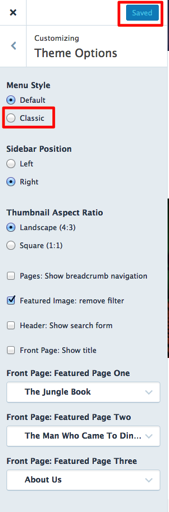
That’ll give you a more traditional menu – let me know if this achieves what you’re after.


- The topic ‘Possible to change the Edin Theme menu button?’ is closed to new replies.
 WordPress.com Forums