

Post Format Disabled
-
Although my blog has Post Formats enabled (Spun), I do no see this (http://en.support.files.wordpress.com/2010/12/new-post.png?w=688&h=280) screen in new editor. Nor can I change the Post Format in the old editor. It automatically defaults to Standard, even though I’ve changed default to Link.
I can’t get any of my blogs to let me post anything other than standard, even though I toggle the other post formats.
Please help!
The blog I need help with is: (visible only to logged in users)
-
I should add, that I’ve tried other themes that have Post Format enabled, and still nothing works. Is it my account?
-
Hi there!
We’ve updated the editor, so you’ll no longer find that screen. However, you’ll find the post format setting listed under the Advanced Settings drop down.
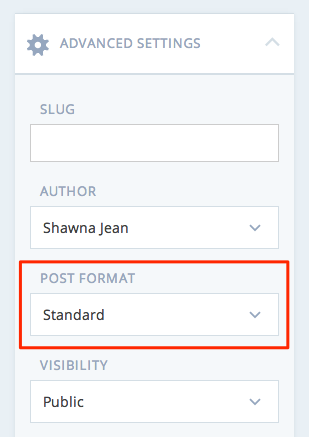
Let me know if I can help further!
-
-
Do you mean that when you select a post format from that drop down your post still appears as a standard format post on your site? Or are you unable to open the menu itself?
Can you tell me what type of post you’re trying to create and what’s happening so I can try to recreate the issue?
-
When I select a different post type, it just shows up as standard.
I’m trying to create a link post.
Is this what is supposed to happen when I try that?
I selected ‘Link’ nothing changed, and just copied the url into the text box. I thought it would autodirect to the link, not open a new page on the WordPress site.
Am I misunderstanding how Link posts work?
-
Thanks for the info! Technically that is a link-style post. Every theme does something a little different with these post formats, but usually it involves the format of the post. Here are the different formats Spun does:
Different themes deal with these formats differently. For instance, I’m pretty sure the theme Motif does what you were thinking off. If you click on the title of the post It takes you to the link in the content rather than the specific WordPress.com post.
Hope this clarifies things. Let me know if you have more questions!
-
-
I did some digging through our theme showcase and here are a few that I found:
- Pictorico – Check out the demo. The post with the picture of the trees titles ‘Ornate’ is a link style post. When you mouse over it on the desktop site, you can click on the image and be directed to the WordPress.com post, or you can click on the title itself and be taken directly to the link.
- Gallery
- Gridiculous Pro
- Poly
Hope this helps! Let me know if you have any other questions! :)


- The topic ‘Post Format Disabled’ is closed to new replies.


 WordPress.com Forums
