

Post Order
-
How do I arrange my post order. The months are out of order, and I want my posts to show up by the date I posted them! My posts from August are showing up before my posts from September.
Thanks!
The blog I need help with is: (visible only to logged in users)
-
The default timezone is UTC time. You can reset your timezone here > Settings > General Select the closest city to you in the same timezone in the drop-down menu you see there and then click “save changes”.
If that does not resolve the issue then edit each post and make sure none are marked as sticky posts.
http://en.support.wordpress.com/posts/edit-posts-screen
http://en.support.wordpress.com/posts/post-visibility/#sticky-posts -
Neither of these two things worked… It’s not set as a sticky. And I changed it to my location’s time… Still has all my August posts before my september posts…
-
I’m sorry that’s still happening. I tagged this thread for Staff assistance. Please subscribe to it so you are notified when they respond. To subscribe:
1. Look in the sidebar of this thread and find the subscribe to topics link.
2. Look below the comment box:
_ Notify me of followup posts via e-mail -
-
I just visited your site and I’m not seeing your posts out of order. Is there a different page that you’re seeing this happen on?
-
It’s on my main page. My first 2 posts are in order but then it goes and puts all of my August Posts before my September posts.
-
Hi Nichole,
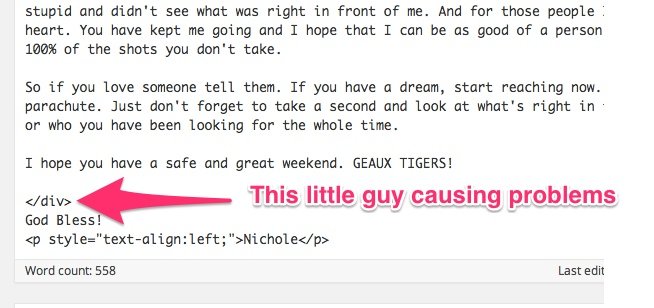
It looks like this is the result of a random “div” tag in your post “Don’t Miss the Moon” here:
https://nicholewierschem.wordpress.com/wp-admin/post.php?post=101&action=edit
Towards the bottom, you will see the following:
</div>Can you remove that, update the post, and see if that fixes the ordering issue?
-
-
-
Can you make sure you’re in the Text Editor, not Visual Editor? The difference is broken down here:
Here’s the tag within the post:
-
-


- The topic ‘Post Order’ is closed to new replies.
 WordPress.com Forums