

Post sharing from WordPress to Twitter incorrectly
-
Hello, I noticed my WordPress posts are sharing to my Twitter as well as my Tumblr pages incorrectly. For the sake of time, I will include the Twitter link. I have two Twitter accounts and it used to share to each one separately with the correct Twitter handle but now it shows my posts on my primary account with the link to my secondary account . I am including the link to the page in reference to view: Lord, I Won’t Complain. I Will Rejoice! I Have Been Faithful Over Little Things; Assured Greater is Coming http://wp.me/p2QACj-1nV
Additionally, when I tried to share the same post from the Twitter and Tumblr icons on my WordPress home page, I kept getting the Inspiring Blogger photo instead of the picture associated with the WordPress post I referenced above.
And it’s not just doing it with my Twitter accounts, but shared the Inspiring Blogger photo on to my Tumblr even though they all are set up properly and have been previously set up to share from my WordPress sharing page. I had to delete the post, click on the icon from the home page to reshare it, and look for the proper photo associated with the post before posting it to my Tumblr blog. I don’t know what to think of this but I do believe there is a problem and I need help. If this is not where I need to go, please direct me to the appropriate social media outlet.
Thank you.
joaynn510
The blog I need help with is: (visible only to logged in users)
-
Hi there!
Please see below:
I have two Twitter accounts and it used to share to each one separately with the correct Twitter handle but now it shows my posts on my primary account with the link to my secondary account .
I see the two individual tweets on your accounts here:
Those look like individual tweets directing readers back to the blog. Can you let me know if I misunderstood what you were referring to?
Additionally, when I tried to share the same post from the Twitter and Tumblr icons on my WordPress home page, I kept getting the Inspiring Blogger photo instead of the picture associated with the WordPress post I referenced above.
It looks like the photo within the blog post is being shared alongside your tweets as shown here:
The best way to ensure the proper image is shared alongside your post is to set a featured image:
Can you give that a try?
-
Hello,
Thanks for your response. Yes, they both direct the reader back to the blog but when you click on the actual link (JonnayD) above the blog post on my joaynn510 Twitter account, it is suppose to bring up the profile summary for that Twitter account. However, when you click on the link it brings up my Jonnayd Twitter profile summary page instead of my joaynn510 Twitter profile summary page. The jonnayd status link is correct. It’s the joaynn510 status link I’m having trouble with.
I’ve included an example that I hope I am explaining correctly. I hope this helps. Thank you.
https://twitter.com/joaynn510/status/507701935147712512
Jonnay Designs (https://twitter.com/joaynn510/status/489076120810033152)
View this content on Jonnay Designs’s website
Choose To Be Healed. Choose To Be Happy. Wait on God. Your Breakthr… -
Hi!
This issue is probably a result of caching. Basically, your old Twitter handle was somehow saved in the post information that is sent to Twitter. I’ve reset it to your actual Twitter handle (joaynn510) so it should be fixed going forward. However, it will not fix past tweets. Can you let me know if this is still not working correctly on your next tweet?
-
Hi! Thank you. I will let you know how it works once I post. Thanks again for all your help.
-
-
Okay, I just created a new post and it is still sharing the incorrect Twitter handle. It also did not share the video but instead shared my Gravatar picture. Is that what it does when there is no picture in the post? Just curious. Thank you.
-
I also shared it from the Twitter icon underneath the post to see what it shows and my other Twitter handle JonnayD appears, so I manually changed it to appear correctly and it still shows my JonnayD Twitter handle even though my other handle is listed at the end of the tweet. I’m confused and really don’t know what to do to fix this. Any help you can provide would be greatly appreciated. Thanks.
-
Hi!
I’m sorry you’re still having trouble with this! Regarding the “via” text that appears at the end of a tweet when you click the sharing button, that is now appearing correctly on my side:
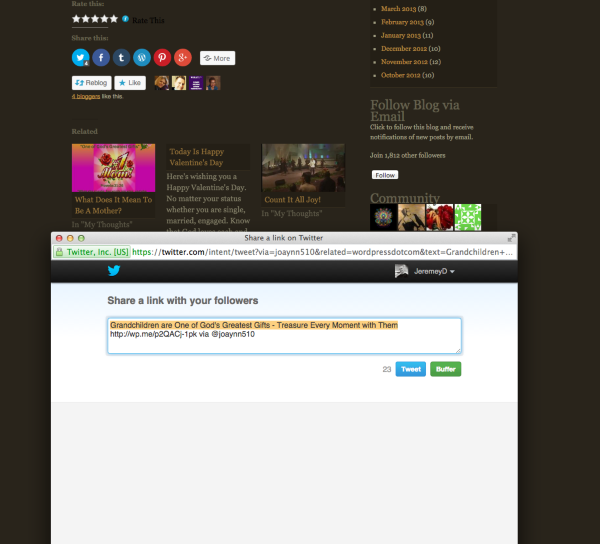
Can you click that again and see what you’re finding on your side?
The difficult part about the Twitter handle that appears in the tweet is that we’re sending the correct meta information to Twitter. Meta information is what Twitter uses to formulate your post. You can see an example here:
If you click “Twitter”, you should see the following:
twitter:creator @joaynn510The button is also working correctly (including the Twitter handle at the top of the post) on my side as shown in the example here:
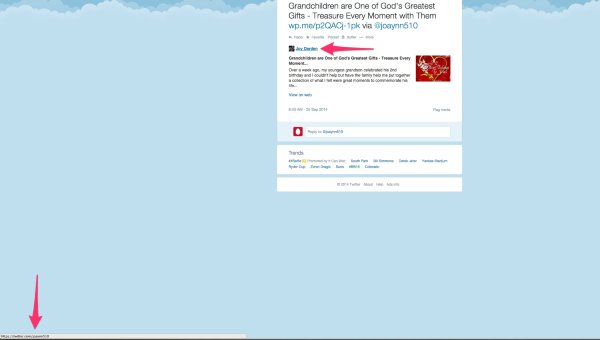
I believe this might be a caching issue on the side of Twitter wherein Twitter has saved information from previously that isn’t updating with your updated handle. That should resolve itself within the next few days. Unfortunately, since it’s working correctly on my side, there isn’t anything I can directly do to speed it up.
It also did not share the video but instead shared my Gravatar picture. Is that what it does when there is no picture in the post?
For most social networks, yes, the network will pull an image associated with your post (somewhere on your site) if the post doesn’t have an image inserted directly into it. The images are selected in the order described here:
http://en.support.wordpress.com/publicize/#images-in-publicize
So, the best way to ensure you know which image is selected would be to insert a featured image:
However, Twitter is a bit unique in that it also offers a “player card”, which is a specific format that Twitter can use to share posts with videos. The card is outlined here:
https://dev.twitter.com/cards/types/player
Unfortunately, you can’t force Twitter to use a specific sharing format. It scans your post and chooses the format that it thinks best represents your post.
Going forward, I would follow the steps here under “A few things to note before you’re on your way” to make sure Twitter is able to properly create cards for your site:
https://dev.twitter.com/cards/cms-integration#wordpress_com
Then, I would set a featured image to fall back on in case an image is shared alongside your post.
Please let me know if you have any questions on any of the above!
-
Hello,
For the past few weeks after receiving your instructions above, the posts were still sharing incorrectly as I noted in my initial complaint. I apologize for the delay in responding back to you but wanted to see if the problem would correct itself in time. Since it hasn’t, I wanted to update you on what I’m now seeing when I share posts to Twitter.
Today, when sharing my first post, it still showed the JonnayD handle on both Twitter accounts so I decided to view my share page on WordPress and noticed the first Twitter account listed was my JonnayD and the second account listed was my joaynn510. I thought, this may be the problem so I removed access to both, reauthorized access listing the joaynn510 account first and the JonnayD second. This is what it looks like on the Publicize page:
Connected as: @joaynn510 ×
Connected as: @JonnayD ×I created two posts today, one before changing the Publicize order and one after changing the Publicize order. When I shared the second post after changing the order and viewed it on both Twitter accounts, now its sharing each post listing my joaynn510 Twitter handle twice instead of listing each handle separately, even though the problem is no longer with listing the JonnayD Twitter handle twice. And I think this is because I changed the Publicize Twitter order. I’m at a loss.
I also tried the link you provided re: Card Validator “follow the steps here under “A few things to note before you’re on your way” to make sure Twitter is able to properly create cards for your site.
I signed in to my JonnayD Twitter account, entered the link to the first post I created today before changing the Publicize order on WordPress and this is what I found:
https://cards-dev.twitter.com/validator
Jonnay Designs
@JonnayDThe card for your website will look a little something like this!
Jonnay Designs
View this content on Jonnay Designs’s websiteThanks to Bishop Thomas’ Powerful Sermon on Sunday, God Led Me into a…
After thinking about how the devil worked my nerves the other day, I woke not feeling well, but excited because I was looking forward to going to church the following Sunday. Then after receiving s…
View on webLog:
INFO: Page fetched successfully
INFO: 25 metatags were found
INFO: twitter:card = summary tag found
INFO: Card loaded successfullyAfter changing the Publicize order, this is what I found:
https://cards-dev.twitter.com/validator
Jonnay Designs
@JonnayDThe card for your website will look a little something like this!
Joy Darden
View this content on Joy Darden’s website
Don’t Become Complacent or Too Comfortable – In the Face of Adversi…When we become too comfortable, we become complacent. And may find ourselves losing our voice and our identity. We also will lose focus and take our eyes off God. And will try to work things out ou…
View on web
Log:
INFO: Page fetched successfully
INFO: 25 metatags were found
INFO: twitter:card = summary tag found
INFO: Card loaded successfullyWhen I signed in to the card validator with my joaynn510 Twitter account, before changing the Publicize order, this is what I found:
https://cards-dev.twitter.com/validator
Joy Darden
@joaynn510The card for your website will look a little something like this!
Jonnay Designs
View this content on Jonnay Designs’s website
Thanks to Bishop Thomas’ Powerful Sermon on Sunday, God Led Me into a…After thinking about how the devil worked my nerves the other day, I woke not feeling well, but excited because I was looking forward to going to church the following Sunday. Then after receiving s…
View on web
Log:
INFO: Page fetched successfully
INFO: 25 metatags were found
INFO: twitter:card = summary tag found
INFO: Card loaded successfullyAfter changing the Publicize order, this is what I found:
https://cards-dev.twitter.com/validator
Joy Darden
@joaynn510The card for your website will look a little something like this!
Joy Darden
View this content on Joy Darden’s website
Don’t Become Complacent or Too Comfortable – In the Face of Adversi…When we become too comfortable, we become complacent. And may find ourselves losing our voice and our identity. We also will lose focus and take our eyes off God. And will try to work things out ou…
View on webLog:
INFO: Page fetched successfully
INFO: 25 metatags were found
INFO: twitter:card = summary tag found
INFO: Card loaded successfullyI really think this is a WordPress issue on the Publicize page. It’s as if there is a glitch somewhere and it’s not recognizing something when the share takes place. I’ve never had this problem before and I’ve been with WordPress almost two years this month. If there is anything you can advise me on what to do, I would greatly appreciate it.
Thank you.
joaynn510
-
Hi @joaynn510,
Thank you so much for the detailed reply here! I’m working on reproducing this and taking notes as to why this is happening, but I wanted to reply here so you didn’t think we forgot about you!
-
Just to recap, currently, I’m using the following link in the validator:
Don’t Become Complacent or Too Comfortable – In the Face of Adversity, It’s Okay to Be Uncomfortable
With that link, I return the following result:
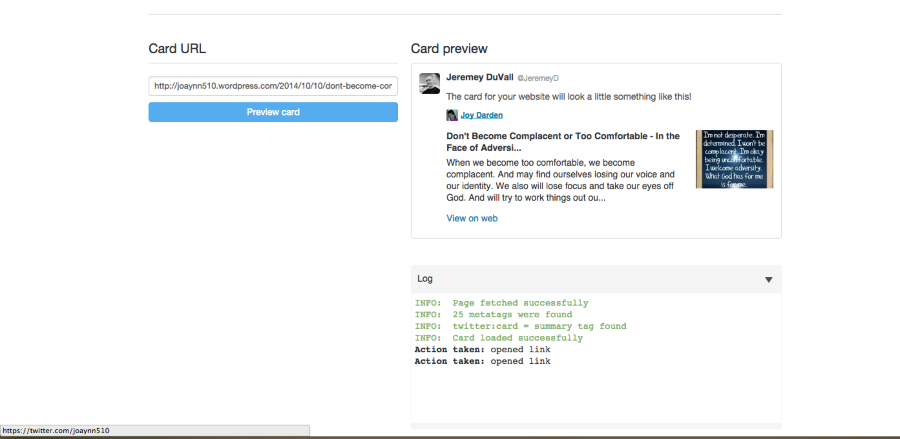
The URL at the bottom of the page (twitter.com/joaynn510) is the URL I show when I highlight the author name within the Twitter card (Joy Darden), which seems to match the settings on your sharing page:
https://joaynn510.wordpress.com/wp-admin/options-general.php?page=sharing
It also matches what I see when I click the Twitter share button underneath your post:
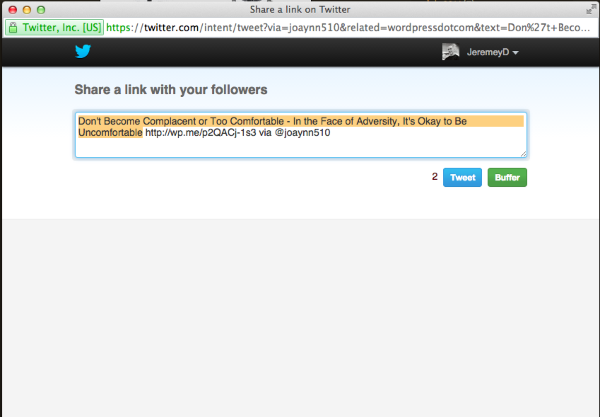
I’m also seeing the correct Twitter account on your individual posts on both profiles:
joaynn510 account: https://cloudup.com/c0Y69wIUWxl
JonnayD account: https://cloudup.com/c55k_ru8wdPIt appears as if the Twitter username is correct on your posts. Could you clarify if I misinterpreted part of your post?
-
Thank you for your prompt response and keeping me in the loop on your working on this issue. Everything you mentioned is correct with the joaynn510 account as the cloud does show the correct Twitter handle underneath the reply, retweet, favorite, etc. links. However, what you’re seeing on the cloud for the JonnayD account is incorrect. The post is fine but If you look underneath the reply, retweet, favorite, etc links, it shows my joaynn510 Twitter account when it should be showing my JonnayD Twitter account. Which is why I believe it appears to be a WordPress sharing issue.
Because if I were to change the order of the sharing buttons on WordPress where the JonnayD account would be listed first, it will show the correct JonnayD Twitter handle underneath the reply button of my JonnayD Twitter account but will show the incorrect Twitter handle of JonnayD underneath the reply button on my joaynn510 account. I do hope I’m explaining this correctly. If not, please let me know.
Thanks again for all your help!
joaynn
-
The post is fine but If you look underneath the reply, retweet, favorite, etc links, it shows my joaynn510 Twitter account when it should be showing my JonnayD Twitter account. Which is why I believe it appears to be a WordPress sharing issue.
Can you clarify what area you’re referring to by perhaps uploading a screenshot to your Media Library via the instructions here?
I’ve broken down a tweet from each account below:
JonnayD: https://cloudup.com/c5yy0Snlssv
Joaynn510: https://cloudup.com/cT_KwNi6vsy
In both cases, the “Author Twitter Profile” reads: https://twitter.com/joaynn510. Is that the portion you’re referring to? It isn’t possible to set this so that it reads the JonnayD Twitter account when tweeted from that account and Joaynn510 when tweeted from the Joaynn510 account. Does that make sense?
I apologize if I’m misunderstanding!
-
Jeremey,
First I’d like to thank you very, very much for sticking with me during this process and taking the time to help resolve my issue. Your patience and diligence was truly appreciated. Secondly, I must apologize for taking so much of your time out of my confusion with this process but I think I finally understand what’s going on and believe the issue has been resolved.
After reviewing your cloud links, of which you gave an excellent example for me to follow that cleared up a lot of things, everything you posted does make sense.
I managed to pull up old tweets from both accounts and noticed my posts have been appearing exactly as it shows in the cloud links you provided for over a year and half, going on two years in January. And it confirms there is no problem with the tweets or the sharing from WordPress. Obviously, this is how Twitter has it designed and confirms what you stated:
It isn’t possible to set this so that it reads the JonnayD Twitter account when tweeted from that account and Joaynn510 when tweeted from the Joaynn510 account.
I think I understand what this means :-)
The good part is I learned an awful lot about this process with your help and when reviewing the information you shared as well as finding answers when going back and looking at old posts from 2012 through 2014. With that said, what I find is if I change the order of my sharing status on WordPress where I list the JonnayD account first, it will show the Author Twitter JonnayD url on each account.
So, I’ve decided to leave it as is and keep the Author Twitter joaynn510 profile on both accounts until I decide to change it again later. And as it stands, it won’t be anytime soon because I noticed whatever posts not shared prior to making the change, if I make any edits, it will share to all of my accounts listed on the Publicize page as a new share. Which, in my opinion is duplicating efforts.
Again, thank you so much for taking the time out of your busy schedule to help me resolve this issue. You were patient and your professionalism exceeded my expectations. Thank you!
Btw…I created another ticket for an issue I’m having with Google+ because it seems my posts are sharing with a featured image instead of the image that corresponds with the post. It was fine before I began this process so I’m not sure what happened, and I know this is a lot to ask but if you are able to take a look at it when you get a chance and see if you can provide any assistance, it would be greatly appreciated. And I will see if I can create a screenshot once I figure out how to do that to show what I’m seeing.
Thank you.
joaynn
-
Hi Joaynn,
I’m glad we were able to get this semi-resolved. If you ever have any trouble with the Twitter links in the future, please don’t hesitate to ask. We’re really happy to help. Regarding your Google + issue, it looks like Grace has already replied back there!


- The topic ‘Post sharing from WordPress to Twitter incorrectly’ is closed to new replies.
 WordPress.com Forums