

Post Width on Hemingway Rewritten
-
Is there a way to alter the width of the post on Hemingway Rewritten theme?
I have uploaded a custom background image that I love, but I would like the actual width of the text to be a bit narrower in order to be more legible.You can see what I am talking about at maryannaking.com
The blog I need help with is: (visible only to logged in users)
-
Howdy Mary!
Are you looking for something like this?
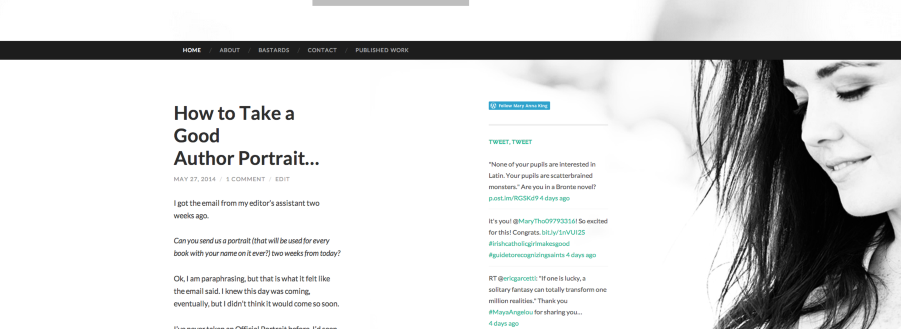
If so, that’s definitely possible. However, in order to attain that look, you’ll need to purchase the custom design upgrade shown here:
http://en.support.wordpress.com/custom-design/
Then, you can use the following CSS:
@media screen and (min-width: 700px){
	div.entry-content {
		width: 400px;
	}
	h1.entry-title {
		width: 400px;
}}
Please let me know if that’s what you’re looking for!
-
-
-
Hey Mary!
One last thing, currently, the image in the background makes it a bit difficult to read on mobile devices as shown here:
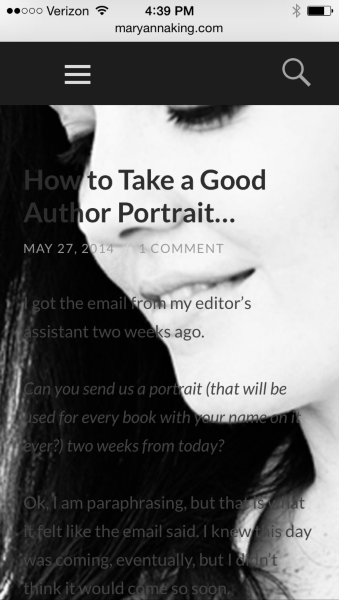
If you would like, you could add the following CSS:
@media screen and (max-width: 1024px) {
	body.custom-background {
		background-image: none;
	}
}
That will eliminate the background for phones and small tablets (just leaving a white background). Definitely not required, but just thought I would let you know!


- The topic ‘Post Width on Hemingway Rewritten’ is closed to new replies.
 WordPress.com Forums