

Posting to a page
-
I feel like a complete idiot as I am sure this is soooo obvious. I only have 3 pages on my menu. When I want to post to one of them, how do I select it??? Brand new to all this and my first post ended up going to the wrong page. Can I just move it? Do I have to delete it? And then how do I get to the right page to post it? I’ve gone thru the “how to post” and “what’s a page” etc. but I’m just not seeing how to select where you want to post to. HELP????
The blog I need help with is: (visible only to logged in users)
-
Posts will appear in one of two main places by default:
1. Your home page
2. Whatever you selected for the “Posts page” in your Customize > Static Front Page > A static page sectionPosts will also appear on category pages automatically. If you add a category and publish a post first, then you will be able to add that category as one of the links in your custom menu if you’d like:
http://en.support.wordpress.com/category-pages/
http://en.support.wordpress.com/menus/Note: categories must be added to posts first and only then can a category be added to a custom menu. It must be done in the proper order. To learn how to add a category (the first step), start here:
http://en.support.wordpress.com/posts/categories/
https://en.forums.wordpress.com/topic/i-have-written-a-post-how-do-i-get-it-onto-a-page?replies=7#post-2365185 -
Oh, help!!! I have a static home page, I’ve set up my categories, I’ve deleted the post and went in and attached it to the category, reposted it. I only have 3 pages: Home, Before and Afters, and What’s Going On. I’m trying to move the first post to What’s Going On and no matter what I do it keeps showing up in the Before and Afters. Worse, it says under the post that it’s posted to What’s Going On, but it’s not there!!! If I try to change the Posts Page to What’s Going On, then everything moves there. What am I missing here??
-
I have a static home page, I’ve set up my categories, I’ve deleted the post and went in and attached it to the category, reposted it. I only have 3 pages: Home, Before and Afters, and What’s Going On. I’m trying to move the first post to What’s Going On…
You can’t post on the static page “What’s Going On,” or any static page, even the static front page. You need to do the following:
1. If you haven’t already done so add one or more categories to each of your posts.
2. Create a custom menu.
3. Add the same categories to your custom menu that you’ve added to various posts.Read the support pages I’ve provided links to. If your questions aren’t answered there, then come back here and give us a yell.
-
I created a custom menu, I added categories to the post. It will not show up under the new category under What’s Going On (even though it says it is posted to that category) and it also says it’s uncategorized. I’ve deleted it and tried again and again.
Does it have something to do with the Post Pages? If I select What’s Going On everything moves there, if I leave it on Before and Afters everything shows up there. How do I get around this???
-
OK, now it’s showing up under both What’s Going On and Before and Afters…..if I try to edit it, will it disappear from both?
Where’s the Tylenol…..
-
Does it have something to do with the Post Pages? If I select What’s Going On everything moves there, if I leave it on Before and Afters everything shows up there. How do I get around this???
The posts page works differently than the rest of this. The posts page will always show all of your posts. You’ll want to either display them on your home page or you’ll want to create a page just for them.
I created a custom menu, I added categories to the post. It will not show up under the new category under What’s Going On (even though it says it is posted to that category) and it also says it’s uncategorized. I’ve deleted it and tried again and again.
You are almost there. The problem is your menu items are pointed to static pages instead of category pages.
Here’s a screenshot of how “Before and Afters” is set up now.
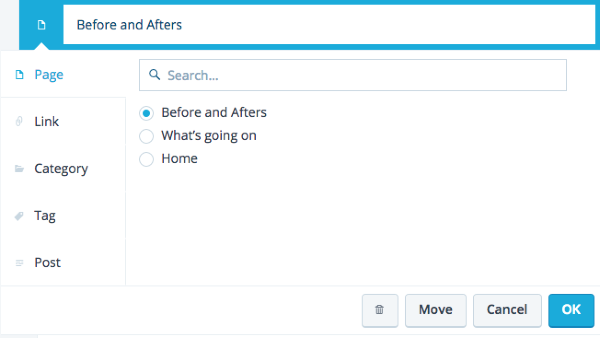
If you choose “category” instead of “page” in the dropdown menu you see when you edit, the menu will work the way you want.
Let me know if that solves this for you. If not, we can walk through how to make the changes step by step.
-
Here’s a screenshot of how “Before and Afters” is set up now.
https://cloudup.com/cONdIo8E1OUWhat page is the screenshot from? I’m not aware of a page where you can change the type of a custom menu item from a list of types as your screenshot seems to demonstrate.
-
Liz, I can’t find this page that you took the screenshot of. I’ve been trying for about a half hour now….can you tell me where it is, how you got there? As for the walk through, I’d love it because I’m ready to just walk away!
-
The problem is your menu items are pointed to static pages instead of category pages.
This is the URL of a static page that will never automatically update
http://paintingprettythings.com/before-and-afters/If you publish posts and assign the “before and afters” category to them then the URL of the dynamic category page will become http://paintingprettythings.com/category/before-and-afters/
Note that category pages cannot display data until you actually publish a post with the category assigned to it.Delete the static page.
Create a post and assign the and “before and afters” category to the post.
Create a custom menu https://en.support.wordpress.com/menus/#1-create-a-custom-menu
Add the dynamic category page to it. (Category – Show a feed of blog posts from a given category) -
It’s my opinion that the reason that there are so many misunderstandings about custom menus is a simple one. Blogger start mucking with menus before they have created any content. They so not know what the differences between pages and posts are and they do not know what the differences between static pages and dynamic category, archives and tags pages are. So in no time flat they are in the ditch frustrated, angry and ready to throw in the towel.
Themes are just “skins” and the organizational structure of the site ought to be created after there is some basic content to work with. That is why I insist that everyone I work with (they never post here for support) creates 4 pages and 4 posts before they even begin to think about which theme they will use and how to set up custom menus.
After they have worked their way through comprehending the differences between static pages and posts, and the differences between static pages and dynamic pages they are ready for theme section and custom menu creation.
-
Please excuse my obvious errors (typos and grammer weirdness) above. I’m visually challenged and I didn’t proofread well enough before I clicked submit.
Edited version:
It’s my opinion that the reason that there are so many misunderstandings about custom menus is a simple one. Bloggers start mucking with menus before they have created any content. They do not know what the differences between pages and posts are, and they do not know what the differences between static pages and dynamic category, archives and tags pages are. So in no time flat they are in the ditch frustrated, angry and ready to throw in the towel.
Themes are just “skins” and the organizational structure of the site ought to be created after there is some basic content to work with. That is why I insist that everyone I work with (they never post here for support) creates 4 pages and 4 posts before they even begin to think about which theme they will use and how to set up custom menus.
After they have worked their way through comprehending the differences between static pages and posts, and the differences between static pages and dynamic pages they are ready for theme selection and custom menu creation.
-
Liz, I can’t find this page that you took the screenshot of. I’ve been trying for about a half hour now….can you tell me where it is, how you got there? As for the walk through, I’d love it because I’m ready to just walk away!
My mistake. Based on your description, It sounded like you were working with our new menu page. Here’s a direct link to the page I used for the screenshot:
https://wordpress.com/menus/paintingprettythings.com
You get there from the menus link in the left column of this page
https://wordpress.com/stats/paintingprettythings.com
From the menus page, click the pencil next to the menu item you want to change.
Then make the change from “Page” to “Category” like in the screen shot.
Once you choose “Category” in the left column, choose the circle next to the category you want in the menu and click ok.
Follow this process for each menu item.
When you are done, click save.
Let me know if you get stuck!
-
It’s my opinion that the reason that there are so many misunderstandings about custom menus is a simple one. Bloggers start mucking with menus before they have created any content.
timethief, I’ve thought about this a bit lately. If it’s so common to try to create menus before content, I wonder if we should just support that. However, it opens them up to a new problem too: menu links that feel broken because they don’t have any content in them yet. It’s an interesting challenge to work on revising the menus interface. The new menus page is an early step, but all of these insights notes in the forums around what people do with menus is helpful and we’ll be reviewing feedback again before the next iteration (future). Thanks for tagging issues with appropriate keywords such as “posts on pages”—I find that super useful.
-
I am sorry for mucking around, I’m an older blogger and definitely not the most computer savy. But perhaps because of that I’m also a good guinea pig for making things a little easier. I assumed (mistakenly) that when I created a post there would be a user friendly question, like, where would you like to post this? Then given a choice to click on of my menu topics. Obviously there is but I can tell you it’s hard to figure out. I’m still struggling but with the helpful advice I’ve received about making categories etc. I’ve managed another post that actually went where I wanted it to go.
I’d like this blog to be an enjoyable experience and I hope the forum will take some pity on those of us not as knowledgeable as most of you seem to be.
Having said that, can I ask 3 more probably obvious questions?
How can I have my posts show up on my homepage as they are posted and remain under their menu/pages too?
Could I get some clarification on the Static Page and Page Posts? As I struggled to move a post and changed the page posts to where I wanted it to go, everything moved there.
What exactly is the process for moving a post from one location to another? Do I copy and trash it and start all over? -
@ lizthefair,
I visited https://wordpress.com/menus/songbook1.wordpress.com for the first time. It indicates that there are “3 menu areas in this theme.” Actually, the theme only supports one menu, in one location, “primary navigation.” Also, the drop-down list under “3 menu areas in this theme” does not list three areas, but rather lists the single area, plus two apparently randomly selected menus out of the nine I’ve created.
-
@ paintingprettythings,
1. How can I have my posts show up on my homepage as they are posted and remain under their menu/pages too?
Go to Settings > Reading and change the “Front page displays” setting to “Your latest posts.”
2. Could I get some clarification on the Static Page and Page Posts? As I struggled to move a post and changed the page posts to where I wanted it to go, everything moved there.
What is a “page post”?
3. What exactly is the process for moving a post from one location to another? Do I copy and trash it and start all over?
Why would you want to move a post from one location to another? A custom menu is composed only of links. You may move the link to a post hither and yon all day long to your hearts content without ever touching the post itself.
-
-
You may relocate a post by changing the date and time at the Publish module of a post editor.
-
I assumed (mistakenly) that when I created a post there would be a user friendly question, like, where would you like to post this?
I think I can help clear this up by stepping back a little and explaining how posts and category pages work.
When you create a post on WordPress.com, it will appear on the home page by default. If you add categories to your post, then category pages are created automatically and the post will appear on those pages too. So, if you add category links in your menu, then you can make a post appear on those pages simply by changing the category for the post.
See http://en.support.wordpress.com/posts/categories/
Now, if you set a static front page instead, that means posts will not appear on your home page by default and will appear on the category pages for whatever categories have been added to that post. It sounds like this is the route you want to take.
2. Could I get some clarification on the Static Page and Page Posts? As I struggled to move a post and changed the page posts to where I wanted it to go, everything moved there.
In the “Static Front Page” panel in the Customize screen, the posts page is where all of the posts will appear by default instead of on the home page like they were before. You don’t have to set a posts page if you would rather only have things show up based on category. However, most people make a page named “Blog” and select that page for the “Posts page” setting.
What exactly is the process for moving a post from one location to another? Do I copy and trash it and start all over?
You would simply edit the post and update the categories for that post to move it from one category page to another.
I think we should stop talking about the other issues (we hijacked your thread a little!) and start focusing more on what you’re trying to do so we can help you get setup faster.
As a next step, you might want to go to https://wordpress.com/customize/paintingprettythings.com and change the site title because I noticed it’s all one word right now and overlapping other content.
After that, let me know if you still have any questions about menus and I can help you work on it until you’re all set.


- The topic ‘Posting to a page’ is closed to new replies.
 WordPress.com Forums