

Posting to a page
-
Thanks so much designsimply, very clear and understandable explanations. I went to the link but I don’t see any overlapping so I’m not sure what you mean. Are you seeing something I’m not?
-
The overlap I’m seeing is on http://paintingprettythings.com/ and looks like this:
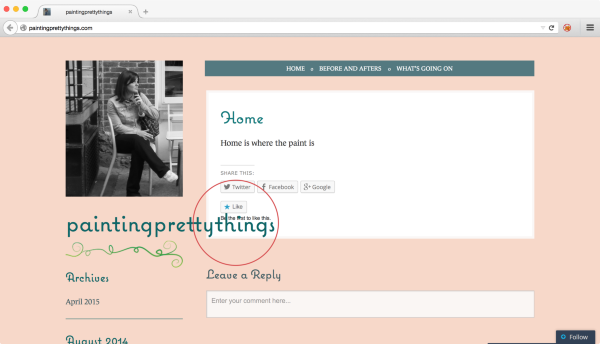
You can fix that by updating the Site Title setting.
-
OK, this is truly bizarre because here is a screenshot of what it looks like from my end:
https://cloudup.com/ctC3pcSvVIsHow do I fix this????
-
I went in to change the font and it said Coquette, which is not what I had chosen. I changed it, are you still seeing it overlap?
-
I changed my static home page and now nothing shows up when I click on one of my other menu choices!!! They have categories, but they are just not showing up there. I also changed the font, again, is it still showing an overlap? So fed up….
-
Dynamic category pages automatically update when you publish a post with a category assigned to it.
Static pages do not auto-update and are for content that rarely changes.
Replace the static page URLs with dynamic page URLs in your custom menu and your issue will be solved.
Example: This is the URL in your custom menu
http://paintingprettythings.com/before-and-afters/
That is a static page link and that page will never update. Delete it.This is the correct dynamic category page URL found by clicking the category link on the post
http://paintingprettythings.com/category/before-and-afters/
Examine that URL closely please. -
You need to replace these static page URLs in your custom menu with dynamic page URLs.
Delete http://paintingprettythings.com/before-and-afters/
Then add http://paintingprettythings.com/category/before-and-afters/ into your custom menu.Delete http://paintingprettythings.com/whats-going-on/
Then add http://paintingprettythings.com/category/whats-going-on/ into your custom menu. -
@ paintingprettythings,
How do I fix this????
You probably can’t, at least not with the Lovebirds theme. On my monitor I see both your site logo and title centered in the header area, with the navigation menu below them. Here’s a screen shot: http://snag.gy/mrDGY.jpg.
However, if I zoom out one click all three of those elements are shifted and I now see the title overlapping the leading post as reported by designsimply. Why do we each see something different? The answer is that we are using different tools to access the page. Some factors which might result in a different appearance of a webpage for different viewers include the following:
1. Monitor screen size and resolution. Mine is 12″ X 9,” set at a 1024 X 768 pixels.
2. Display aspect ratio. Mine is 4:3. According to Wikipedia,In 2008, the computer industry started to move from 4:3 and 16:10 to 16:9 as the standard aspect ratio for monitors and laptops…By 2010, virtually all computer monitor and laptop manufacturers had also moved to the 16:9 aspect ratio, and the availability of 16:10 aspect ratio in mass market had become very limited.
3. Zoom settings.
Three different views of the top of your front page:
paintingprettythings — https://cloudup.com/ctC3pcSvVIs
designsimply — https://cloudup.com/c3YVYEReSkg
musicdoc1 — http://snag.gy/mrDGY.jpg -
And now I’m having Menu issues. I just had my son pull up the blog and click on the menu choices/category and all he and I both get are empty pages. I changed my static homepage because I thought the posts would show up on both, but no. The posts have categories, but for whatever reason they are not showing up. I don’t even want to post anything more because it’ll probably just get messed up too. designsimply…..where are you? I need your help!!
-
@ paintingprettythings,
I changed my static home page and now nothing shows up when I click on one of my other menu choices!!! They have categories, but they are just not showing up there.
This is not caused by adding or changing a static homepage. Every day we see many members reporting this issue. In part it’s a result of misunderstanding the differences between static pages and category archives pages, and how to use custom menus to link to either of them, but particularly the latter.
Your top-level menu item “Before and Afters” links to the static page http://paintingprettythings.com/before-and-afters/
The top-level menu item “What’s Going On” links to the static page http://paintingprettythings.com/whats-going-on/.
If you want these to be a link to a category archives page that will display posts that have been assigned to that category, then the URLs in your links should be
http://paintingprettythings.com/category/before-and-afters/, and http://paintingprettythings.com/category/whats-going-on/, respectively. You add categories to your menu with the categories module at the left of the menus page.Also, your three subcategory menu items: “Thrift Store Finds,” “Painting,” and “The To Do List,” are each linked to a single untitled post (#129), published on April 30 which contains merely a link to the April 29 post “In the beginning…..”
-
Don’t worry. We’ll get it sorted out!
I just had my son pull up the blog and click on the menu choices/category and all he and I both get are empty pages.
What exactly did you click on? Or if you copy and paste the URL, that will help me know the exact location.
If this is the page you were on:
https://paintingprettythings.wordpress.com/wp-admin/nav-menus.phpThen you need to select a menu at the top before you can see the items in the main part of the page. You should select the one that says “(Primary Menu)” next to it.
-
Correction:
Change “If you want these to be a link to…” to “If you want either of these to link to…” -
I went in to change the font and it said Coquette, which is not what I had chosen. I changed it, are you still seeing it overlap?
I can see the custom font now. I’m not sure why it wasn’t showing up for me before! The font I see for headings now is Fertigo Pro Script.
I am still seeing some overlap. It might have something to do with the local zoom settings in your browser (you could be looking at a more zoomed out view compared to me). What if you changed the Site Title from “paintingprettythings” to “Painting Pretty Things”? That would let the lines wrap as needed.
-
If I google Paintingprettythings.com the blog shows up, all the posts are showing up on the homepage (thank you for helping me fix that), but if I click on Before and Afters, or the subs of Painting or Thrift Store Finds, nothing shows up. I checked the posts, they all have categories, but they just aren’t showing up when I click on the menu. The In the beginning post says it is categorized to What’s Going On but if click on that on the menu bar, again, nothing. Is something wrong with my menu bar?
My son pulled up the site on his iphone and the title looked ok on his phone….it looks ok on my daughters notebook and it’s fine on my laptop but I guess I’ll have to change it (would rather not, I like it the way it is). -
@designsimply
It seems to me that this blogger is not comprehending what I explained at
https://en.forums.wordpress.com/topic/posting-to-a-page-8?replies=30#post-2369915
and
https://en.forums.wordpress.com/topic/posting-to-a-page-8?replies=30#post-2369921
about the differences between static pages and dynamic category pages. Click the links in the menu and note that they static page links, not dynamic category page links. -
@ paintingprettythings,
All of your custom menu items are linked to the wrong pages (or to a post) as explained in my previous message. -
timetief, I see :) and I was trying to take things a little more slowly in this case. I’m working (just for a little while) to document the top issues people have with menus.
musicdoc1, thanks for your help. I noticed the multiple menus issue you reported earlier, and I’m working to file a separate bug for that—it looks to be tied to an account and not a theme or the new menu page specifically. Also, I don’t mean to step on your replies. I think you misunderstood a few of the questions and I chimed in and wanted to follow through on this one (also, it seems we’re answering at the same time sometimes!). I can help from here if that’s okay.
paintingprettythings, I checked your menu again, and I found that you setup the menu types as pages, but you probably want them to be categories. Here are some steps to help fix that problem:
1. Go to https://wordpress.com/menus/paintingprettythings.com
2. Click the pencil icon next to “Painting”
3. Click “Category on the left
4. Select the Painting category
5. Click OK
6. Click SaveCheck the site and see if the Painting link in the menu is working after that. If it is, repeat the same steps for all of the other thing inside the menu that you want to link to category pages.
-
Yes, I need things explained a little more slowly, sorry Timethief, but dynamic and static were new terms to me and you were way over my head. Designsimply, thanks for your “slow” step by step, I managed to change it all and it’s fine. The bar across the top with: “Home” “Before and Afters” and “What’s Going On” is the menu right? Are they also called pages? Can I add another to that top bar? If yes, can you tell me how so I don’t screw up anything else ie menu 1, menu 2 etc. (just the way you explained above would be perfect thx
-
Hi!
Designsimply, thanks for your “slow” step by step, I managed to change it all and it’s fine.
Excellent! :)
The bar across the top with: “Home” “Before and Afters” and “What’s Going On” is the menu right? Are they also called pages?
Correct – the bar across the top is a menu (shown here: http://d.pr/i/1bWfJ). The items in that menu are controlled here:
https://paintingprettythings.wordpress.com/wp-admin/nav-menus.php
Currently, you have two menus (Menu 1 and Menu 2). You can see them in the toggle shown here:
You’ll see “Primary Menu” next to the Menu 2 option because it’s currently active on your site. If you highlight that option, you’ll see a representation of what is displayed across the top of your site currently.
Can I add another to that top bar?
Yep! You’ll want to start on that page linked above. Then, make sure you select “Menu 2” from the dropdown menu mentioned above. The resulting page should look like this:
You’ll notice that on the left-hand side of the page, you can add items to the menu. For example, if you click “Category” on the left-hand side, you can add a category page (like designsimply explained) following these steps:
We have a bit more info on adding menu items here if you’re curious:
Can you try adding a menu item or two and let me know if you have any trouble?
-
@ designsimply,
musicdoc1, thanks for your help. I noticed the multiple menus issue you reported earlier, and I’m working to file a separate bug for that…
You’re welcome. Actually, I do not recall reporting a multiple menus issue. What are you referring to?
I think you misunderstood a few of the questions and I chimed in and wanted to follow through on this one (also, it seems we’re answering at the same time sometimes!).
One or two of the OP’s questions were difficult to decipher, such as the one about “page posts,” and another about moving posts. However, later it became clear that the principle issue here was the very common misunderstanding of the difference between links to static pages and category archives pages in a custom menu. I understood the issue very well, having encountered it daily recently, and detected the mistakes made by the OP.
So, here, I explained how each item in the OP’s menu was linked to the wrong page or post. I’ve also provided a solution regarding changing links to pages in a custom menu to category links. My solution is to be implemented at the old custom menus page, whereas yours is at the new one. That is principle difference. Both are valid.
I did not include specific instructions for changing the links to posts in the OP’s menu to category links, because it would have been redundant. Essentially, the same remedy previously provided would apply.
I can help from here if that’s okay.
It’s all yours. : )


- The topic ‘Posting to a page’ is closed to new replies.
 WordPress.com Forums
