

posting to Facebook -this post is no longer available, it may have been removed
-
Having no joy with wordpress today…
Trying to post a WP post to facebook, but received above message.
The post is there.Pleas help.
The blog I need help with is: (visible only to logged in users)
-
Hi Stephen,
Was the post marked as Private when it was first published? That would explain why Facebook could not initially scrape information from the post’s URL.
I’m assuming this is regarding your newest post. I ran it through Facebook’s Object Debugger and saw the error you mentioned:
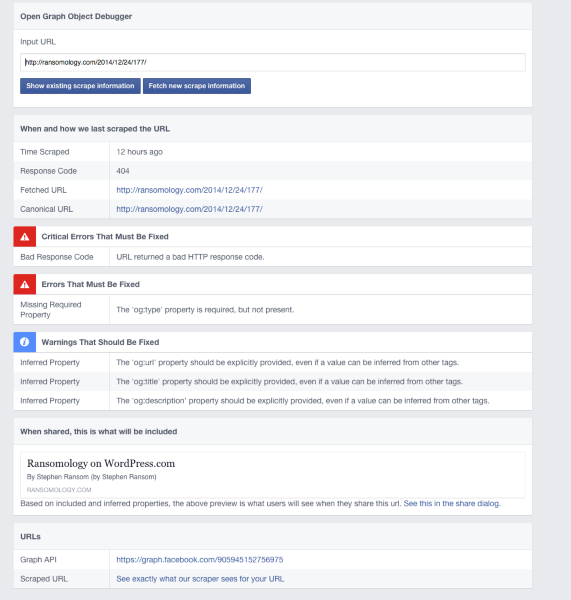
After scraping new information the issue appears resolved:

If you have any other posts with the same issue, using that link, entering the URL, and click “Fetch new scrape information” is a great first step.
-Alex G.
-
Hi Alex,
This quite bazaar. I have a personal facebook page obviously, which is the primary place i share my WP posts. Then I manage a ‘business’ page linked to that account. I also put the posts on that page.
Now that you’ve done the scrape, I’ve been able to post my WP post on my personal FB page (and it’s the right size), but I still get the error message re post may have been removed when i try to post on my business page.
Thanks for your help.Im
I’m really struggling to understand how thisnis working now.
-
Hi Stephen,
Facebook does do some moderate caching when working in the same timeline. If you removed the error post and then re-attempted the post (after the new scrape) I can see where it might just display the error again.
The other thing I can think of is if there were any differences to the URL between what you posted on your personal profile and your business Page — even perhaps missing that last ‘/’ at the end — Facebook would see it as another URL entirely and could require the scrape again.
My recommendation is this:
- If you still have the business Page open in your browser, do a force refresh
- Re-scrape the URL you’re about to share using the Facebook Object Debugger
- If the share preview looks good there, copy the URL out of the Facebook Object Debugger
- Paste the URL into your business Page
I apologize if this feels like repeating work, but Facebook grabs those scrapes the same place, so there’s no reason that you should see different share previews between personal profiles or business Pages unless there was some kind of caching error or difference between the URLs.
Note we’re not making any changes to your site here. We know that’s not the issue because the Facebook object scrape would show the error if the error was in your site.
-Alex G.
-
Ok alex. Thanks for the help. Very helpful as always – You’ve got a fabulous review coming your way.
Given that i had so much trouble with this one, I’m very hesitant to do anything to mess it up. So if i go scraping to get it up on the business page, could it mess up the current fb post on my personal page? I really don’t understand how this is working sorry.
also, and I’m sorry to put this on the same email. I tried to put the code for text justify in the css. It’s not working. I put in code for padding at the same time and that did work, so it’s just the justify that’s gor the problem. Can you help please?
thanks alex.
s. -
Hey Stephen,
I’m jumping in to help, since Alex is enjoying the holiday. I’ll certainly pass along the very nice words to him, though.
To answer the questions you’ve posed:
So if i go scraping to get it up on the business page, could it mess up the current fb post on my personal page? I really don’t understand how this is working sorry.
If you are logged into your business account on Facebook, and you use the debugger, nothing should interfere with with you’ve currently got posted on your personal Facebook wall.
I tried to put the code for text justify in the css. It’s not working. I put in code for padding at the same time and that did work, so it’s just the justify that’s gor the problem.
It appears as if Shawna addressed this issue for you here:
https://en.forums.wordpress.com/topic/justify-text-in-css?replies=15She advised:
Your code isn’t working because the class selector you’re using isn’t correct. You want to use .entry-content not .entry. Your padding code doesn’t seem to be having an effect for the same reason.
That should do the trick for you!
Please let us know if you have any other questions. Thanks much!
-
Hi,
Ok, I’ve just made a new post and published it to facebook. As happened with the last one, it’s posted it as a status update on facebook, not as a full sized post, with accompanying photograph.The suggestion from alex with the last one was that it happened becuase it was initially posted privately, but that is not the case this one.
Please help me post it as a standard sized post on facebook. It’s my latest post.
Thanks. -
Can you give me a link to the Facebook post? You can get a direct link to the post by clicking on the timestamp.
-
Hi Shawna,
Hope you can help with this. This thread’s getting a bit messy, which is my fault for not keeping it specific to a single issue. The problem I’m trying to deal with is:
My personal facebook page is the primary place i currently share my WP posts. I also manage a ‘business’ page linked to that account. I currently need the posts in both places. Ultimately I’d like to have the WP posts only on my business page, but i’m not there yet.
So currently, the settings in word press are such that when I share a post, it goes to my personal FB page. The problem I’m having is that when I then try to share a second time to my business page, I get the following error message:
“We’re sorry, this post is no longer available. It may have been removed.”
I think it’s a word press error message but am not sure of that. I have tested this with a number of posts and the same thing happens with all of them.
In an attempt to work around, I went to my personal FB page to repost to my business page from there. This is not possible becuase when I try, the option to save to “a page i manage” is rendered unavailable with the accompaning message “only public posts can be shared on your page.
So it seems the nub of the issue with my attempted workaround is that my personal FB page is personal and the business page is public. This makes sense. I don’t want to make my personal FB page public at this point.
I can’t understand though why WP will not let me publish my posts a second time to my business page (assuming WP is the issue as speculated).
I thought perhaps I need to change my posting settings so that my primary place to post is my public business page, and then repost from there to my personal page, but before I go though all that I wanted to confirm with you that it will work. If it will work and you could tell me how to go about it that would be great. Alternatively if there’s some way to get WP to allow me to post them a second time to my business page that would also work. I’m trying to avoid doing and FB scraping as have had limited success with this and it’s time consuming.
Thanks as always for your help.
Steve.My business page on FB is called Ransmology.
-
Hi Steve, Thanks for the follow up. I have a few questions for you.
The problem I’m having is that when I then try to share a second time to my business page
How are you doing this ‘share’? Through the sharing buttons on the post? Through the original post on your personal Facebook page? Or by pasting the link into a new status post on Facebook?
“We’re sorry, this post is no longer available. It may have been removed.”
This sounds like a Facebook error message that can happen when you try to ‘Share’ a post that’s been removed from Facebook. I could be wrong, but your answers to the questions I asked above should help me sort it out.
I thought perhaps I need to change my posting settings so that my primary place to post is my public business page, and then repost from there to my personal page
This will definitely work. You can set this up by removing the currently linked Facebook account from your site and reconnecting your site to your public Facebook page following these directions:
http://en.support.wordpress.com/publicize/#facebook-profiles-pages
-
Hi Shawna,
Ive been attempting the second post to FB using the share buttons on the WP post. As I said, Ive also tried reposting the successful FB post from my personal page to my business page but that does not work. I have not tried pasting the link, but I need a full post, not a status post becuase I need the full sized photographs.
Regards,
Steve -
Ive been attempting the second post to FB using the share buttons on the WP post.
Interesting. I just tested the sharing button and a Facebook post window came up. I did not see an error. Can you grab a screenshot of the error you’re getting? Upload it to your Media Library and I can take a look.
but I need a full post, not a status post becuase I need the full sized photographs.
I’m not sure exactly what you mean here. I just tested sharing this link directly to my Facebook:
Here’s what that post looks like in my feed:
Can you grab an image of what you’d like this post to look like? Or give me a better link if its a particular post you’re having trouble with.
Thanks for your patience with this. I’m sure we can get this straightened out. :)


- The topic ‘posting to Facebook -this post is no longer available, it may have been removed’ is closed to new replies.
 WordPress.com Forums