

Posts not appearing on twitter or facebook
-
I have two blogs: potd-4d.com and magiclife-jdm.com
Both are connected to my Facebook account. The daily potd-4d.com blog posts appear correctly as Facebook posts. The weekly magiclife-jdm.com posts are not appearing on Facebook.
Similarly, both blogs are connected to two different Twitter accounts. The potd-4d.com blog posts are sending out a tweet, but the magiclife-jdm.com posts are not sending out any tweets.
Any suggestions?
Thanks.
The blog I need help with is: (visible only to logged in users)
-
Hello there!
Could you please disconnect and then reconnect your Publicize option for the site, magiclife-jdm.com?
Here are the instructions:
http://en.support.wordpress.com/publicize/#reconnecting-services
Once you’ve reconnected, could you please let me know the results once you’ve published a new post?
Let me know if this step helped. If not, never fear, we’ll continue with the troubleshooting process.
Looking forward to hearing from you. Thanks very much.
-
Thanks, Robyn. My next post for that blog isn’t till Monday, so I will let you know at that time. Appreciate it. Joe
-
-
Hi Robyn (or other support person),
So here is the update today. I have new posts both on potd-4d.com and magiclife-jdm.com.
Both of the posts appear on Twitter (two separate Twitter accounts).
The magiclife-jdm.com post appears on Facebook, but the potd-4d.com post doesn’t. They are both connected to the same Facebook account. Does that work, or can you only connect one blog to one Facebook account?
Thanks,
Joe -
Hey Joe!
This should still work. Can you confirm that you’re attempting to publish both WordPress.com sites to a single personal account? I ask because it is not possible to simultaneously connect to both a personal Facebook account and a Facebook page created by that account.
Also, have you ever tried to disconnect magiclife-jdm.com, and post/publicize from potd-4d.com? I’d like to get to the bottom of why that site isn’t publicizing for you. Has it ever worked? Are you the only user publishing/publicizing on that site?
Let me know. Thank you very much!
-
Hi Robyn,
I hope they are paying you well for this :).
To answer your first question, yes, I am trying to post them both to my personal Facebook account–not a page on the account.
So the sequence is …
1. I originally had just one blog, potd-4d.com. I connected it to Facebook and the posts showed up fine.
2. I created the second blog, magiclife-jdm.com, and connected it to Facebook. The posts didn’t show up, but the Facebook ones did continue to work. That’s when I wrote to you originally.
3.Following your instructions, I disconnected and reconnected magiclife-jdm.com to Facebook. Now the posts show up there fine.
Unfortunately, now the potd-4d.com posts don’t show up. I could try disconnecting/reconnecting that one, but I’m afraid it might “bump” magiclife-jdm.com again.
Oh and yes, I am the only user publishing on that site.
Anyway, that’s the long story.
Thanks!
Joe -
Hi Joe,
I hope they are paying you well for this :).
Ha! I like a good mystery :)
I took a look at your latest post on magiclifejdm.wordpress.com and potd4d.wordpress.com. I’m seeing an issue that indicates to me why certain posts didn’t publicize to Facebook.
Please open your latest post, by clicking here:
https://wordpress.com/post/74709769/1519/?optinIn the right-hand column, you will see your Sharing module. Click on the little down arrow in that box so the settings are open. This is what I see:
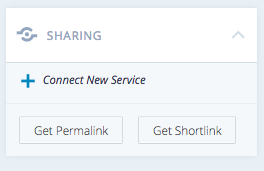
Notice that the post isn’t setup to publicize automatically. Click Connect New Service, and add the connection for the post.
If you use the Classic editor, instead of the New editor, the Publicize settings will be in the upper, right-hand Publish module, as seen here:
https://potd4d.wordpress.com/wp-admin/post.php?post=1519&action=editRegardless of which version of the post editor you use, everytime you post, you should see live Sharing connections in that box. It shouldn’t be empty.
The next time you post, on either site, could you please make sure this is configured, before publishing?
Let me know how it works for you! Let’s get this mystery solved!
-
Hi Robyn,
I am a big mystery fan also! Unfortunately I don’t have a butler, so there’s one suspect out the window …
When I click the Sharing on the right of any of my posts, I don’t see what you see. I actually see both the Twitter and Facebook accounts with checkboxes (I would show you a screenshot but not sure how to create a link to one.)
The Twitter box is checked. The Facebook box is unchecked.
The weird part: I check the Facebook box and click Update. When I look again, the Facebook box is … unchecked. For some reason it’s not letting me keep that account selected for publishing.
Any thoughts?
Joe
-
Joe,
I am a big mystery fan also! Unfortunately I don’t have a butler, so there’s one suspect out the window …
You’re hilarious! You should write a blog ;)
Here’s the thing: once you publish a post, you cannot re-publicize it to Facebook or Twitter, so changing an older post won’t work. You won’t be able to re-select those boxes once the post is out in the world.
Could you confirm that you’re looking at the Twitter/Facebook check boxes in a brand new post?
If you’d like to send me a screenshot, you can add it to your Media Library. Just upload the screenshot as you would any of your images, and then let me know when there’s something I should look at.
Since one of your sites is working properly, and one isn’t, it’d be great to have a couple images to compare/contrast.
Thank you! Talk soon.
-
OK, makes sense about not being able to change a published post.
What about one that’s scheduled but not yet published? I just tried to check the Facebook box on a post that’s scheduled for tomorrow, and again when I click Update, the box unchecks.
A screenshot is here: https://potd4d.files.wordpress.com/2015/02/scheduled-post.png
I have about two weeks’ worth of posts scheduled to go out, so I hope there’s some way to connect them.
-
Hey Joe,
Aha! Another clue: that this is an issue with scheduled posts, rather than auto-published posts.
Take a look at the scheduled post that is supposed to go out on the 5th:
https://potd4d.wordpress.com/wp-admin/post.php?post=1450&action=editNotice that I have sent you to the classic editor, rather than the new editor. Could you please test the Facebook connect on this post? See if you can check that box?
Also, did you know that the post will not publish to WordPress.com OR Facebook unless there is a visit to your site on the scheduled publish date?
http://en.support.wordpress.com/posts/schedule-a-post/#troubleshooting-scheduled-posts
Let me know if the classic version of the post editor allows you to opt-in to publicize to Facebook.
Thank you!
-
Hi Robyn,
It’s looking more and more like the gardener did it …
OK, when I check in the classic editor, it shows the Facebook box already checked: https://potd4d.files.wordpress.com/2015/02/sharing-settings2.png
Just for kicks I looked ahead about 5 posts, and they all have the Facebook box checked in the classic view.
So in theory they should publish to FB, yes? Any idea why that isn’t happening automatically when I connected the blog to the account? (It really doesn’t matter … if it starts working I will put you right up there with Hercule Poirot and Ms. Marple.)
For what it’s worth, I visit the site incognito to check the posts (almost) every day, to make sure there were no weird glitches. So based on that they should publish to Facebook, I think?
Thanks!
-
Hi Robyn!
So remember how last night I sent you the photo of the classic editor for today’s post, with the Facebook boxed checked? I went to Facebook today, and … no post. So I went back to the editor and … the box is unchecked.
For some reason when the post is publishing on WordPress, the Facebook option is turning off.
The plot thickens …
-
Hey there! One last test, then I’m calling in the big guns (our developers).
First, a question: I know you said that magiclife-jdm.com is now posting to Facebook. Are these also scheduled posts, or are you publishing these automatically?
Now, the test…and don’t worry, I know you had a fear that you might “bump” magiclife-jdm.com from posting on Facebook. If this happens, we’ll get the staff on it asap and make sure the issue is cleared up.
- Disconnect BOTH of your sites from Facebook: potd-4d.com and magiclife-jdm.com:
http://en.support.wordpress.com/publicize/
Disconnect both of these sites one after the other, before taking the next steps. - Log out of WordPress.com.
- Clear the cache on your browser:
- Remove the WordPress app from your Facebook account:
https://www.facebook.com/help/204306713029340/ - Return to WordPress.com and login.
- Add the Publicize function for Facebook to potd-4d.com
- Add the Publicize function for Facebook to magiclife-jdm.com
- Follow any/all instructions to add the WordPress app to your Facebook account.
- Open up the post that is scheduled to publish next. See if you can add the Twitter and Facebook publicize option to this post.
And that’s that.
Let’s see how this final, comprehensive test works. Hopefully, all will go well. If not, we’ve dotted the I’s and crossed the Ts, and can moved forward from here.
I am VERY much looking forward to hearing back from you! Fingers crossed :)
- Disconnect BOTH of your sites from Facebook: potd-4d.com and magiclife-jdm.com:
-
Hey Robyn,
OK, to answer your question: Yes, the magiclife-jdm.com posts are also scheduled posts. The difference is:
– The potd-4d.com posts are short posts that I publish every day M-F. So I try to stay a week ahead of scheduling those on a weekend – for example, last weekend I created and scheduled all the posts for next week, 2/9-2/13. That helps me stay on top of them.
– The magiclife-jdm.com posts are long posts that I publish once a week on Mondays. I also do them on the weekend for the following Monday (last weekend I created/scheduled the on that published on 2/2).
So for potd-4d.com I have a bunch of posts scheduled over a week out, and for magiclife-jdm.com I just schedule one a day or two ahead of publication.
Meanwhile …
I followed all your instructions. I looked at tomorrow’s potd-4d.com post, and it shows both the Facebook and Twitter boxes checked. The real test will come tomorrow when I see if it actually published to FB.
And then the next real test will come Monday, when I see if the mext magiclife-jdm.com post publishes to FB. I can’t check that one because I won’t create/schedule it till the weekend.
Whew.
So I will check in with you tomorrow about potd-4d.com (hopefully good news), and then again on Monday about magiclife-jdm.com. By which point you will probably be seeing these URLs in your dreams.
Fingers crossed … Thank you!
Joe
-
Joe,
This is awesome information. Thank you so much for being so comprehensive. It’s truly helpful.
I will indeed keep my fingers crossed and hope I hear good news from you tomorrow…and Monday, for that matter!
Talk soon :)
-
Survey says ….. !!!
Nope.
Today’s potd-4d.com post didn’t publish to Facebook, and when I open the post editor the Facebook box is unchecked. The social media gods are out to get me!
Thanks,
Joe -
Ok, Joe,
Not the news I was hoping you’d have :)
Time to escalate this to our developers. I’m going to ask them to get involved and see if this is a technical glitch.
I’m going to write up a ticket about this and put it in their queue. I will get back to you the moment I have an answer for you!
In the meantime, I’m sure you know this, but you can use your Facebook Sharing Button to manually click/publish a new post notification to Facebook.
Don’t give up! There is a solution for you! I’ll be in touch as soon as I have it. Thank you!
-
Hi Robyn,
Thanks! I will look forward to hearing from you. Thanks for continuing to try to solve this …
I’m not sure how to manually publish a new post notification to Facebook. Do you mean just to click Facebook on the published post itself? (not in the editor)
Thanks,
Joe


- The topic ‘Posts not appearing on twitter or facebook’ is closed to new replies.


 WordPress.com Forums

