

Premium Theme Issues
-
Good Morning,
Yesterday, I purchased the premium theme ‘Standard’, and I really love this theme, however, my pages do not show in the NavBar except for Home/About (which were created by the theme creator).I’ve already tested a couple of the other free themes to make sure it wasn’t on my end, and the NavBar displayed all my pages. Help!!! Did I mention I really love this theme?!?! :)
Sincerely,
The blog I need help with is: (visible only to logged in users)
-
Hi there!
The Standard theme doesn’t create custom menus by default like lots of themes, so you’ll need to add one in.
You can create a custom menu here:
https://wordpress.com/menus/dawnthescreenwriter.wordpress.com
If this is your first custom menu, we have a guide to creating them here:
-Alex G.
-
Thank you, Alex!!! I have my pages showing in my NavBar, but now I have a NEW issue. Same scenario, now “Home” no longer shows in my NavBar, but it shows on other themes, and if I create a new “home” page, it shows 2 home pages, or it latches on to another page i.g. about!!
I will continue to play around with it, and search the forum, unless you have suggestions.
Thanks,
Dawn
-
Still unsuccessful. I’ve tried everything under the sun. In “default menu” it shows “Home & About”, in new menue it shows every page except “Home”, but listed in the breadcrumbs.
When I try other themes out of curiosity, it shows all pages + home. When I create a new home page, it shows a Blank page– or double home page. What am I doing wrong?
-
Hi Dawn,
Looks like you’ve done some more playing around with this since your last message. I see a Home link in your menu and your home page is displaying your latest posts:
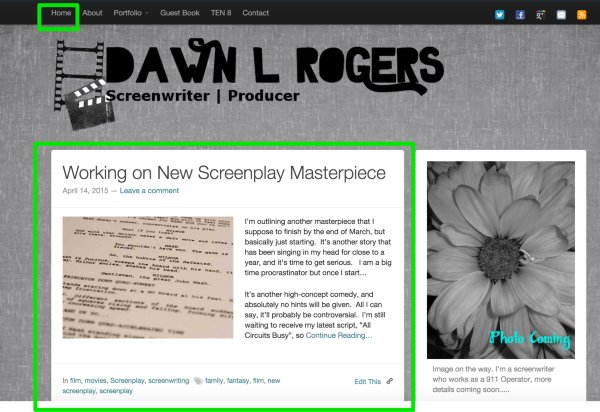
Sounds like before you were adding a new Page titled “Home” and had it automatically adding to your to your menu as a blank page — but you still had your home page set to display your latest posts in your Reading Settings. When you have that set, it automatically adds a ‘Home’ item to your menu to display those posts.
Would you prefer to have a static front page?
-Alex G.
-
Hello Alex,
I had to create the home page linking to http://www.dawnthescreenwriter.com.wordpress.com. I tried every other way possible, and could not get it to work.In other themes, it still shows 2 “home” pages. I would prefer a static front home page and thought I was following directions, but still unsuccessful. I guess if the way I have it set up is not an issue, then I’m happy with it at least for now.
-
Your custom link item is a perfect solution. :)
When you switch to other themes, the reason two ‘Home’ tabs display in the menu is because in your Reading Settings, you have the option for ‘Front Page Displays’ set to ‘Your latest posts’. The first home page link is to make the home page for those posts.
The second home page link comes from the Page you created, called ‘Home:’
https://dawnthescreenwriter.wordpress.com/wp-admin/post.php?post=934&action=edit
Since a lot of themes, by default, show all your top-level pages when you switch to them. Standard does not.
If you’re fine with how it is, then you’re all set after adding that custom link. But if you want a static front page, do the following on your site:
- Edit your Home page to be as you’d like it.
- Add a new Page, title it ‘Blog’ and publish it, no body text needed
- Go to your Reading Settings
- For the ‘Front Page Displays’ option, select ‘A Static Page’
- For Front page, select Home
- For Posts page, select Blog
- Scroll to the bottom and save changes
- Go to your Menu settings
- Add a Page item for ‘Blog’


- The topic ‘Premium Theme Issues’ is closed to new replies.
 WordPress.com Forums