

Problem changing header on theme
-
Downloaded Lyretail It is supposed to be compatible to have header customized. I followed the directions on how to do that but, there is no header option available after I hover over my site name, click customize. Why?
The blog I need help with is: (visible only to logged in users)
-
after I hover over my site name, click customize.
I’m don’t know where you’re hovering over your site name, but you should be able to customize the header at either of the following two places:
https://primed2style.com/wp-admin/themes.php?page=custom-header (reached via Appearance > Header in the dashboard admin menu)
https://primed2style.com/wp-admin/customize.php? (reached via Appearance > Customize in the dashboard admin menu).
-
dnorris310 – were you able to get to the header customization area using one of the paths musicdoc gave you above?
This is what you should see under Appearance > Customize:
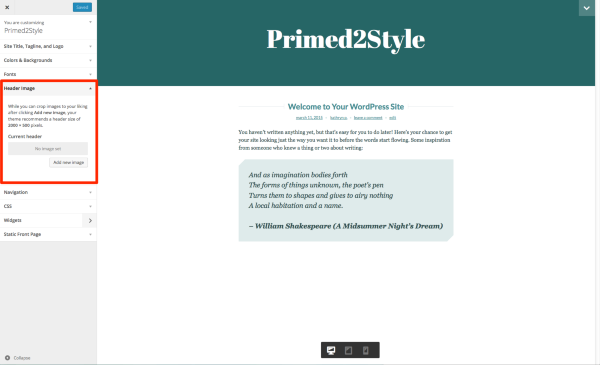
Just let us know if you still need help.
-
Kathryn WP
I got there, thanks to all who responded. Just one question after uploading image from my library, it says save and publish. Does this mean it will publish the draft I started but not finished with yet? I am not ready to publish whole article yet. -
I got there, thanks to all who responded.
Great!
Just one question after uploading image from my library, it says save and publish. Does this mean it will publish the draft I started but not finished with yet? I am not ready to publish whole article yet.
If you’re referring to the Save and Publish button in the Customizer itself, that only saves any changes you’ve made within the Customizer, such as adding a header, changing your site title, or tweaking colours. It doesn’t publish any of your posts or pages you may have set to draft status.
This is a screenshot of the button I mean: https://cloudup.com/cyjtAqUVcTI
-
Kathrynwp
thanks so much for your help.
I went back to try what you said. The customize won’t open it just spins and says loading customize, and also at the bottom of the screen page also says errors are occurring while trying to open page. Is this a website problem? -
To rule out a browser-specific issue, could you please try a different browser? For example, if you’re using Safari, could you try Chrome or Firefox and let me know if it works there?
-
Hi Kathryn WP
I tried Firefox worked great. I really appreciate your help. Thanks so much.
-
Glad Firefox worked!
To get your original browser working again, I suggest first clearing the browser cache and seeing if that does the trick.


- The topic ‘Problem changing header on theme’ is closed to new replies.
 WordPress.com Forums